Key takeaways:
- YouTube is one of the best platforms for discoverability and content creation.
- For businesses, free platforms may lack sufficient privacy controls. Look for platforms with enterprise security like Riverside, Loom, Vidyard, or Vimeo.
- If you’re looking for a mobile-friendly platform, pick Riverside, TikTok Live, Kaltura, or Spotify for Creators.
YouTube is popular because it’s free and easy to use, but it isn’t right for every creator.
If you need more privacy, control, time-saving features, or other use-case specifics, other platforms may be a better fit.
This guide covers the 18 best online video platforms for creators in 2026. We’ll cover options across video sharing, podcasting, marketing, and live streaming, or all of the above.
How do I choose a video platform?
The right video platform for you depends on what you’ll be using it for. However, there are a few general features that signify a quality video platform, including:
- Security. Hacking and cyberattacks are a real problem, especially for larger creators with a lot of traffic. Look for a tool that is SOC 2 Type 2 compliant.
- Multiple levels of access. If your team has different roles, your video platform should also have different access permissions.
- White-label branding. Especially if you are an enterprise team or professional brand, you want your videos and video player to display your logo, not the branding of the video platform.
- Hosting. You should be able to store video (securely) on the video platform.
- Monetization options. If you’re going to monetize your content, look for platforms that support ads or content repurposing to extend your reach on multiple channels.
18 Best online video platforms in 2024
In this list, we’ll break up the top tools into 5 categories: all-in-one, video sharing, podcasting, business marketing, and live streaming.
Note that, depending on your picks, you might want to use multiple video platforms simultaneously for your content.
Best online video platform for all-in-one video creation
1. Riverside

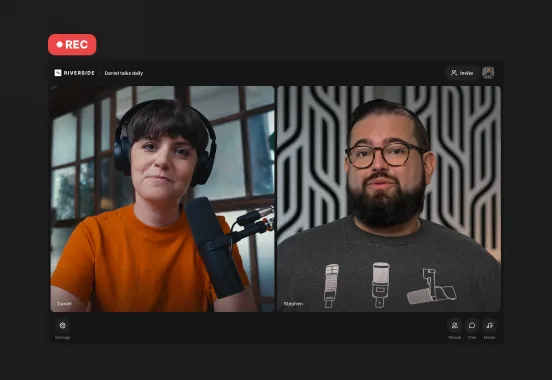
Riverside is the ideal online video platform for content creators who want to record, edit, host, and repurpose all in one place.
You and your remote guests can record uncompressed video in up to 4K. Everything records locally to each participant’s device, so your final product doesn’t depend on your internet quality. You can also livestream in full HD to multiple locations at once, including YouTube, Facebook, Twitch, LinkedIn, and any custom RTMPs.
And when you’re done recording, you’ll save hours of post-production with chat-based editing. Just ask Co-Creator what you need, and our AI agent will apply any edits for you. You can also turn your long-form recordings into shareable short-form videos, blogs, thumbnails, and more.
For a more hands-on editing experience, try our built-in video editor. It comes with text-based editing to trim videos just by adjusting text in your transcript. And, you’ll get access to automated tools like filler word removal, audio enhancement, captions, and more.
If you’re a podcaster, you can even host your show, add custom thumbnails, and check your episode analytics, all without leaving your dashboard!
Pricing: Free plan provides unlimited recording and editing. Paid plans start at $34/month for up to 4K video quality, live streaming and screen recording, watermark-free content, and more.
Key features:
- Professional-grade recording quality: 4K video and 48kHz WAV audio for every guest.
- Local recordings: for maximum quality and to avoid data loss if your internet connection drops during the recording.
- Live streaming to Twitch, Facebook, Youtube, LinkedIn, and a custom RTMP destination simultaneously.
- Separate audio and video tracks for each participant for maximum control in post-production.
- Chat-based editor to edit your content in minutes instead of hours.
- Automatic transcriptions for accessibility and SEO.
- Magic Clips tool to let AI turn your recordings' key moments into short, shareable clips.
- iOS and Android apps for on-the-go recording.
- Customizable branding to add your logo, change the video background, choose a layout, and more.
- Screen recording so you can capture your screen and any presentation slides.
- Powerful dashboards and shared team spaces for project organization
- Producer mode to monitor and manage recording sessions.
- SOC 2 Type 2 Certified with SSO and end-to-end encryption.
Pros
- All-in-one recording and editing platform
- Intuitive and easy to use
- High-quality video and audio recording, custom branding, and easy editing making it ideal for podcasters
- Local recording with progressive uploading to the cloud
- Bonus features like Co-Creator, Magic Clips, multistreaming, and live call-ins
- Reliable security
Cons
- Advanced editing tools are only available on the desktop version
Best online video platforms for video sharing
The following platforms are good for consumer-facing and simple video sharing. If you’re looking for a tool that’s easy to use, flexible, and makes it easy to share video, you may find it here.
2. YouTube

YouTube is the most popular video-sharing platform in the world, with 2.6 billion users worldwide. So if you’re looking for a simple platform to share your videos and livestreams to the widest audience, YouTube might work for you.
The platform lets you upload video for free and set privacy settings to public, private, or unlisted. But YouTube’s security settings leave something to be desired for larger brands or creators, and the upload times can be a bit long. So if you’re looking for a more secure and reliable content platform, you may want to keep looking.
Pricing: Free
Key features:
- Live streaming
- Option to pay to promote your videos on YouTube and Google
- AI-generated transcriptions and captions available
- Basic privacy settings
- Can create playlists to attract and engage viewers
- YouTube Studio for data analytics, managing your comments, and more
- Great monetization options with YouTube’s Partner Program
- Audio library
Pros
- Free to use
- Very popular website; makes it easy to reach a wide audience
- Good monetization and audience-building features
Cons
- You lose the right to your videos
- Lacking in security features
- Not optimized for business use
3. Vimeo

Vimeo is a popular video creation and sharing platform for businesses who create a lot of consumer-facing videos, interactive video events, and live streams. Easily record your webcam, external camera, or screen, then use Vimeo Create to add your own graphics, music, and text. Vimeo’s video hosting platform provides multiple privacy and security options, including password protection and private links.
Price: Free plan available. Paid plans start at $12/seat/month.
Key features:
- Extensive cloud storage
- Privacy controls
- Mobile apps
- Large and easy-to-use video library
- Automatic Zoom uploads
Pros
- High-quality video resolution
- No ads
- Unlimited viewers and events
- Multi-device compatibility
- Data analytics
- Good customer support for higher subscription tiers
Cons
- Limited levels of user access
- Web app is very cluttered and difficult to navigate
- Pricing plans can be restrictive for larger file storage
4. JW Player

While JW Player started as a video player app, it has since become a reputable live streaming and video-on-demand hosting tool. It may be lacking in extensive content creation and management features, but if you’re looking for an affordable video-sharing tool, JW Player may be a good place to start.
Price: The Starter plan is $10/month. Contact JW Player for a custom quote for Enterprise plans.
Key features:
- Ad support and other monetization options
- HTML5 video player with multi-bitrate and adaptive streaming
- Article Matching and Recommendations features
- Global content delivery
- Simulcasting to Facebook Live
- Video API
Pros
- Intuitive and easy to use
- Multiple monetization tools
- High-quality video
Cons
- Limited features
- No free plan
- Limited customer support
5. Droplr

Droplr is a cloud-based screen recording and screenshot tool that also lets you record HD video from a webcam. The tool is available in a Chrome extension and in Mac, Windows, iOS, and Android apps.
Easily create shareable links to your videos, or use one of the tool’s many integrations to share video in Slack, Gmail, Teams, and more. You can also use your Droplr account as cloud storage and sharing service for other types of files.
Pricing: Paid plans start at $6/month for individuals and $7/user/month for teams.
Key features
- Record full screen, part of a screen, or webcam
- GIF creation tool
- Download videos as PNG, WebM, or MPEG-4
- All videos are saved to Droplr cloud account
- URL shortener for link shortening
- Data analytics
- Multiple integrations (Gmail, Slack, Sketch, Teams, and more)
Pros
- Available for Mac, Windows, mobile, and a Chrome extension
- Easy screen-capture and editing
- High-quality video
- Cloud storage and team file sharing
Cons
- No free plan
- Limited file types
Best online video platforms for podcasting
Podcasters need a unique set of features in their recording software. The following five tools are optimized for podcasting, with a focus on high-quality audio and video, remote guests, and distribution to podcast directories.
6. Podbean

Podbean is an all-in-one podcast creation and hosting platform. Its robust features and ease of use make it a popular tool for many podcasters, although the high price point may discourage many video podcasters.
Podbean’s biggest selling point is that users can record, edit, store, distribute, promote, monetize and manage your podcast all from Podbean. Keep in mind, though, that Podbean’s recording features are only available through the mobile app. So if you want more advanced recording functionality, you may want to look elsewhere.
Pricing: Free for a basic (audio-only) plan. Video podcasting plans start at $29/month for the Unlimited Plus plan.
Key features:
- Mobile app for recording on-the-go
- Automated transcriptions and closed-captions ($0.20/minute)
- Live streaming (audio-only)
- Record remotely with up to 7 co-hosts
- Integrated social media promotion tools
- Private podcasts
- Monetization options like Podbean Patron and the Ads Marketplace
- Basic editing tools
- Data analytics
- Automatic distribution to major directories like Apple Podcasts
Pros
- Very easy to use
- Unlimited audio and video hosting
Cons
- Expensive for a video podcasting plan
- Only supports lossy file formats (lower quality recording than Riverside and others on this list)
- Live streaming limited to audio-only
- No multi-track recording
7. Spotify for Creators (formely Anchor)

Anchor by Spotify is another all-in-one podcast creation, hosting, and distribution platform. Since Anchor is owned by and integrated with Spotify, you’ll have easy access to one of the fastest-growing podcast audiences in the world.
However, while you can upload your own videos with the app, the platform has a seamless integration with Riverside. You can create video podcasts on Riverside and easily distribute them on Spotify.
Pricing: Free
Key features
- Mobile app
- Remote recording with up to 10 guests
- Detailed data analytics directly from Spotify
- Monetization tools like ads and donations
- Audience interaction features like Q&A, poll, and timestamp sharing
- Streamlined distribution to Spotify, Apple Podcasts, and other podcast directories
Pros
- Integrates with Riverside
- Free and easy to use
- Use on mobile and desktop
- All-in-one platform for creation, hosting, distribution, and monetization
- Unlimited hosting
- Use music from Spotify
- Good monetization tools
Cons
- Need to use another video recording software if you’re creating video content
- Not compatible with external microphones, resulting in lower audio recording quality than other apps on this list
- Limited editing tools
Best online video platforms for business marketing
This section covers video platforms that are optimized for business marketing. These tools have extensive features for business, like advanced security, flexible sharing options, and community-building tools.
8. Loom

Loom is a video and screen recording tool designed to help business teams create videos quickly and easily. In a world of remote work and asynchronous communication, Loom aims to help coworkers and remote teams communicate better.
But you can also use Loom to record video conferences on Zoom or Google Hangouts, create product tutorials for your customers, or build a corporate content library.
Pricing: Free for up to 25 videos up to 5 minutes each. Paid plans start at $8/creator/month.
Key features:
- Video hosting
- Mobile app
- Record screen or webcam (or both at the same time)
- Share videos with a link
- Video editing tools
- Up to 25 participants in one video
- Viewers can respond to videos with emoji reactions or comments
- Enterprise-grade security
Pros
- Recording resolution at up to 4K
- Record on desktop or mobile
- Affordable and easy to use
Cons
- Lower quality recording than others on this list
- Limited editing capabilities
- Recording is internet-based and dependent on your connection
- Free plan limits videos to 5 minutes
9. Brightcove

If your enterprise team needs a powerhouse video content management platform, Brightcove is worth considering. It’s optimized for large brands who need to create marketing, e-commerce, and external entertainment videos.
Price: Contact Brightcove for a customized quote.
Key features:
- High-quality audio and video
- Live streaming
- White-label branding
- Mobile optimization
- Advanced monetization features
- Cloud transcoding and adaptive bitrate streaming
- Audience interactivity
- Enterprise-grade security
- CRM integration
Pros
- Fast upload time
- Advanced analytics
- Good quality video
- Integrates with your CRM
- Good customer support
Cons
- Limited automation and integration tools
10. Vidyard

Vidyard, like Loom, is a video creation tool designed to make business communication flow more smoothly. The browser extension lets users create quick screen recordings, product walk-throughs, messages for coworkers, and introductory clips. And with the full subscription, brands can create a video library for both internal and external use.
Price: Free plan available, with paid plans starting at $15/month for individuals and $300/month for teams.
Key features:
- Record screen, webcam, or both
- Interactive viewing features
- Marketing tools for SEO and email
- Advanced security and password protection
- Data analytics
- Animations and automatic transcriptions available
Pros
- Easy to use
- Good customer support
- CRM integrations
Cons
- Can have a steep learning curve
- High price point for enterprise teams
- Some customers report buggy performance
11. IBM Cloud Video

IBM Cloud Video is primarily a live streaming tool for businesses and media companies, but it has branched into offering video-on-demand (VOD) hosting as well. An enterprise subscription gives your team access to white-label branding, advanced data analytics, and content syndication.
Price: No free plan. Paid plans range from $99/month for small businesses to $999 per month for 5,000 viewer hours and 20 channels.
Key features:
- Enterprise content delivery network
- AI captions for live and on-demand video
- Interactive features (like form embedded in the video player) to increase viewer conversions
- Video marketing
- Advanced security features
- Live streaming
- Monetization options
Pros
- Excellent customer service
- Reliable performance and security
- Integrated tools for marketing and conversions
Cons
- Very expensive
- Primarily focused on live streaming
- Recording above 720p resolution comes at an additional cost
12. Dacast

Dacast is a video platform that hosts both live and on-demand video content for enterprise businesses, media companies, and large content creators. The tool is optimized for security and video speed. Users can also host paid live events using Dacast, and all videos have unlimited attendees.
Pricing: No free plans. Paid plans start at $39/month for 50 GB of storage per year.
Key features:
- Advanced security features
- Ad-free streaming
- Multi-bitrate streaming for live video and VOD
- Real-time analytics
- Multi-user access (on Scale and Custom plans only)
- Zoom integration
Pros
- Various video monetization tools
- Unlimited viewers and live channels
- Excellent customer support
- Advanced security features
Cons
- Steep learning curve
- Expensive
13. Wistia

Wistia is a video marketing platform that lets users create, host, market, and analyze high-quality video recordings. The tool’s advanced user testing and analytics tools make it a great option for businesses looking to ramp up their corporate video marketing game.
Pricing: Free plan available. Paid plans start at $19/month for 20 videos and 3 users.
Key features:
- Advanced video analytics
- A/B testing options
- Integrations with Zapier, Hubspot, Zendesk, and many more
- Browser-based recorder (Soapbox) records your screen or webcam
- Simple video editing tools
- Security features like password-protected videos, domain restrictions, and email gating
- Fully customizable player
- Video API access
- Global content delivery network (CDN)
Pros
- Lots of useful integrations
- Easy video embedding and sharing
- Advanced analytics and marketing tools
Cons
- Doesn’t support external microphones, which affects the audio quality
- Limited editing tools
Best online video platforms for streaming
Finally, let’s look at a few video platforms that are best for live streaming. These options are either already frequented by viewers, or they’re optimized for consumer-facing video streams.
14. Twitch
.webp)
Twitch is a popular live streaming platform for chatting, interacting, and making live videos. If you’re a video content creator who wants to stream your gaming content to your audience (or build an audience from scratch), Twitch is a great place to do that. But you don’t have to be a gamer; other popular categories on Twitch include music, talk shows, sports, travel, and food and drink.
Pricing: Free
Key features:
- Monetization options (affiliate and partnership programs)
- Channel analytics
- Viewers can comment or use “emotes” to engage with your streams
- Live-stream scheduling
Pros
- Highly interactive space; easy to build a community
- Very popular and well-known platform
- Easy to use
- Free
Cons
- You don’t have complete control over your content once published
15. TikTok Live

TikTok is the fastest-growing social network in the world, which makes it a great platform to stream your video content—especially if your target audience is Gen-Z or millennials. If you have more than 1,000 followers on TikTok and are older than 16 years old, you can use TikTok Live.
Pricing: Free
Key features:
- Audience interaction with comments and reactions
- Five monetization options: TikTik Creator Fund, Creator Marketplace, Video Gifts, LIVE Gifts, and Tips
- Advertising options for business
- Algorithm boosts your content to viewers who may be interested in you but have never heard of you
Pros
- Free and easy to use
- Extremely popular platform
- Connect with your audience in real-time
Cons
- You lose full control over the content
- Live videos aren’t recorded
16. OBS (Open Broadcaster Software)

Open Broadcaster Software (OBS) is free, open-source software for recording and streaming video. It’s compatible with Windows, macOS, and Linux systems, and it easily integrates with several popular streaming platforms like YouTube and Twitch. If you’re looking for a free way to live stream to your favorite platform while still retaining granular control over your content creation process, you may want to look into OBS.
Pricing: Free
Key Features:
- Record your screen, webcam, or from a capture card
- Studio Mode for previewing and tweaking scenes before they stream
- Monitor up to 8 scenes at once and set up custom transitions
- Built-in audio mixer with filters, noise suppression, and more
- Modular Dock UI for arranging video layouts
Pricing: Free
Pros
- High-quality recording
- Very customizable
- Free
- Easy to mix and match recording sources (window capture, webcams, text, etc.)
- Multiple export formats
Cons
- Steep learning curve and un-intuitive interface
- Many users report mid-session crashes
- Not optimized for including remote guests
17. Kaltura

Kaltura’s Video Experience Cloud is a modular hub that lets content creators mix and match the tools that work best for them, like a video player and analytics dashboard. This tool is optimized for media/telcom professionals and educators who want an easy way to live stream to their audiences.
Price: Contact Kaltura for a custom quote.
Key features:
- Cloud TV platform for media/telecom
- Virtual classrooms and campus portal for educators
- Video API access
- Video content management tools
- Virtual events
- Host meetings, webinars, and townhalls
- Monetization options
Pros
- Multiple monetization choices
- Highly customizable; mix and match the tools that work for you
- Reliable security features
Cons
- Steep learning curve
- Some users have reported slow customer support response
18. Wirecast

Wirecast is an online video platform that lets users create professional-grade live streams. The tool’s intuitive interface and professional production tools make it easy to create live video content, while the recording option lets you create and edit studio-quality videos for distribution to social media later.
Pricing: You can buy a lifetime license of Wirecast Studio for $599 or Wirecast Pro for $799, or you can sign up for a subscription starting at $35/month.
Key features
- Custom transitions
- Social media integration
- Integration with Facebook Live and Twitter to display comments, live polls, and viewer counts
- Option to insert pre-recorded content or use media from their stock library in your live streams
- Free wireless camera app lets you use any iOS device as a video source
- Chroma Key compatible
- With the Pro Plan: Scoreboards, Replay, clocks, and timers
Pros
- Easy-to-use and flexible interface
- High-quality recording
Cons
- Pricing can be prohibitive for many creators
Which is the overall best video platform?
As always, the best platform depends on your unique needs, budget, and priorities. Each category in this list leans toward a certain set of features that set them apart.
For example, if you’re looking for a podcasting tool, focus on high-quality audio and video, the ability to interview remote guests, and easy distribution to podcast directories. If you need a video platform for your business marketing, on the other hand, you’ll want a tool with advanced security and video content management features.
And Riverside may be the best tool for podcasting, but it also boasts many robust features that cater to live streaming, video sharing, and business. It offers the simplicity of YouTube, the screen sharing capabilities of Droplr, and the advanced livestreaming experience of Wirecast, all in one platform.
If you want to try Riverside for yourself, take it for a test drive today with a free account, no credit card required!



-(1).webp)

.webp)