.webp)


Key takeaways:
- Web Real-Time Communication (WebRTC) is an open standard and set of browser APIs that support low-latency, browser-based live streams.
- WebRTC supports high-quality audio and video, and adjusts quality based on network conditions.
- WebRTC is built for peer-to-peer data exchange so it’s less suitable for larger audiences. To complete the live stream experience, platforms also use RTMP and HLS for performance and stability.
- Platforms that use WebRTC work without additional software downloads for host, guests, or viewers.
What is WebRTC?
WebRTC stands for Web Real-Time Communication and is a set of open-source standards and browser APIs that allows audio, video, and data to be transmitted in real time directly between devices.
In practice, WebRTC is what enables two or more people to see and hear each other instantly in a browser-based call or livestream using a peer-to-peer (P2P) connection. Since it’s natively included in browsers, your viewers and participants can simply click a link to attend your stream.
There’s no need to download plugins or install extra software, which makes the entire experience smoother. Because the video doesn't have to travel to a central server for processing first, latency is quite low, making it ideal for interactive livestreaming where even a few seconds of delay would break the experience.
Many modern remote recording and streaming platforms use WebRTC. In terms of the tech behind it, WebRTC was first released by Google in 2011. It’s now open-source technology that is also supported by Apple, Mozilla, Microsoft, and more. In short, if you’ve joined or hosted a live stream on Google Meet or the browser version of Zoom, you’ve probably used WebRTC. And without it, we’d all have to install more apps for real-time streams, recordings, and meetings.
Why should creators, marketers, and podcasters use tools built on WebRTC?
Tools built on WebRTC make live streaming easier for both you and your viewers.
Benefits of WebRTC
- Direct connection: WebRTC connections typically have latency in the 100–500 millisecond range. This is faster than other video streaming protocols like HLS (which I’ll get into later). This means there is minimal delay between recording and streaming, creating a natural flow for live conversations and audience Q+A.
- Browser-to-browser: Live streamers and viewers don’t have to download anything. Creators stream directly from the browser, and viewers join instantly online.
- High-quality audio and video: WebRTC supports high-definition video and audio. It will also adjust quality based on each individual's network conditions.
- Continuous improvements: WebRTC is open source and standardized across the industry. Major browser vendors actively maintain it, with regular updates for security, performance, and compatibility.
Limitations of WebRTC
- Hiccups on bad Wi-Fi: Individual network conditions can affect WebRTC streams. Poor internet connection can lead to lower quality video, frozen frames, or audio dropout.
- No recording out of the box: WebRTC itself does not include built-in recording or storage.
- Doesn’t work well at scale: The P2P model doesn’t hold up for live shows with multiple guests or large audiences. In real livestreaming setups, each guest’s stream must be routed through a server called an SFU (Selective Forwarding Unit), which then forwards optimized versions to other participants. This is why WebRTC becomes costly when pushed beyond small-scale interactions.
- Hardware encoders don’t support WebRTC: Most hardware encoders and streaming cameras don’t support WebRTC natively. While this may not be an issue for some, it may create a performance/quality ceiling for certain use cases.
WebRTC vs. RTMP vs. HLS
WebRTC, RTMP (Real-Time Messaging Protocol), and HLS (HTTP Live Streaming) are used at different stages of streaming and recording workflows.
Most modern livestreaming tools quietly combine these three protocols under the hood, using each where it performs best.
WebRTC: Real-time studio connection
WebRTC enables near-instant, 2-way communication. It lets you talk naturally with multiple guests in your browser with near-zero latency.
The trade-off is that WebRTC would be expensive and difficult to scale to millions of simultaneous viewers. This is where RTMP and HLS steps in.
RTMP: Broadcasting your stream to platforms
RTMP is a one-way protocol used to send video from a device or encoder to a streaming platform. This makes it well suited for broadcast workflows rather than real-time interaction like WebRTC.
Major platforms like YouTube, LinkedIn, Facebook, and Twitch accept RTMP streams for going live.
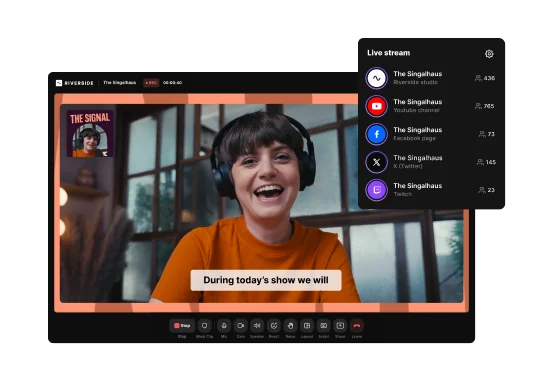
Because of this, tools like Riverside support RTMP output, allowing creators to push their stream to external platforms for distribution at scale.
HLS: Large audience delivery
Once a live stream reaches a platform like YouTube or LinkedIn, it can get converted into HLS for viewer playback.
HLS works by splitting video into small segments that can be distributed efficiently through content delivery networks. This allows thousands of viewers to watch at the same time.
This method does introduce a small delay, but that’s an acceptable compromise for the scale and reach that HLS provides.
FAQs about WebRTC
Is WebRTC good for live streaming?
Yes, WebRTC allows live streaming to happen with minimal latency. This is especially important for interactive streams, such as live Q&A sessions.
When broadcasting to much larger audiences, it’s better to use HLS or DASH. The trade off can be a few seconds of delay, which is acceptable for most use cases.
What is DASH?
DASH stands for Dynamic Adaptive Streaming over HTTP. Similar to HLS, this technology adjusts video quality in real-time based on your internet connection speed.
Instead of sending one continuous file, DASH breaks the content into small segments (2-10 seconds each). This enables more efficient video content delivery. DASH also monitors the internet connection and automatically adjusts quality levels to prevent buffering.
How do I use WebRTC to live stream?
WebRTC isn’t something that you access and use directly. WebRTC is built into online streaming tools. You use WebRTC as part of the platform. To use WebRTC to livestream, you need to pick a tool that supports it.
Which is better for live streaming, WebRTC or HLS?
It depends.
WebRTC is better for real-time interaction with no delay.
HLS is better if you want to stream to hundreds of thousands of viewers.
It comes down to prioritization. Is latency or audience size more important?
Tools will also use both (WebRTC for the remote online studio and then HLS for streaming on the major platforms).
Does YouTube Live use WebRTC?
For most creator workflows, YouTube Live doesn’t use WebRTC. Instead, it ingests live streams via RTMP/RTMPS or HLS/DASH, and then delivers at using HTTP-based streaming for mass distribution. However, YouTube uses WebRTC for its in-browser webcam feature (Go Live) directly in the browser, but it’s not the typical protocol you configure in streaming software.
WebRTC-based platforms are better if you’re broadcasting to smaller, more engaged audiences. For example, they include virtual classrooms, Zoom or Google meetings, and telemedicine.



-(1).webp)
.webp)
-(1)-(1).webp)