Riverside
Produkt
Produkte
  • Aufnehmen
    4K Video- und Audioaufnahmegerät.
  • Bearbeiten
    KI-basierter, textbasierter Videoeditor.
  • Live-Streaming
    Für Livestreams in voller HD-Qualität.
  • Webinare
    Moderieren, aufnehmen und umfunktionieren.
  • Hosting
    Podcast publishing and analytics.
  • Newsletters
    Create and send newsletters.
Funktionen
All AI Tools
Arrow Icon
Magic Clips
Transkribieren
Magic Audio
AI Co-Creator
AI Translation
Captions
AI Show Notes
Social Scheduling
Apps
Mac-App
Mobile Apps
AI illustration with abstract icons
Explore AI Tools
Lösungen
Anwendungsfälle
Podcasts
Video testimonials
Webinare
Video Marketing
Lernen und Entwicklung
Learning & Development
Async Recording
Virtual conferences
Interne Kommunikation
Virtuelle Konferenzen
Für
Podcaster:innen
Producer:innen
Marketer
Ressourcen
Lernen
Riverside-Universität
Blog
Kostenlose Tools
Webinare
Masterclass
Gemeinschaft
Fallstudien
Creators Newsletter
Gemeinschaftszentrum
Auf Riverside aufgezeichnet
Hilfe
Hilfe-Center
Support kontaktieren
Laptop
Blog
Universität
Für UnternehmenPreise
Deutsch
Site language
English
Deutsch
Deutsch
English
Deutsch
Vertrieb kontaktierenAnmeldenKostenlos starten
What's new
Hide from captions
Update
Editing & repurposing

Hide from captions

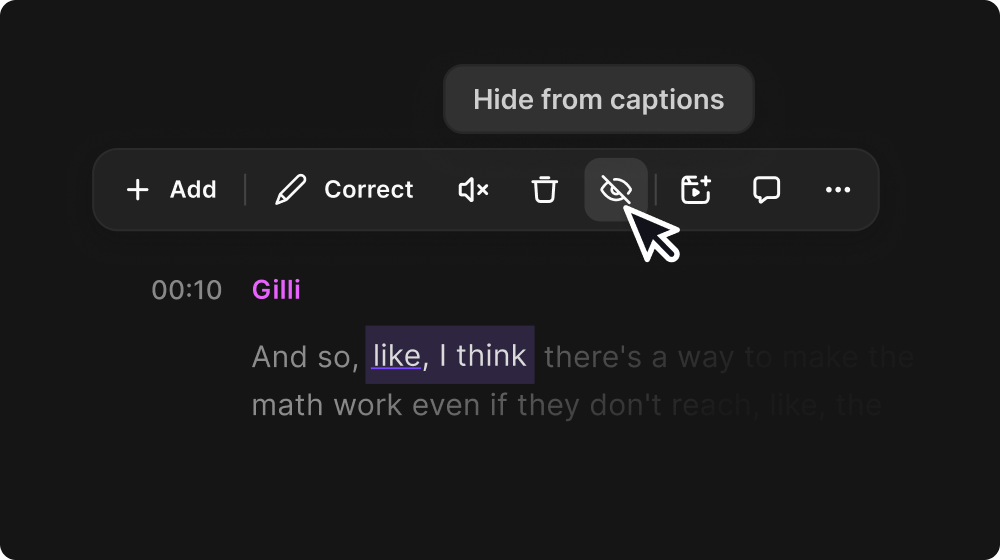
Hide words or phrases from your captions without removing them from your transcript.

June 17, 2026
Free

Share

Try Riverside
for Free

Los geht's
Record video Try Riverside for Free

What's new

Hide words and phrases from your captions

Don't want every "um" and "so yeah" in your captions but still want them in your transcript? Now you can hide any word or segment from captions without removing it from the transcript. Restore it anytime.

How to use it

Highlight the section on your transcript that you want to remove, and click Hide from captions (the eye icon). If you want to reverse it, you can click Undo, or  highlight it again and click Show in captions.

Ready to create? We think so too.

Start for Free
*No credit card needed. Free plan available.
Riverside
Unternehmen
Über unsBlogKarrierePartnerAffiliate-ProgrammCreator-PartnerschaftenPressePresseImpressum
Produkt
Warum RiversidePreiseFür UnternehmenMac-AppMobile AppsFAQAppsAppsHilfe
Funktionen
AufnehmenLivestreamEditorHostingKI Co-CreatorMagic ClipsTranskriptionUntertitelMagic AudioKI Show NotesTeleprompterAsynchrone AufnahmeMedienboardOptimierungOverlaysStudio BrandingKI-ÜbersetzungArrow Icon
All AI Features
Anwendungsfälle
VideomarketingTutorial-VideosVirtuelle VeranstaltungenPodcastsLernen und EntwicklungInterne KommunikationWebinareKundenstimmenVirtuelle KonferenzenLiveshowSplit-Screen-Video
Werkzeuge
Podcast-ErstellerPodcast-RekorderLive-PodcastYouTube-Video-ErstellerBildschirmrekorderVideo-KompressorWAV zu MP3Podcast-NamensgeneratorYouTube-NamensgeneratorMikrofontestWebcam-TestYouTube-Transkript-GeneratorTop Podcast-ChartsKostenlose Podcast-Musik
Alle Werkzeuge
Lösungen
Podcaster:innenProducer:innenMarketer
Ressourcen
Riverside-UniversitätWhat's NewAuf Riverside aufgezeichnetHilfe-CenterFallstudienPartnerBlogCreators NewsletterProduktvideosPresseMasterclassCommunity-HubGlossar zur Videobearbeitung
Download on the App Store IconGet it on Google PlayAICPA SOC certification
Podcast icon

Podcast-Anleitungen

Video-Podcast-Software: Top-Tools zum Aufnehmen, Bearbeiten und Veröffentlichen
So startest du einen Podcast: Schritt-für-Schritt-Anleitung und kostenlose Checkliste (2025)
Podcast remote aufnehmen: 4 Methoden für professionelle Qualität
Download on the App Store IconGet it on Google PlayAICPA SOC certification
Facebook iconYoutube iconX (twitter) iconLinkedin iconInstagram iconTiktok

© 2024 RiversideFM, Inc.

Deutsch
English
Deutsch
Allgemeine GeschäftsbedingungenDatenschutzCookies
Facebook iconYoutube iconX (twitter) iconLinkedin iconInstagram iconTiktok