






.webp)


Key takeaways:
- A strong webinar marketing strategy covers promotion, execution, and follow-up.
- Topic and a well-defined audience are the biggest drivers of registration and attendance.
- With a large share of engagement happening on demand, repurposing and follow-up often generate more value.
- Track metrics that match your goals and where your webinar sits in your sales funnel.
Marketing a webinar well is what separates a high-conversion session from one that gets ignored.
The key is treating it as a full campaign, not just a live event. That means promotion before, engagement during, and follow-up after.
In this guide, you'll get a step-by-step webinar marketing strategy you can apply to your next session.
Webinar marketing strategy: How to market your webinar in 8 easy steps
To market a webinar effectively, you need a clear goal, a strong topic, the right promotion, and a follow-up plan. And each part builds on the last.
Here’s how to do it step by step.
Step 1: Define your webinar goals and audience
Set your webinar goals
Start by choosing one primary goal and one secondary goal before you plan the topic or title.
Your primary goal is the main result you want from the session. That could be lead generation, product education, brand awareness, customer onboarding, or sales support.
Your secondary goal is the next action you want if attendees are not ready for the main conversion yet.
For example:
- Primary goal: Generate demo requests from mid-market SaaS teams.
- Secondary goal: Build a retargeting audience from replay viewers.
Or:
- Primary goal: Educate existing customers on a new feature.
- Secondary goal: Increase adoption after the webinar.
This gives you a clear direction before you move into audience targeting.
Define your webinar audience
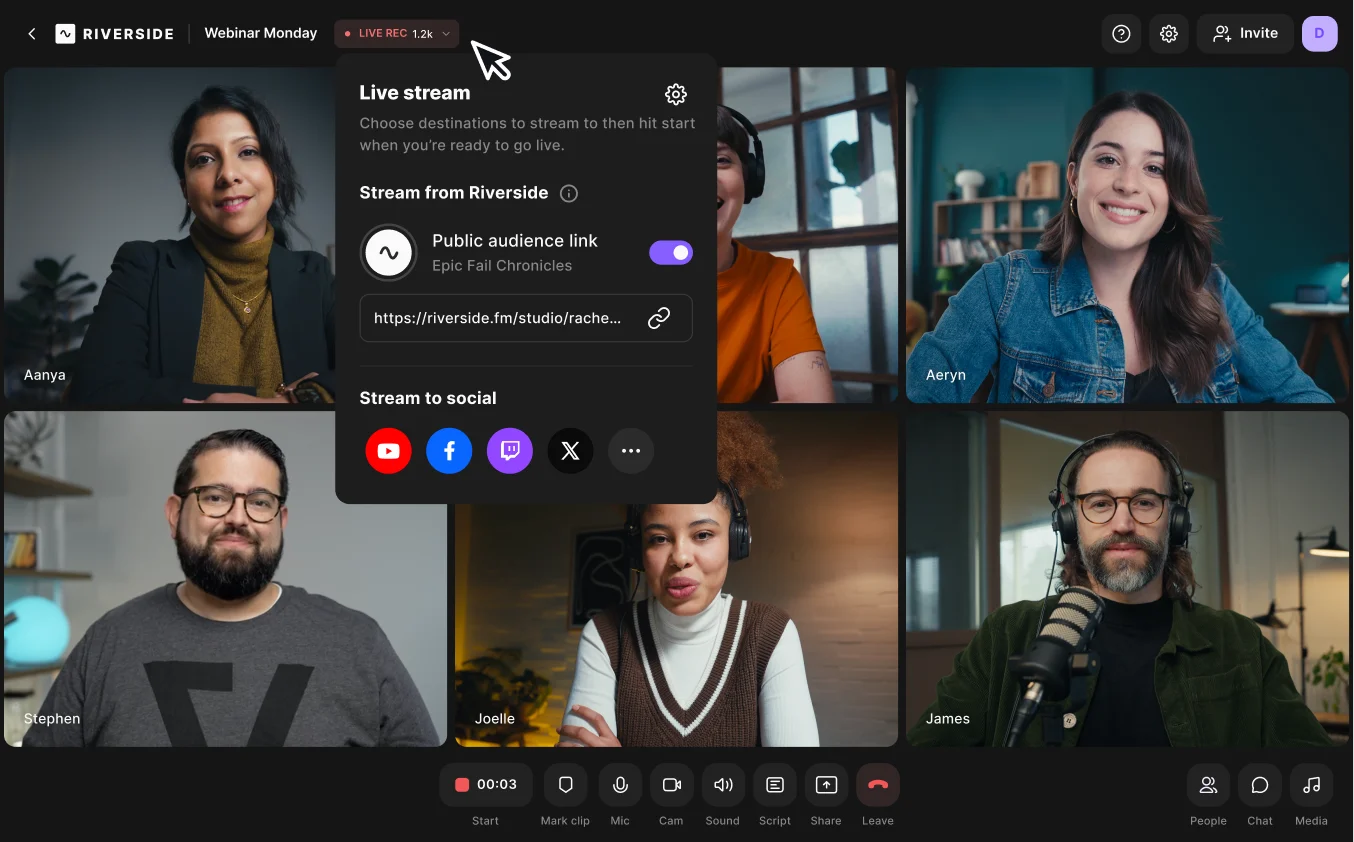
Next, write down who this webinar is for to help you shape your webinar content, promotion, and format.
Ask yourself:
- Who are they?
- What are they trying to do?
- What are their pain points?
- Why would they sign up for this now?
For example, “Marketers” is too broad. “Content teams trying to get more output from existing webinars” is much clearer.
Before moving on, check where your audience sits in the funnel. If they're still learning about the problem, lead with education. If they're already comparing options, make the session more specific.
Once you’re clear on your audience, write a one-sentence promise: what will attendees learn, solve, or be able to do by the end?
For example: "By the end of this session, you'll know how to turn a single webinar into three months of content."
This promise helps you keep the session focused. It also makes it easier to write a stronger title and CTA.
Set metrics
Set your metrics according to your main goals and audience. For example, if you’re hosting:
- Brand awareness webinars look at registrations, attendance rate, and replay views.
- Product education webinars look at watch time, poll responses, and CTA clicks.
- Sales-focused webinars look at demo requests, meetings, and influenced pipeline.
Step 2: Choose a compelling webinar topic and format
Your topic should match the format you deliver in.
Choose a webinar topic with a clear takeaway
Pick a topic that solves the specific problem in your one-sentence promise to your audience.
Before you lock it in, check:
- Is the value clear from the title?
- Will the right audience immediately see why it matters?
- Can you cover it properly in one session?
If not, narrow it down.
For example, our webinar title “Turn one webinar into endless content” works because the value is immediate and concrete. I’m not positioning the webinar as “learn content strategy.” I’m showing how one webinar can turn into multiple usable assets (e.g., LinkedIn posts, YouTube clips, newsletters, blogs). That’s easy to understand and, more importantly, easy to want.

Choose a webinar format that fits the topic
Once the topic is clear, choose the webinar format that best supports it.
Here are a few common webinar formats and when to use them:
- Product demo: Best for showing how a tool, feature, or workflow works.
- Panel discussion: Best when the value comes from different perspectives.
- Training session: Best for teaching a clear process step by step.
- Workshop: Best for hands-on learning people can apply right away.
- Fireside chat or interview: Best for expert insight, stories, or thought leadership.
- Case study webinar: Best for walking through a real example and what it taught you.
Match the format to the outcome. If you’re teaching a repeatable process, use a training session or workshop. If the value comes from discussion, use a panel.
Step 3: Set a budget
In our analysis of 400+ webinar users, 66.7% of them cited high costs and budget constraints as their #1 friction point. A good way to think about your budget is to look at your estimated webinar ROI. If you’re expecting to get a large return, you can be more flexible with your budget.
In general, webinar costs can range from almost nothing if you do everything yourself, to several thousand dollars, depending on your strategy.
For example, if you already have an email list and organic social reach, and rely on an all-in-one software like Riverside, a $100–200 budget might suffice.
If you rely on paid social promotion on channels like LinkedIn, and want to hire a professional editor and an expert speaker, your budget may easily grow to $1,500–2,000.
Step 4: Set up pre-webinar marketing
Pre-webinar marketing is where you shape the offer, build the sign-up flow, and make sure you can see what’s driving conversions. This happens before you open registration.
Focus on these 4 aspects:
The angle and speakers
Bring in speakers who make your webinar topic’s outcome or solution feel credible. If you’re inviting a guest, they should strengthen the session and help extend reach.
A clear, outcome-focused registration page
Your webinar landing page should make 3 things obvious right away: what the webinar covers, who it’s for, and what attendees will walk away with. Keep the form short, make the timing easy to spot, and write the copy around the value of attending.
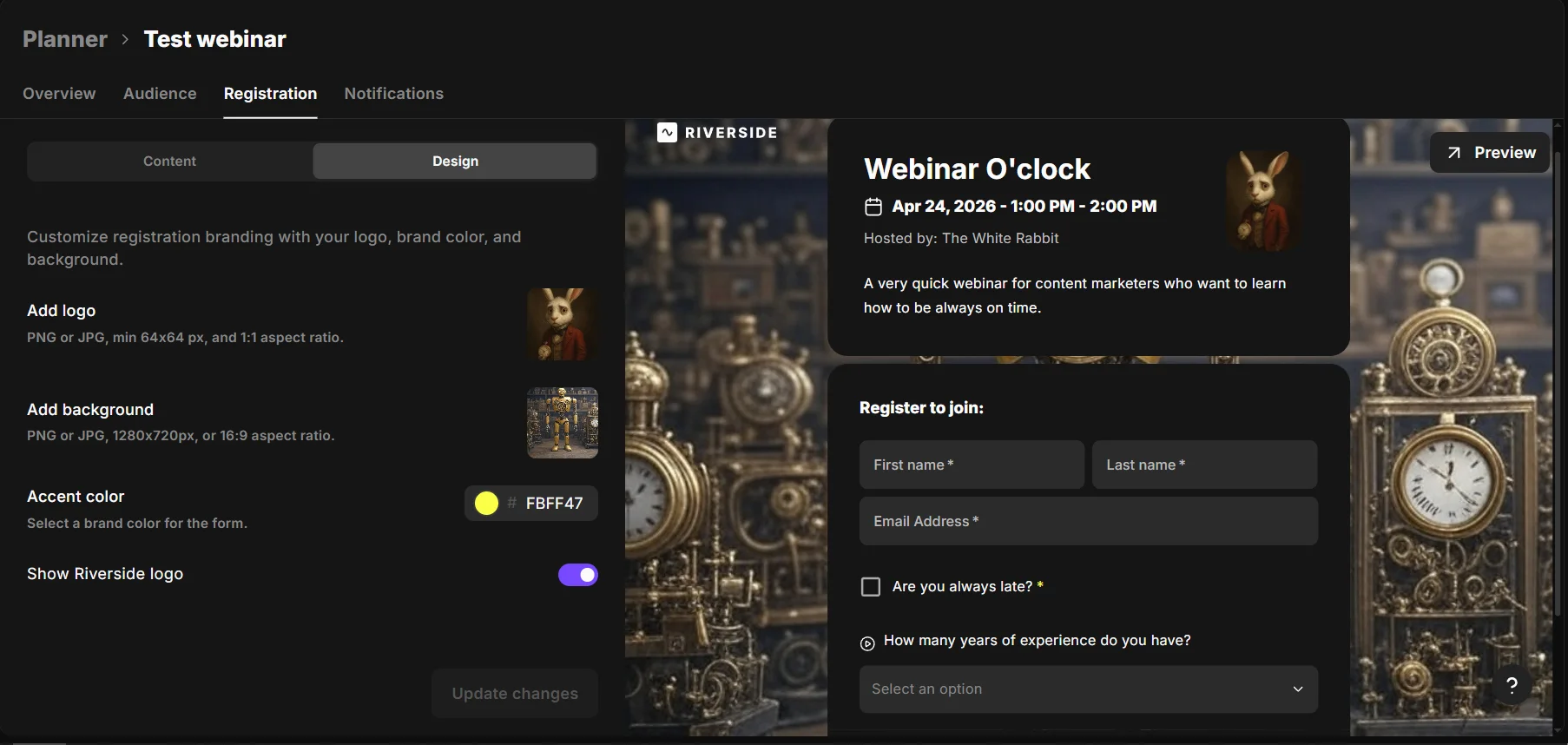
On Riverside, you can create a customized form very easily. From your dashboard, just click on “Webinar”, type your webinar name and description, and select “Registration form”.
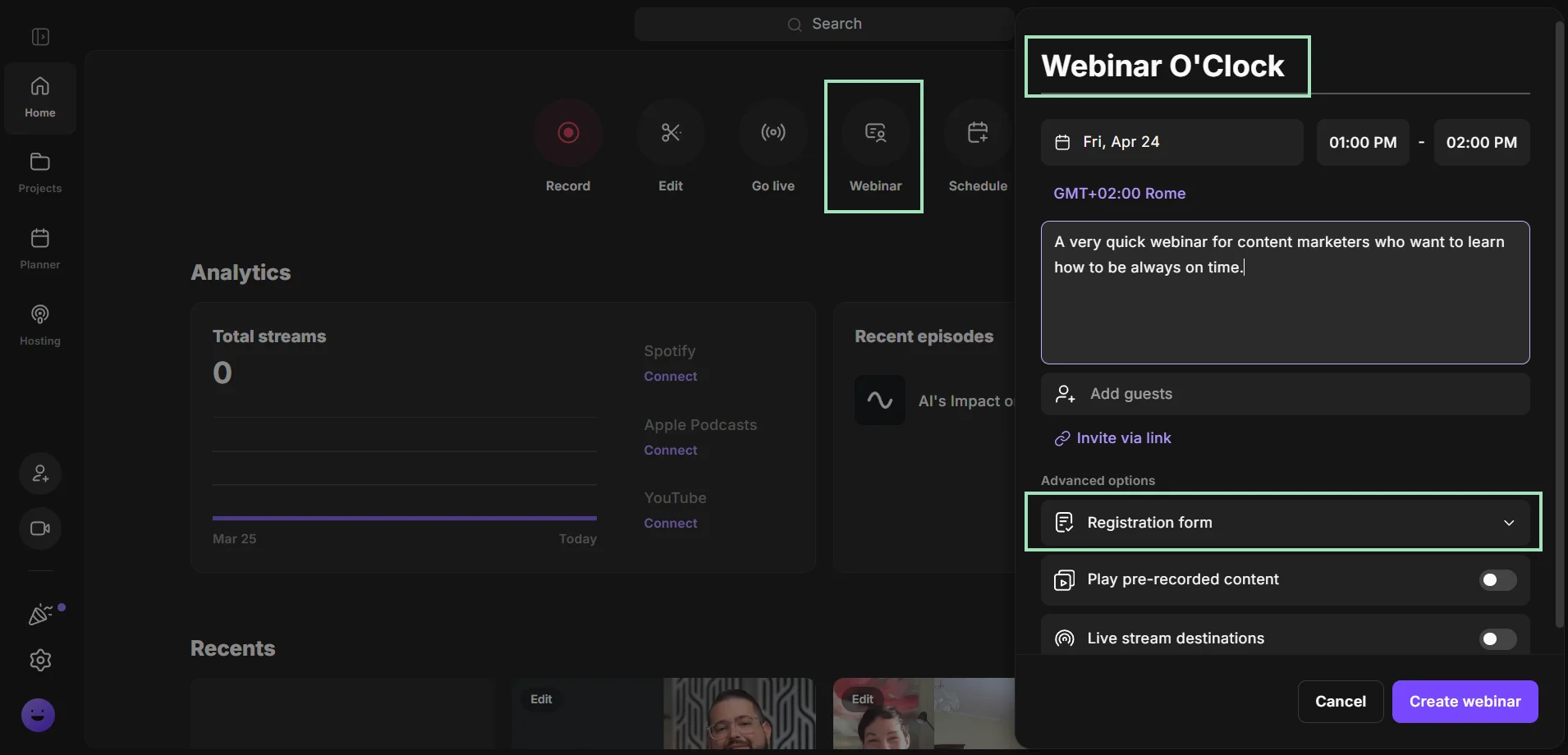
You can now pick the questions you want to ask your attendees, select your logo and background, and add custom fields to collect their data.
Riverside will automatically send your audience reminder and follow-up emails, and sync all leads into HubSpot and Salesforce.
The right webinar platform
If it’s part of your content engine, your webinar platform should support more than just the live session. It should make recording, replay, and repurposing straightforward. For example, Riverside lets you create custom registration forms, host webinars, and turn the recording into post-event promotional content like clips and posts, all in one place.
Source tracking
Set up tracking across every registration link so you know what’s actually driving sign-ups, the topic, the guest, or the channel. Without that visibility, it’s hard to improve the next campaign.
Step 5: Promote your webinar across multiple channels
You don’t need to be in every marketing channel, but each one you use should have a clear role in driving registrations.
- Email usually drives the highest-intent registration if you already have an audience.
- Social reinforces the message and keeps the webinar visible.
- Online content supports discovery by reaching people already searching for related topics.
- Paid works best as an amplifier once you know what’s converting.
Build the promotion sequence before registration goes live. Write one core message for the webinar, then adapt it for each channel without changing the positioning.
Here’s what to keep in mind for each channel:
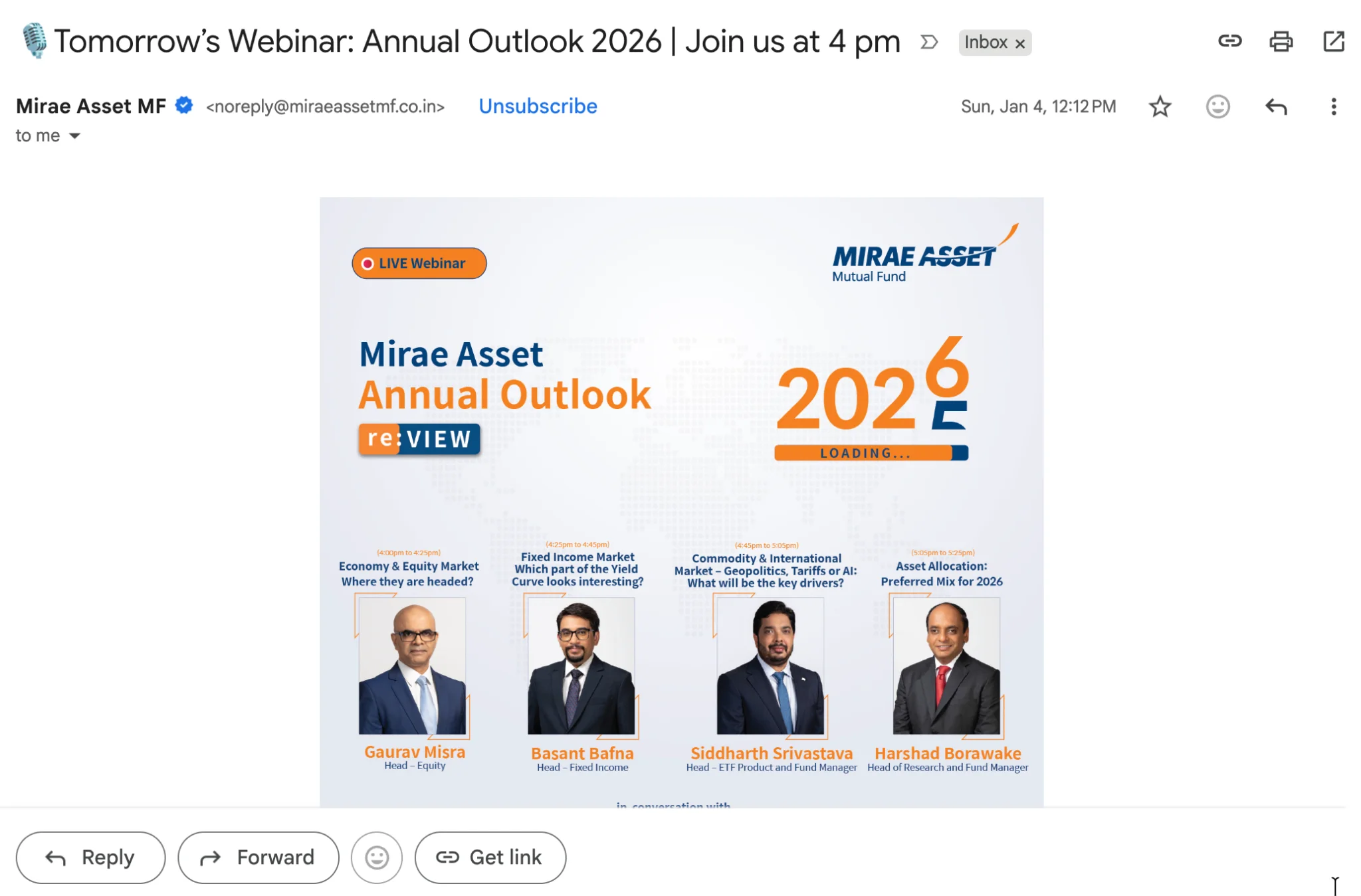
Plan the full email schedule upfront: an announcement email, a follow-up email that sharpens the value of attending, and reminder emails as the webinar gets closer. After someone registers, send separate reminder emails to help drive live attendance.
Social media
Use social to show people what they’ll get, not just tell them to sign up.
Share teaser clips, speaker moments, or short sneak previews that make the session feel worth attending. That gives you more ways to promote the webinar without repeating the same post every time.
Online and paid content
Add the webinar to the places your audience already visits. Include it in relevant blog posts, newsletters, landing pages, resource hubs, and community spaces so people can discover it while they’re already engaging with the topic. Track every registration link so you can see which channel, placement, or partner is actually driving sign-ups.
Give people a reason to register now. Offer a template, gated download, exclusive resource, discount, or bonus that connects directly to the webinar topic. The incentive should feel like part of the value, not an unrelated extra.
If you’re working with a guest or partner, give them ready-to-use copy that fits your positioning. That keeps messaging consistent while expanding reach.
Step 6: Run an engaging webinar
Now it's time to structure your webinar so that your audience gets value early and continues to get value throughout.
Offering value
For my webinars, I open with the problem and the outcome (what’s not working and what they’ll walk away with). Then I move quickly into something practical: a framework, a breakdown, or a clear way to approach the problem. That early takeaway keeps people engaged.
Engagement
From there, I build in interaction on purpose. Polls, chat prompts, Q&A, or even live call-ins can help turn the session into a conversation instead of a presentation. The point isn’t to add activity for the sake of it. It’s to keep people thinking, responding, and connecting the topic to their own work as you go.
Outline and structure
I also keep the session tight. Use clean transitions, cut long detours, and make each section earn its place. If you want people to stay engaged until the end, the webinar needs to feel focused.
Your CTA should be specific and tied to the moment. After a strong insight or useful takeaway, tell people exactly what to do next, whether that’s booking a demo, downloading a resource, or signing up for your next event. Don’t wait until the energy drops.
Planning for repurposing
If you know the webinar will be reused, plan for that before you go live. The session should still make sense on replay, which means clear audio, stable recording, and a structure that holds up outside the live format.
That’s where Riverside fits naturally for me. I can record locally, get separate tracks, and use transcripts or clips afterward without extra work.
“You have to start thinking about repurposing before you even create the content. If it’s not going to work on the channels your audience actually uses, don’t make it. Trying to repurpose after the fact never works as well as planning for it from the start.” — Emily Kramer, Co-Founder & Partner of MKT1 Capital, Creator of MKT1 Newsletter
Read more: How to Create a Webinar: A Step-by-Step Guide (2026)
Step 7: Prioritize post-webinar marketing
A lot of webinar engagement happens after the live event, which is why your follow-up matters as much as the webinar itself.
Start by splitting your audience into 3 groups: people who attended live, people who registered but didn’t show up, and people who never registered but match the audience you want to reach. Then give each group a follow-up that fits where they are.
- For attendees, send the replay, highlight the strongest takeaway, and give them one clear next step. That could be booking a demo, downloading a related resource, registering for a follow-up webinar, or talking to sales if the topic connects to an active buying need.
- For no-shows, don’t just resend the same link. Give them a reason to watch by pulling out what they missed: a sharp insight, a strong speaker moment, or one practical takeaway they can get from the replay.
- For people who didn’t register, turn the webinar into content you can distribute across other channels. Pull out clips for social, turn the discussion into a blog post, add insights to your newsletter, or publish the replay on an on-demand landing page. With Riverside, you can do it in minutes by just chatting with our AI Co-Creator.
This is also the point where you start nurturing prospects based on interest.
If someone engaged with the webinar, follow up by inviting them to another webinar on a connected topic, or route high-intent leads into sales outreach. The goal is to keep the conversation moving, not let it end with the replay.
Step 8: Measure performance by business impact

Registrations and attendance tell you if promotion worked. They don’t tell you if the webinar succeeded. To get a clearer picture, assess performance in stages.
Track all the metrics available to you, but don’t treat all of them as KPIs. The numbers that matter most should reflect the goal you set in step 1. If your goal was lead generation, meetings booked, or pipeline influenced matter more than replay views. If your goal was content distribution, replay views and post-event content performance matter more than attendance alone.
Here are a few metrics you might want to track, depending on your goals:
Acquisition stage
- Registrations by channel
- Cost per registrant
- Landing page conversion rate
Engagement stage
- Attendance rate
- Watch time
- CTA clicks
Outcome stage
- Replay views
- Meetings booked
- Pipeline influenced
- Post-event content performance
This is also where you see which marketing channels actually work. One might bring in more people but low engagement, while another brings fewer, more interested attendees. Those insights help you decide where to focus next time.
Best webinar hosting software for marketing
Riverside: Best for content-driven webinar marketing and repurposing

Riverside is built for marketers who want one webinar to turn into a lot more than a single live event. You can live stream, add custom branding, record in high quality, edit in the same workflow, and quickly repurpose the final session into replay content, short clips, and follow-up assets.
It records locally in up to 4K video and 48kHz audio, so your webinar stays polished enough to reuse across replay pages, social posts, email campaigns, and other promotional content. Separate tracks for each speaker give you more control during editing, while Riverside’s built-in editor helps you clean up the session and create multiple versions without switching tools.
Its repurposing features help you turn one webinar into clips, replays, and follow-up content for every channel.
Demio: Best for webinar marketing funnels and automated campaigns

Demio helps you structure the funnel around your webinar. You set up registration pages, automate reminders, and run live or evergreen sessions, and use CTA popups to push attendees toward the next step while they’re still engaged. Engagement tools like chat and polls help keep attendees active during the session.
Demio is useful when webinars are part of a repeatable lead generation system, where each session feeds into email sequences or sales workflows.
WebinarJam: Best for sales-focused webinar marketing
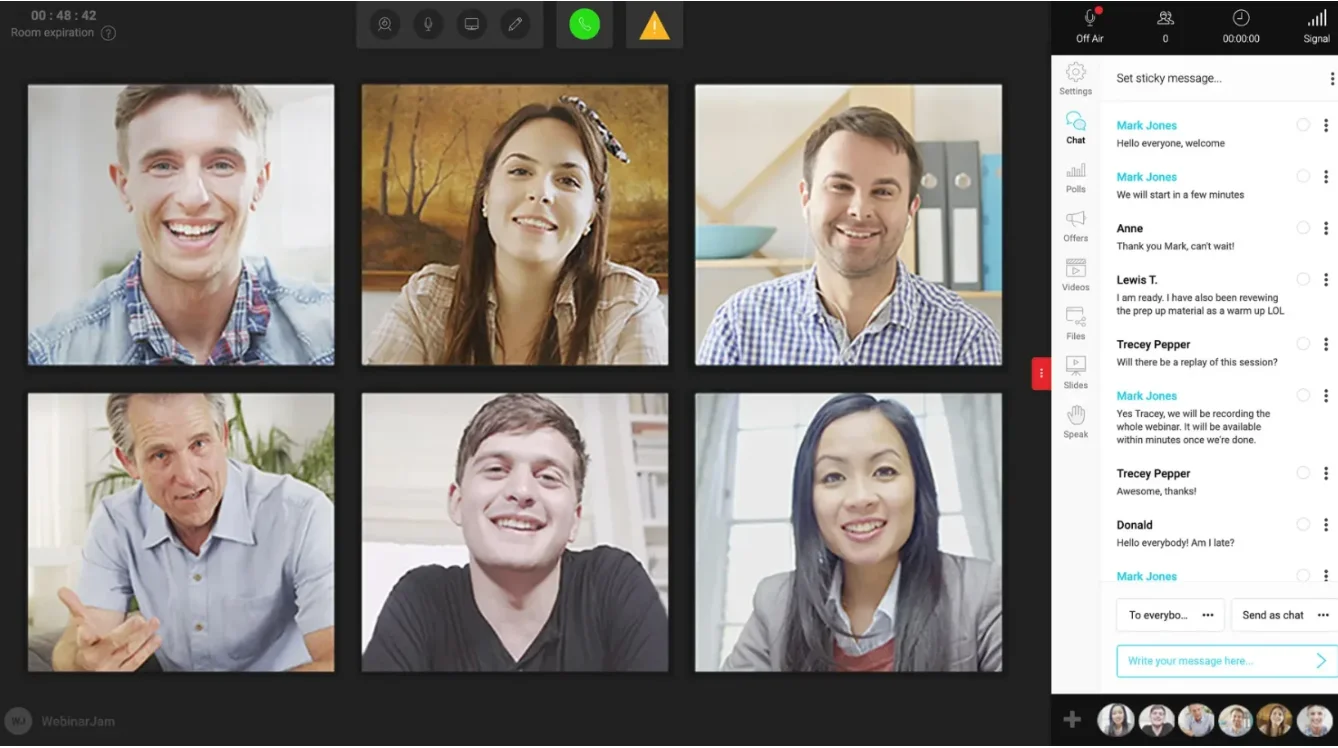
WebinarJam is designed for webinars where you want attendees to take action while attention is high. It supports large audiences, email automation, live engagement, and built-in follow-ups, which help you keep momentum going during and after the session.
This makes it a strong fit for product launches or promotional webinars where timing and conversion matter.
Other tools that can help with webinar marketing
Email marketing tools
Email helps you control attendance, not just drive sign-ups. You can send reminders at the right moments, adjust messaging based on behavior (registered, attended, missed), and bring people back to the replay. Without it, most registrants simply won’t show up.
Landing page builders
A landing page builder gives you control over how your webinar is positioned. You can shape the message, structure the page around outcomes, and optimize it over time. That’s what turns traffic, especially paid traffic, into actual registrations.
CRM and marketing automation tools
These tools let you see what happens after the webinar. You can track who registered, who attended, and what they did next, then connect that back to the pipeline. For instance, Riverside’s HubSpot and Salesforce integrations help you sync registrant data and webinar performance into your CRM, so follow-up and reporting stay connected.
Social media and scheduling tools
These tools help you promote the webinar consistently before it goes live and maintain its visibility after. You can schedule posts to drive registrations in the lead-up, then reshare clips or key moments to bring in replay views and ongoing interest.
Content repurposing tools
With a content repurposing tool, you can pull clips, reuse sections, and turn a single session into multiple content assets that fit different channels. Tools that support high-quality recording, transcripts, and quick clip creation, like Riverside, make this process fast enough to scale.
Analytics tools
Analytics shows you what’s working and what isn’t. You can track which channels drive registrations, which audiences engage, and where people drop off. That’s what lets you improve the next webinar instead of repeating the same approach.
FAQs about webinar marketing
Can a webinar be a marketing strategy?
Yes, a webinar can be a marketing strategy. It can attract prospects, engage them with useful content, and move them toward a signup, demo, or purchase.
The exact role depends on the format. A training webinar can build awareness, while a product demo can support conversion.
What are the key metrics to measure webinar success?
The key metrics to measure webinar success are registrations, attendance, engagement, and conversions. These show whether your webinar attracted interest, held attention, and drove action.
You can also track replay views and follow-up results, especially if on-demand viewing is part of your strategy.
How can I increase attendance for my webinar?
You can increase attendance for your webinar by choosing a strong topic, promoting it clearly, and sending reminder emails before the event. The goal is to keep registrants interested and make it easy for them to join.
Promote the webinar across your main channels, then send reminders a few days before, the day before, and shortly before it starts. For more tactics, check out our webinar promotion guide.



.webp)
%20(copy)%20(1).webp)
.webp)


