


Key takeaways:
- Since October 15, 2024, newly uploaded vertical or square YouTube Shorts can be up to 3 minutes (180 seconds) long.
- YouTube sets no official minimum length for Shorts, so you can experiment with shorter clips freely.
- The YouTube algorithm favors retention over length, so aim for 80% or higher.
- Export your files with a 9:16 aspect ratio at 1080 by 1920 pixels to completely fill mobile screens.
Creating YouTube Shorts is a powerful way to expand your audience and grow your channel fast.
But the maximum runtime isn't always the best for your content. If you want to succeed, you’ll need to know what the ideal length of your YouTube Shorts should be.
In this guide, we break down the exact length requirements, correct dimensions, and current limits you need to follow to maximize retention.
How long can YouTube Shorts be?
YouTube Shorts can be up to 3 minutes, or 180 seconds, long. YouTube expanded the limit on October 15, 2024, giving creators room for storytelling and bringing Shorts closer to longer formats on TikTok and Instagram Reels.
Any vertical or square video uploaded under this duration now automatically qualifies as a Short. Make it longer, and YouTube will upload it as a standard video unless you trim it to fit.
This rule applies to any new video file you upload. If you want to remix an already-published long-form video into a Short, you can select up to 60 seconds from the original video, instead.
Note: A shorter video uploaded before October 15, 2024 (or December 8, 2025 for Artist Channels) remains classified as standard, long-form video if it was not already classified as a Short.
Is there a minimum length for a YouTube Short?
There is no official minimum length for a YouTube Short. You can upload a video as short as 1 or 2 seconds. YouTube will still process it as a Short as long as it meets the vertical or square aspect ratio requirements.
The common belief that Shorts require a 15-second minimum comes from the YouTube mobile app. When you open the built-in Shorts camera to record, the app defaults to a 15-second recording timer. But this is simply a duration preset you can toggle, not a requirement, so a Short can be shorter than 15 seconds.
Note: If a new upload meets length and format rules, YouTube categorizes it automatically as a Short, and you can’t opt out of it. To publish it as long-form instead, YouTube recommends using a wider aspect ratio such as 16:9.
How does music change the YouTube Shorts limit?
Music per se does not reduce the overall 3-minute limit. However, you must follow two distinct rules to prevent YouTube from blocking your content:
- Music from the Shorts Audio Library: You can use most songs from the built-in Shorts Audio Library for no more than 90 seconds. Some tracks are limited to just 60 or 30 seconds.
- Active Content ID claims: YouTube automatically blocks any Short over 1 minute that carries an active Content ID claim. While a claim is just a notification that allows the copyright owner to take action, the video cannot be played, recommended, or monetized until the claim is resolved.
To safely maximize the 3-minute limit, use original audio or completely royalty-free music.
How long should your YouTube Shorts
Multiple studies put the ideal Short at 30 to 60 seconds, including analyses from Inflow Network and from Paddy Galloway and Chris Gileta. But even the authors of those studies cautioned that other factors affect performance.
Riverside creators land in the same place. When they set a target length before generating a Short with Magic Clips, 44% pick 30 to 60 seconds and 71% pick under a minute.
Ultimately, the best duration is the exact time it takes to deliver your core message without losing the viewer's attention.
Why completion rate matters more than length
The YouTube algorithm ranks Shorts based on completion rate and average percentage viewed. Retention matters most and, as a rule of thumb, should be at least 80% or higher.
Length isn't a ranking factor. It matters only because it moves retention numbers.
Shorts play in a continuous loop, and if they get rewatched, your retention will be pushed above 100%. If viewers consistently swipe away halfway through your video, the algorithm stops pushing it to the Shorts feed. Your goal is to keep the viewer watching until the final frame, and every second you add to a video gives the viewer another chance to swipe away.
Here’s a more detailed overview of the metrics employed by YouTube to assess a Short’s performance:
- Stayed to watch: The percentage of viewers who continued watching beyond the opening seconds. This primarily tells you whether your hook worked.
- Average view duration: The average time watched among viewers who stayed.
- Average percentage viewed: The average proportion of the Short those viewers watched.
- Audience retention: The graph showing where viewers continued watching, replayed a section, skipped ahead, or left.
For example, an average view duration of 20 seconds represents 100% of a 20-second Short but only 33% of a 60-second one. That does not automatically make the shorter Short better, but it shows why duration cannot be evaluated on its own.
Free guide: Needs some expert tips on how to select the best clips for your YouTube Shorts? Download this guide provided by Good Content.
Starting YouTube Short ranges by content type
There is no ideal length for every type of Short. Different formats require different durations.
Use these ranges as rough guidelines for your own content. These ranges are not a hard rule. If a tutorial becomes clear in 22 seconds, do not stretch it to 30. If a story needs 90 seconds to make its ending meaningful, do not rush it into 60.
My advice is to spend some time watching YouTube Shorts that align closely with your own industry or niche. Take note of the typical length associated with successful videos, and aim to emulate this.
How to find your own number
Once you’ve published several Shorts, your retention data inside YouTube Studio can help you find your ideal length.
Inside your analytics, find the audience-retention report and look at where the curve changes:
- A sharp drop in the opening seconds means your hook failed. Make the subject or promised payoff clearer immediately and start the video faster. My golden rule is to hook your audience within the first 2–3 seconds.
- A gradual decline through the middle suggests the pacing is too slow. Look for repeated explanations, tangents, or visuals that stay unchanged for too long. You can also increase the pacing by cutting silences and filler words.
- A drop near the end may mean the payoff arrived too late or you signaled the end of the video too early. Viewers got bored or heard what they needed and swiped away before the video officially ended.
- A spike indicates that viewers rewatched or shared that section. It can mark a compelling moment, although it may also mean something was unclear and needed replaying.
My best advice is to test two versions of the same concept. One could deliver only the essential setup and payoff in 20 to 30 seconds, while the other adds useful context and runs for 45 to 60 seconds. Keep the topic, opening hook, and payoff as similar as possible.
Publish them a few weeks apart and compare their retention curves. If the longer version adds watch time without a loss in average percentage viewed, the extra context is earning its place. If viewers leave during the added material, the shorter cut is probably the stronger format.
YouTube Shorts dimensions and specs
For most YouTube Shorts, use a vertical 9:16 aspect ratio with a resolution of 1080x1920 pixels. Square videos are also accepted, but vertical video fills the entire mobile screen and delivers the best viewer experience. You do not need any minimum subscriber count to upload Shorts, and standard YouTube file size limits apply.
Here are the exact technical specifications you need to set before exporting your video:
Vertical vs. square YouTube Shorts
YouTube accepts both vertical (9:16) and square (1:1) video formats as Shorts. But, a square video cannot fill a 9:16 phone screen without empty space or cropping.
If you’re repurposing square content, reframe it for 9:16 rather than stretching the original image. This will add black letterboxing above and below the clip that you can use for captions or supporting graphics.
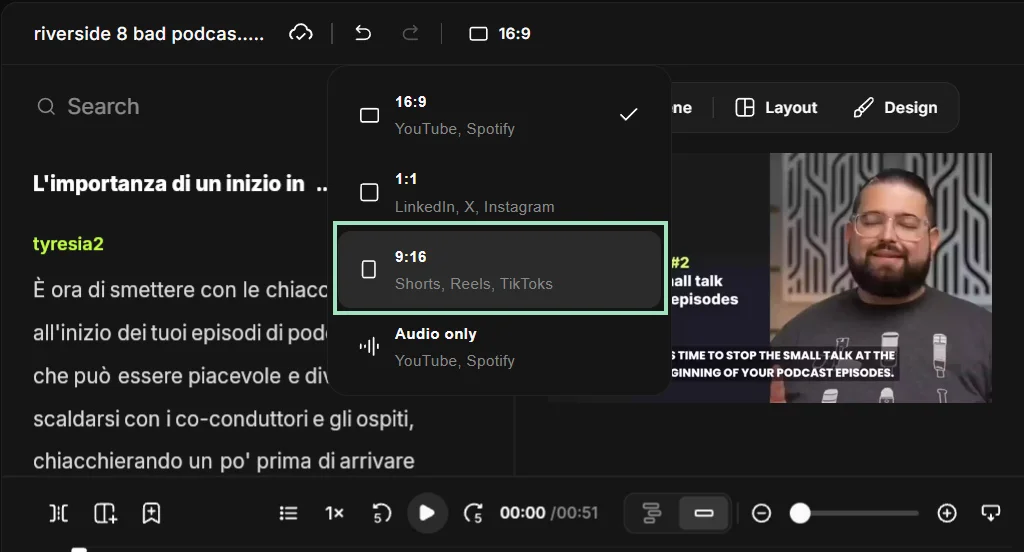
Pro tip: If you’re using Riverside’s editor, you can easily switch your clip's format from square to vertical clicking on the aspect ratio button at the top of the screen.
Safe zones and layout rules
Keep all essential text and graphics inside the 1080 by 1420 pixel safe zone in the center of the frame. YouTube's interface buttons sit on top of your video, so anything near the edges gets covered.
Avoid these interface zones:
- The top margin (150 pixels): The Shorts search bar and camera icons overlay this space.
- The right sidebar (120 pixels): The like, dislike, comment, share, and remix buttons run vertically down the entire right edge.
- The bottom overlay (350 pixels): Your channel icon, handle, video title, subscribe button, and audio track details cover the lower third of the video.
Adding dynamic captions
Add captions to every Short. YouTube doesn't require them, but most people watch short-form video with the sound off, so captions help your hook land.
Place your caption text directly in the vertical center of the frame so the bottom interface doesn’t obscure it.
You can also use branded colors to make them more recognizable.
Pro tip: Riverside’s clip creator automatically adds captions for you. You can also customize them to suit your brand or translate them into other languages.
.webp)
FAQs:
Can YouTube Shorts be 2 minutes?
Yes, YouTube Shorts can be 2 minutes long since the maximum limit is 3 minutes. Any 2-minute video that has a vertical or square aspect ratio is automatically categorized as a Short.
What is the seven-second rule on YouTube?
The 7-second rule is not an official YouTube requirement but a general rule stating that you should capture your audience’s attention within 7 seconds. Use this brief window to deliver a strong visual or verbal hook that convinces the audience to keep watching.
While true in principle, the 7-second rule doesn’t come from any data-backed study or research. This exact number comes from Roger Ailes, who popularized it in the opening chapter of his 1988 book “You Are the Message.” He simply explained how people judge a speaker within that time frame, and never mentioned video retention or YouTube.
How long is the average YouTube Shorts video?
There’s no verified average length for YouTube Shorts in 2026. Both Inflow’s and Galloway-Gileta's studies that found that most videos were between 20 and 40 seconds are from 2023, so they predate 3-minute shorts. Most other studies focus on which lengths perform best for views, and never disclose the average runtime of the datasets they examined.
What happens when a YouTube Short exceeds three minutes?
When your YouTube Short exceeds 3 minutes, YouTube automatically publishes the upload as a standard long-form video. If you’re uploading through the YouTube app, you can tap “Edit into a Short” to trim the video to 3 minutes or less before publishing.



.webp)

.webp)


