

.webp)


Key takeaways:
- The best overall podcast editing software options are Riverside and Descript.
- The best free podcast editing software options are Audacity and GarageBand.
- The best software options for video podcast editing are Adobe Premiere and Zencastr.
- The best software options for audio-only podcast editing are Adobe Audition and Reaper.
I learned the hard way that picking the wrong podcast editing software costs you time, money, and a lot of frustration.
To save you from the same lesson, I’ve rounded up the best podcast editing software, based on my 15,000+ hours of production experience. This guide covers the 8 best options, organized by use case, so you can find the right fit fast.
Let’s get into the details.
Quick comparison table
Here’s a rundown of the podcast editing software I’ll cover in this guide:
How I evaluated
To write this guide to the best podcast editing software, I evaluated software based on these criteria:
- Ease of use: I looked at whether the software has intuitive navigation and features, and the steepness of its learning curve.
- Editing tools: I assessed core capabilities, including trimming, multitrack editing, and noise removal. I also looked at which tools have text-based editing or AI chat-based editing versus a conventional editing timeline.
- AI features: I checked for AI features that cut editing time, including filler-word removal, clips, and audio enhancement.
- Cost: The software’s pricing, including whether it has a free plan or trial.
These are also the criteria I recommend keeping in mind as you look for podcast editing software.
Best overall podcast editing software
The best overall podcast editing software includes Riverside and Descript:
Riverside
.webp)
Price: Free plan available. Paid plans start at $29/month.
Ease of use: ⭐⭐⭐
Compatibility: macOS, Windows, iOS, and Android.
Audio/Video editing: Audio and video editing.
If you want to record and edit on one platform without switching between tools, use Riverside. This all-in-one podcast platform can handle recording to editing (and even hosting).
Riverside’s editor is highly intuitive for beginners, letting you edit with chat-based editing, text-based editing, or a traditional video timeline.
The easiest way is to just chat with Riverside’s AI agent, Co-Creator. Ask it to create fully branded episodes, cut filler words, enhance audio, and more. You can use Co-creator to create assets using multiple recordings or just one.
For more precision, I like the text-based editor. Every recording is automatically transcribed, so editing is as simple as adjusting your transcript text, which syncs with the video and audio.
And you still get a traditional timeline to split clips, add transitions, and position overlays such as text, images, and videos.
Other AI features I often use include AI B-roll and eye-gaze correction. You can also translate your videos in multiple languages to reach a broader audience. I also love Magic Clips, which turns recordings into short-form videos with custom controls for duration, speaker, and topic. With Riverside’s AI features, I’ve cut my editing time in half. Now, completing post-production for video podcast episodes takes under 1 hour.
Key features:
- AI chat-based editing: Edit your episodes by chatting back and forth with the AI Co-Creator. This AI agent can also turn your podcast into endless promotional assets, like social media clips, blog posts, and thumbnails.
- Text-based editing: Easily trim your episode by removing text from its transcript, which deletes the corresponding part of the recording automatically.
- Smart layouts: Riverside can identify the main speaker, and then automatically switch between the main speaker and other camera views to keep users engaged. When using a smart layout, you can adjust the rhythm, or how quickly your episode switches to a new camera view, to match your episode’s pacing.
- AI audio enhancement: Magic Audio intelligently removes background noise, normalizes audio levels, and reduces reverb from your recording to help you get studio-quality audio.
- AI show notes: Automatically generate show notes that you can repurpose into chapters, key takeaways, and full episode descriptions.
User review: “Riverside is the best tool to cut down on editing time while keeping your production quality high.” - Colin & Samir, YouTubers
Reasons to buy it:
Editing a podcast used to be a tedious process of manually trimming away bad parts, arranging clips to switch between scenes, and adjusting audio to improve clarity and levels.
Riverside’s extensive AI features automate many of these tasks, helping users go from raw recording to polished episodes faster and with less technical knowledge. This makes the platform a great option for both beginners who are still learning the ropes and experienced podcasters who want to get professional-looking edits in less time.
The software is a one-stop shop for recording and editing, so you won’t need to pay extra for or learn how to navigate a separate recording tool. Riverside’s generous free plan also lets you test its features before committing.
Limitations:
Riverside lacks the granularity of pro-level editing tools, like multiband compression and color grading, found in more advanced audio and video editing software.
Descript
Price: Free plan available. Paid plans start at $24/month.
Ease of use: ⭐⭐⭐
Compatibility: macOS and Windows.
Audio/Video editing: Audio and video editing.
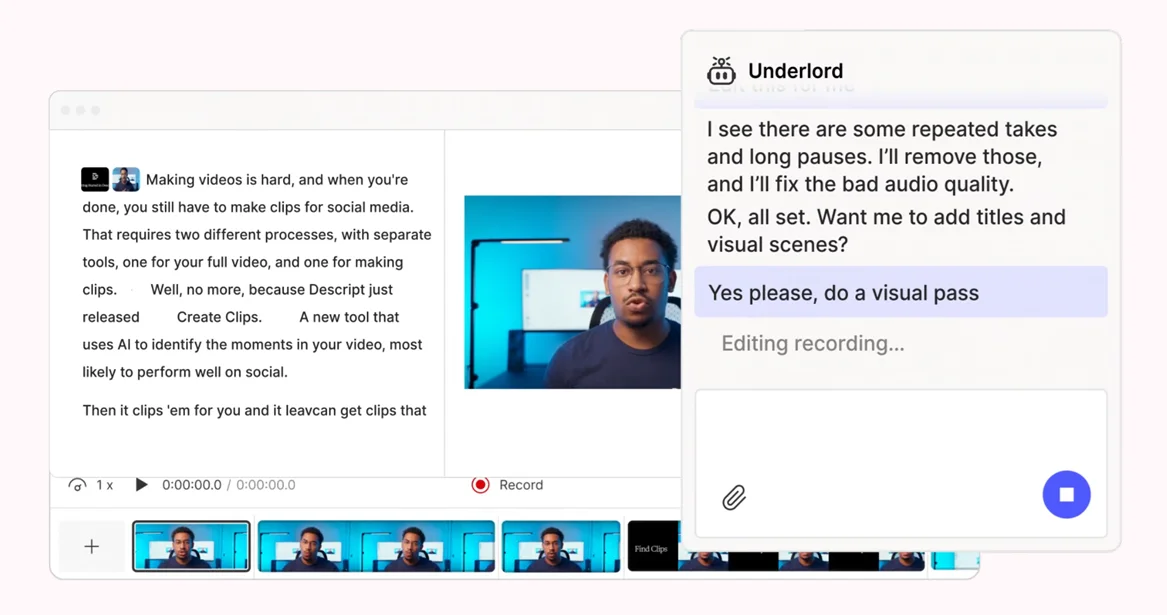
Descript is an editing-focused tool built around text-based workflows. Instead of editing audio or video on a traditional timeline, you edit by changing the transcript. Delete a word, and it’s removed from the recording.
There’s also an AI co-editor called Underlord, whose interface on the home screen looks a lot like ChatGPT’s. You can use suggested prompts, like “clean up video recording” or “create a rough cut of this podcast,” to start editing. Alternatively, write your own detailed prompt.
If you flubbed your lines while recording, Descript can help fix your speech. Just highlight the problematic text in the transcript and enter what you actually want to say. Descript will use AI to generate the correct audio and video.
From my experience, Descript will appeal to creators who want to make rough edits faster.
Key features:
- Text-based editing: Edit audio and video by editing the transcript.
- AI chat-based editing: Chat with an AI co-editor to remove retakes, add zooms, and cut filler words, among other edits.
- AI audio repair: Remove background noise and regenerate speech containing mistakes or tone mismatches.
- Automatic multicam: Feature multiple camera views in your edit by getting Descript to switch between cameras, show multiple speakers onscreen, and add B-roll.
- Transcription: Transcribe your episode into 20+ languages. You can also set up glossaries that control how specific words are to be translated (or not translated at all).
User review: “One [Descript] feature I regularly use is text-based editing. While preparing training recordings or internal demo videos, I can remove repeated lines, pauses, or mistakes directly from the transcript instead of manually cutting frames. That alone saves a noticeable amount of editing time during weekly content preparation.” - Vinay P., Mechanical Design Engineer
Reasons to buy it:
Descript is best for creators who prefer editing by text, whether because doing this is faster or because they’re unfamiliar with editing tools. The tool’s advanced transcription features also improve accuracy, so you can focus on the actual editing rather than fixing your transcripts.
Limitations:
The tool tends to lag and become unstable if you’re working on larger projects.
Best free podcast editing software
The best free podcast editing software includes Audacity and GarageBand:
Audacity

Price: Free.
Ease of use: ⭐⭐☆
Compatibility: macOS, Windows, and Linux.
Audio/Video editing: Audio editing only.
Audacity is a free and widely used open-source audio editor, packing industry-standard editing features into a no-frills, old-school interface.
Even though recent updates have improved Audacity’s user interface, it still looks somewhat dated. You may also face a steep learning curve since the interface isn’t the most intuitive. This is especially true if you aren’t familiar with technical production terms like normalization, equalization, and panning.
This audio workhorse’s features are well documented, so review its support articles to get up to speed with it. Audacity’s help forum is also pretty active, which is useful if you have specific questions about the platform.
Since Audacity is open source, anyone can create plugins to extend its functionality. There are a ton of third-party plugins available, including plugins for AI transcription and noise removal. You can even write your own plugins using the Nyquist programming language.
Key features:
- Free, full-featured editor: Audacity offers practically all the tools found in professional audio editing software at no cost. These include effects like compression, reverb, and auto-ducking.
- Multitrack editing: Arrange your audio (speakers, background music, sound effects, and so on) on multiple tracks and edit them separately.
- AI transcription: Transcribe audio into 90+ languages with no limits by installing a free plugin.
- Plugin library: Install plugins for removing noise, increasing sampling rates, and more.
- Cloud storage: Upload your editing projects to the cloud for convenient team collaboration and access from anywhere in the world. You can upload 3 projects of up to 1 GB total for free before subscribing to a paid plan for more storage.
User review: “Despite being free, Audacity delivers professional-quality results and holds its own against many paid alternatives. While it excels at core editing functions, it lacks some advanced features found in high-end professional suites.” - Hans A., Research and Development Editor
Reasons to use it:
I see Audacity as a tool that bridges the gap between hobbyists and professional podcasters. It helps beginners access pro-level features and learn advanced editing techniques for free.
Limitations:
Audacity lacks text-based and AI-chat-based editing, which modern editing software tends to have.
GarageBand
Price: Free.
Ease of use: ⭐⭐⭐
Compatibility: macOS and iOS.
Audio/Video editing: Audio editing only.
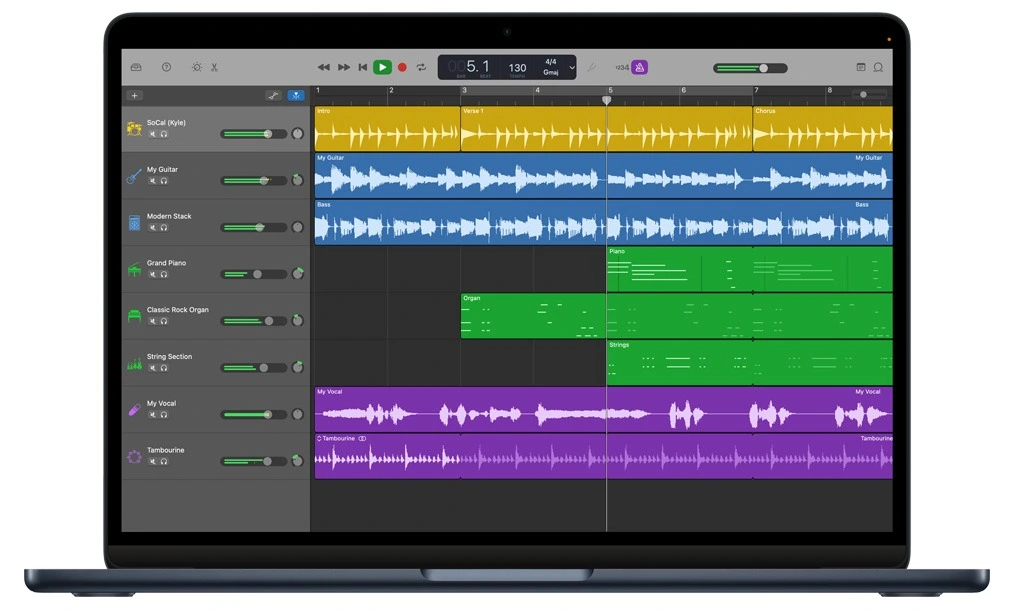
GarageBand is a free, beginner-friendly digital audio workstation (DAW) developed by Apple. While this editing app is more for musicians, it’s also a solid option for podcasters. Its interface is simple to use, and there’s a decent range of features, including trimming, equalization, and reverb.
GarageBand comes pre-installed on Macs and can also be downloaded at no cost on iPhones and iPads.
Here’s a tip if you create a video podcast: use GarageBand to edit your audio before using it with your video footage in the iMovie video editing app. iMovie is developed by Apple and is also free.
Key features:
- Multitrack editing: Edit multiple audio tracks separately, which is helpful if you’ve recorded more than one speaker or want to layer in sound effects and background music.
- Waveform editing: Adjust your audio’s waveforms directly for more precise edits.
- Edit on the go: The iOS app lets you edit from your phone.
- Editing tools: Trim, split, and loop audio; adjust audio levels; compress your audio; and add effects like reverb.
- Sound library: Get access to free instruments, sounds, and loops.
User review: “GarageBand is powerful, sounds good, and yet is very easy to learn. It’s a great starting place for recording. However, once you know what you are doing, all the same great things that made GarageBand so easy become barriers to what you want to do.” - Trevor Zylstra
Reasons to use it:
GarageBand’s mobile app is easy to use and perfect for editing episodes on the go.
Limitations:
GarageBand works only in the Apple ecosystem, so non-Apple users have to look elsewhere.
Best software for video podcast editing
The best software for video podcast editing includes Adobe Premiere and Zencastr:
Adobe Premiere
Price: Free 7-day trial is available. Single-app subscription at $34.49/month for desktop. (IOS app is free)
Ease of use: ⭐☆☆
Compatibility: macOS, Windows, and iOS.
Audio/Video editing: Audio and video editing.
Adobe Premiere is an industry standard for professional video editors, and with its advanced features, I'd recommend it for podcasters who want more fine-tuned control.
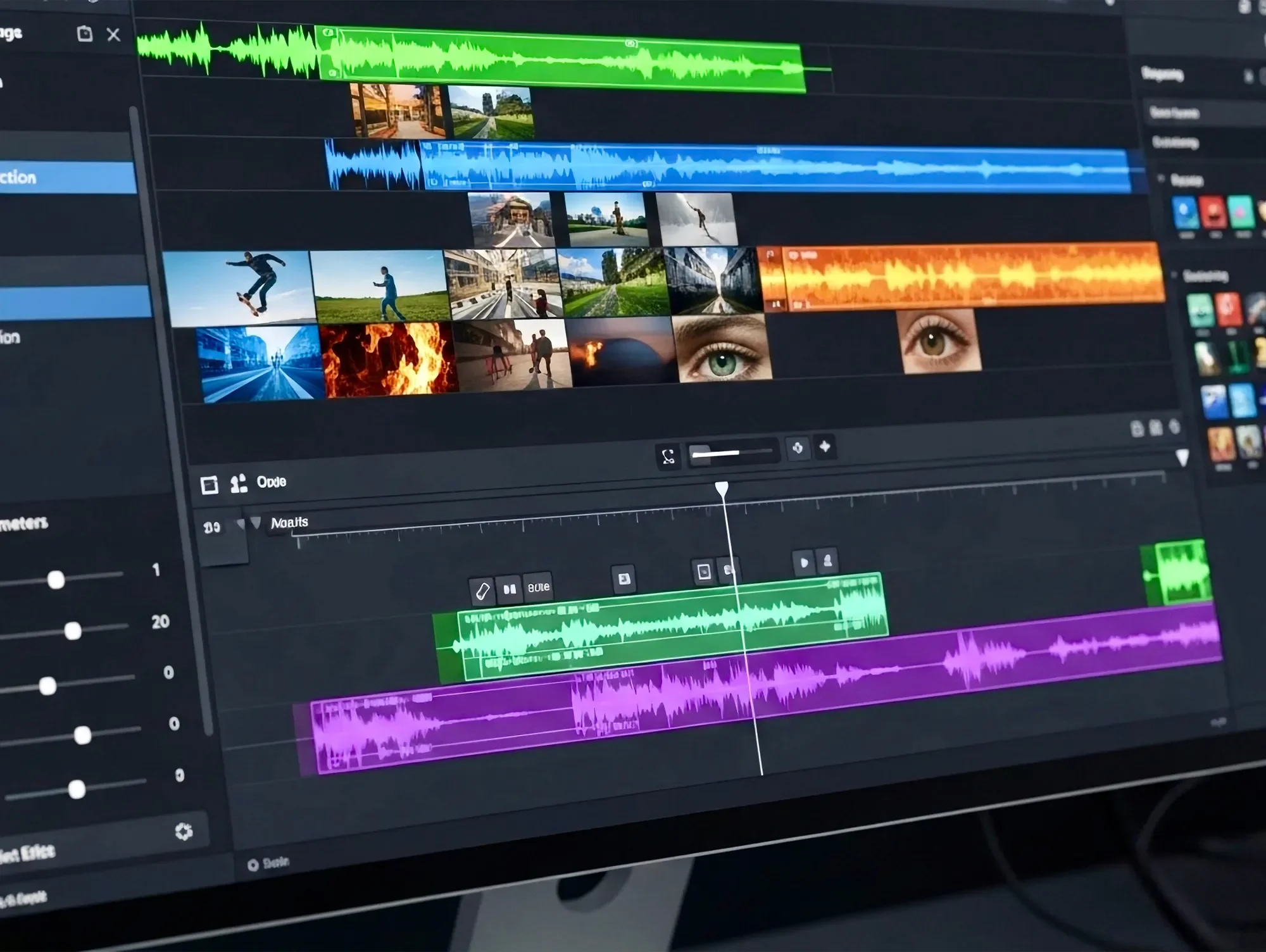
While Premiere lets you trim and rearrange recordings using conventional editing timeline tools, its advanced features, such as timeline snapping and markers, give you greater precision. And it also has text-based editing, which lets you edit your recordings by editing the transcript’s text.
Premiere’s audio editing tools include audio gain, equalization, and compression. There’s also AI speech enhancement, which is handy for removing background noise. Its other strengths include multicam support and advanced color gradings.
But this comes with a learning curve, and it’s better suited to podcasters with some video editing experience.
Key features:
- Multitrack editing: Place your video and audio clips on separate tracks for easier editing. You can flexibly shift your clips up and down on different tracks, which is especially helpful for arranging your video footage’s order onscreen.
- Text-based editing: Edit your video by rearranging or deleting its transcript’s text. You can also search for filler words in the transcript to bulk-delete them from your video.
- AI audio enhancement: Use the Enhance Speech feature to remove background noise and improve speech clarity with one click.
- Color correction and grading: Adjust your video’s white balance, exposure, colors, and more with the Lumetri Color panel to create specific visual looks.
- AI speech-to-text: Automatically transcribe your video’s dialogue for use as video captions and text transcripts. Premiere can label individual speakers to help listeners track who said what.
User review: “Adobe Premiere is a very good professional editing software. The best thing about it is its color grading features, along with the effects we get. Another great feature is speech-to-text, where I don’t have to write captions manually because Adobe Premiere automatically creates the captions.” - Anshika C.
Reasons to buy it:
Premiere provides industry-standard video editing features for creating polished video episodes. This is especially true when you combine Premiere with other apps in the Adobe ecosystem, like Audition.
Limitations:
Since Adobe Premiere is primarily video editing software, its audio editing tools mainly help with simple audio adjustments. I recommend editing your audio in another software (especially Adobe Audition) for more fine-tuned control over your episodes’ sound, and then importing your final audio mix back into Premiere.
Zencastr
Price: Free plan available. Paid plans start at $30/month.
Ease of use: ⭐⭐⭐
Compatibility: macOS, Windows, and iOS.
Audio/Video editing: Audio and video editing.
Zencastr is a podcast recording, editing, and hosting software for creating professional multi-guest video episodes, even if you don’t have extensive editing skills.
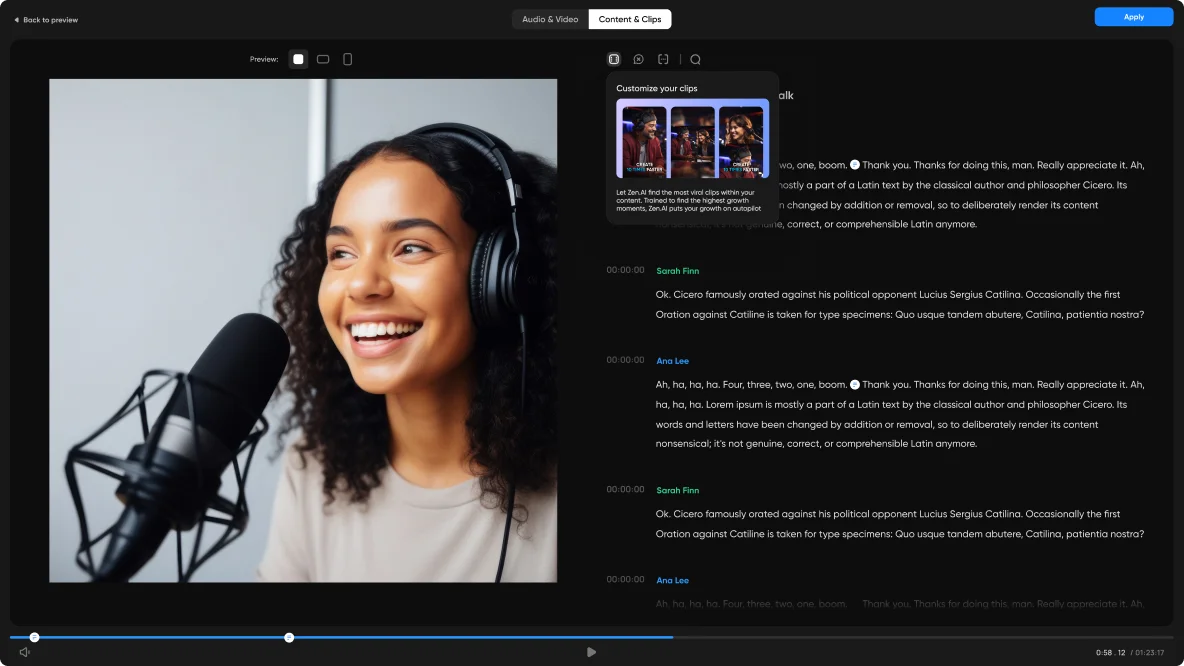
Zencastr’s editor includes support for text-based editing, so you can trim recordings just by deleting transcript text. You can also switch between various speaker layouts and use AI to automatically create highlight clips for social media publishing.
Other AI features include automatically centering each speaker’s face and removing filler words and long pauses. Simple audio enhancement tools, like volume normalization and crosstalk reduction, are also available.
Key features:
- Text-based editing: Edit out segments of video and audio from your episode by removing their corresponding text in the transcript.
- AI video layout: This AI-powered feature detects the active speaker and displays them more prominently in your video.
- Audio enhancements: Remove noise, normalize audio levels, and reduce crosstalk, among other settings.
- Bumpers: Add intros and outros to your episodes.
- AI clipping: Use AI to automatically identify and create clips of episode highlights.
User review: “Zencastr is really kind of seamless. If you’re not super technical and you’re looking for something just, like, turnkey, go, this is kind of it.” - Chris with Minn Media
Reasons to buy it:
Zencastr is a solid all-in-one podcast editing suite suitable for beginners and intermediate creators, featuring several AI features to make editing easier.
Limitations:
All editing is done via text-based editing. There’s no conventional timeline editor for dragging, scrubbing, and splitting video or audio, which can limit editing precision.
Best software for audio-only podcast editing
The best software for audio-only podcast editing includes Adobe Audition and Reaper:
Adobe Audition

Price: Free 7-day trial available. Single-app subscription at $34.49/month.
Ease of use: ⭐☆☆
Compatibility: macOS and Windows.
Audio/Video editing: Audio editing only.
Adobe Audition is a professional DAW that’s part of Adobe’s creative app ecosystem, making it a clean fit for your workflow if you already use Adobe apps (like Premiere Pro for video editing).
I suggest this software to podcasters with a bit of experience, as Audition has a steep learning curve. It’s full of editing controls and tools that help you achieve polished, broadcast-quality audio. I do like its wide array of effects, templates, and presets, though. You won’t have an issue finding any audio filter you need.
Audition’s interface is highly customizable. It offers workspace layouts for common use cases like Simple Editing and Edit Audio to Video, and you can also rearrange the interface’s panels to suit your workflow.
The tool is also known for its batch-processing capabilities, where you can apply the same effects to multiple files at once.
Key features:
- Multitrack and waveform editing: Use the multitrack editor to arrange and mix multiple tracks non-destructively, or switch to waveform view to edit individual audio files directly.
- Essential Sound Panel: Categorize your audio’s type, like Dialogue or Ambience, to get a tailored set of repair and editing controls that guide your editing decisions.
- Advanced noise reduction: Remove noise from your audio with precision using specialized noise reduction effects. You can also target and reduce noise from specific frequencies.
- Royalty-free sound effect library: Choose from over 12,000 sound effects to add to your episodes for free.
- Plugin compatibility: Install third-party plugins to extend Audition’s functionality.
User review: “The seamless integration between apps like Photoshop, Illustrator, and InDesign streamlines my workflow and saves time. Yet, the Adobe Creative Cloud is pricey, some apps are heavy on performance, and you lose access if you stop paying.” - Andrés C., Marketing Associate
Reasons to buy it:
Audition is ideal if you’re a professional looking for advanced editing tools and are already working within the Adobe ecosystem.
Limitations:
As dedicated audio editing software, Audition can be pricey compared to alternatives that bundle audio and video editing at a similar cost.
Reaper
Price: Free 60-day trial available. A paid license starts at $60.
Ease of use: ⭐☆☆
Compatibility: macOS, Windows, and Linux.
Audio/Video editing: Audio and video editing.
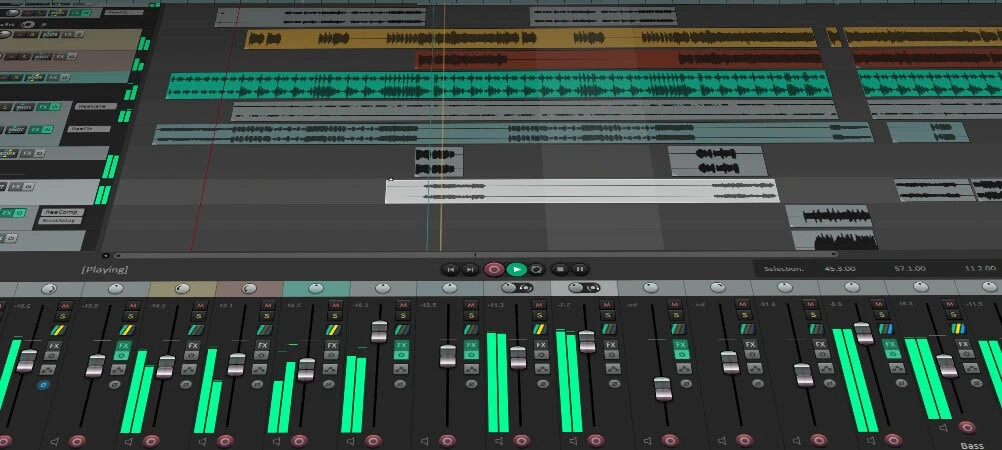
Reaper is a powerful DAW built for advanced audio editing, being capable of editing, mixing, and mastering audio projects of any size and complexity. In particular, its multitrack editor and wide range of tools make it well-suited for editing multiple-speaker episodes.
Trim, split, and arrange recordings on multiple tracks, and link your tracks so that changes to one track automatically apply to the others. Then, use built-in or third-party plugins to compress, equalize, and denoise your audio for a polished, professional sound.
Reaper is especially known for its customizability. You can create custom menus, build keyboard shortcut chains, and tailor its interface to match your workflow. Its one-time fee ($60 for a discounted license and $225 for a commercial one) also makes it highly affordable, especially in the long run.
Key features:
- Multitrack editing: Adjust your audio on separate tracks for cleaner edits.
- Non-destructive editing: Edit your episodes without changing your source files permanently.
- Effects: Enhance your audio with equalization, pitch correction, reverb, and other effects.
- Dynamic split: Automatically split tracks according to volume thresholds, which is helpful for stripping silence from your recording.
- Plugin support: Reaper supports thousands of plugins for extending the software’s functionality.
Reasons to buy it:
Overall, Reaper is a great audio editing tool for pro podcasters who routinely publish multiple-speaker episodes. It offers advanced editing tools at an affordable one-time fee, making it a compelling alternative to subscription-based audio editing software.
Limitations:
Reaper’s learning curve can be steep if you’re new to audio editing.
User review: “The flexibility to configure absolutely all the available functions in the program, from shortcuts, function combinations, aesthetics, changes are implemented quickly and effectively, they present updates constantly correcting minor details and implementing new functions. I haven't used the technical support, but it has a very active user base that helps with corrections or advice.” - Ramiro A., Host
Which podcast editing software is right for you?
The podcast editing software that’s right for you is ultimately the one that best meets your needs. So, take the time to understand your requirements before selecting your software. Otherwise, you risk letting it dictate how you edit your show, which is far from ideal.
Here’s how I recommend shortlisting podcast editing software:
- If you’re a beginner with no budget, use Audacity or GarageBand, which are free. GarageBand is an especially good option if you’re an Apple user.
- If you want all-in-one recording and editing software, use Riverside or Descript. After recording on either platform, you can enhance your episodes’ audio and add video layouts, music, and visuals. In particular, use Riverside if your recording contains dialogue in a less common language, because Riverside supports more transcription languages than Descript.
- If you edit multi-guest video podcasts, use Adobe Premiere or Zencastr. These tools offer video and audio editing features, including text-based editing and background noise reduction. Premiere also has extensive video color correction and grading tools.
- If you need professional audio control, use Adobe Audition or Reaper. Both have industry-standard features for precise audio editing, including noise reduction and restoration, pitch correction, spectral frequency editing, and non-destructive waveform editing. Between the two, Audition is the better fit if you’re already in the Adobe ecosystem.
FAQs about podcast editing software
How can I edit my podcast for free?
To edit your podcast for free, use podcast editing software like Audacity and GarageBand, which are available at no cost. You can also use editing software that has a free plan. For example, Riverside offers a free plan that includes unlimited multitrack editing, text-based editing, and AI chat-based editing.
What are the top podcast editing software options for beginners?
The top podcast editing software options for beginners include Riverside, Descript, and GarageBand. They have intuitive interfaces and easy-to-use tools. For example, Riverside and Descript’s text-based editing features make editing as easy as rearranging and deleting text in a transcript.
What tools do professional podcasters use to edit?
The tools that professional podcasters use to edit include Riverside, Descript, Adobe Audition, and Reaper. Riverside and Descript streamline the editing process for professional podcasters who want to go from raw recordings to publish-ready episodes faster. Adobe Audition and Reaper suit those who want greater control over every element of their audio.
Is Audacity still free in 2026?
Yes, Audacity is still free in 2026. Try editing your episodes with it to see if it’s the right tool for you. If it isn’t, use other free options like GarageBand or Riverside’s free plan.
Can AI edit a podcast for you?
Yes, AI can edit a podcast for you if you use podcast editing software with built-in AI features. For example, Riverside includes a Co-Creator AI chat interface, which can make edits, like removing noise and fixing eye contact, as you instruct it to. Riverside also has an AI-powered Magic Clips feature that automatically identifies and creates social media-worthy highlight clips for your episodes.
What's the difference between a DAW and podcast editing software?
The difference between a digital audio workstation (DAW) and podcast editing software is that a DAW offers comprehensive features for recording, editing, mixing, and mastering audio. In contrast, podcast editing software refers to any tool that helps prepare podcast audio or video recordings for publication.
If your podcast is audio-only, you can use a DAW as your podcast editing software. But if you’re producing a video podcast, you’ll need either 2 tools for editing video and audio separately, or one that can handle both.



.webp)
.webp)
.webp)


.webp)


