






Key takeaways:
- Webinars are focused, single-session presentations that are ideal for teaching one topic or delivering one key message.
- Virtual events are multi-session experiences that function more like online conferences with multiple speakers and networking opportunities.
- Webinars are easier and cheaper to produce because they usually require fewer speakers, simpler technology, and less planning.
- Virtual events offer deeper engagement and community building via networking, panels, workshops, and other interactive experiences.
Trying to decide whether to run a webinar or virtual event? How do they differ? Which will help you meet your marketing goals?
Here we’ll compare webinars vs. virtual events and show you the advantages (and drawbacks) of each.
Let’s do this!
What is a webinar?
A webinar is an online presentation where a speaker or panel delivers content to an audience in real time or on demand. It typically focuses on a single topic and lasts 45 to 60 minutes. You get live webinars, pre-recorded webinars, or “hybrid” ones (where organizers mix both live and pre-recorded elements).
For example, here is our webinar on “How B2B Brands Win Attention in 2026”. This is a single, focused session where someone demonstrates how to do this step by step.
Webinar pros
- Easy to run (usually one host and one session).
- Short time commitment (often 45 to 60 minutes).
- Faster to produce and repeat.
- Generally affordable (fewer speakers, less production).
Webinar cons
- Limited scope (one topic at a time).
- Less immersive than a full event.
- Harder to build community around a single session.
- Harder to create a ‘big event’ feeling.
Read more: What is a webinar?
What is a virtual event?
A virtual event is an online event that includes multiple sessions, speakers, and interactive elements like networking or breakout rooms. It is typically larger and longer than a webinar, often running for several hours or multiple days.
For example, you might see a virtual event called “The B2B Content Summit: Strategy, Stories, and What's Working”. Unlike the simple webinar example above, this would be a multi-session event with talks about podcasting, creator panels, and networking opportunities.
Virtual event pros
- Multi-session agenda (talks, panels, workshops) caters to different audiences.
- Can feature many speakers and topics.
- Feels like an online conference or summit.
- Stronger branding and community experience.
Virtual event cons
- Requires much more planning and coordination (tracks, schedules, speaker coordination, longer promotion cycle).
- Higher cost for speakers, platform features, and promotion.
- Harder to keep attendees engaged all day.
- More technical logistics (multi-session streaming, speaker handoffs, virtual networking spaces).
Read: The ultimate guide to virtual events
Virtual events vs. Webinars: Key differences
Now that you understand webinars and virtual events a bit better, let’s dive deeper into the distinctions.
Format and duration
Webinar content formats and duration
Webinars are usually a single 45- to 60-minute presentation that all attendees watch at the same time. One speaker (or a small panel) walks the audience through slides, a demo, screen share, or a tutorial from start to finish. These sessions typically start with an introduction, followed by the main presentation, and end with questions from the audience.
Typical webinar formats include:
- Presentation or lecture with slides.
- Product demo.
- Step-by-step training or tutorial.
- Interview or small panel discussion.
- Q&A session.
Virtual event content formats and durations
A virtual event often includes multiple content formats and concurrent sessions happening within the same event program. As a result, they are much longer than webinars, occurring over several hours or even a few days. Attendees can choose which sessions to attend, much as they would at an in-person conference. Instead of one presentation, the agenda might include:
- Keynote presentations.
- Expert panels.
- Workshops or tutorials.
- Interviews.
- Networking sessions.
- Breakout discussions and roundtables.
- A virtual conference hall.
Audience size and reach
Webinar audience size and reach
Webinars are designed for smaller, more targeted audiences. Most webinars attract anywhere from 50 to 500 attendees (although larger sessions are possible).
Because webinars focus on a single topic, they tend to draw a specific group of people with a shared interest or need. Attendees usually register in advance, which means the audience is more qualified and engagements tend to be higher.
This means that although you’re reaching fewer people, they’re more likely to care and take action.
Virtual event audience size and reach
Virtual events are built for larger, broader audiences. It’s common to see hundreds to thousands of attendees, especially for multi-session events or well-known brands.
Because they cover multiple topics and formats, virtual events attract a wider range of attendees across different roles, interests, or stages of the buying journey. They often include multiple speakers and sessions that draw different audiences. This means greater reach and more opportunities for brand exposure.
With a virtual event, you’re reaching more people overall, but with a broader (and sometimes less targeted) audience.
Engagement and interactivity
Webinar engagement and interactivity
Webinars usually include basic audience interaction. The presenter controls most of the experience, while attendees participate through simple engagement tools. Depending on the platform, audience engagement features can include:
- Live chat where attendees comment or ask questions.
- Q&A sessions with the presenter.
- Polls or surveys during the presentation.
- Reaction emojis or handraising.
- Breakout rooms for short discussions.
Features like these can help keep the audience involved, but they don’t allow for much interaction between participants outside the specific scope of the presentation.
Read: How to make an interactive webinar
Virtual event engagement and interactivity
Virtual events typically offer various forms of interaction because they’re designed to mimic an in-person conference (where people usually mingle).
Common virtual event engagement features include:
- Networking lounges or group chats.
- 1-on-1 networking/matchmaking.
- Interactive workshops or roundtables.
- Live panel discussions with audience questions.
- Virtual booths or sponsor areas.
- Community discussion channels.
While webinars typically involve interacting only with the speaker, virtual events give attendees lots of opportunities to interact and network directly with each other.
Cost and resources
Webinar costs
Webinars are generally cheaper to produce than virtual events. This is because in many cases, webinars are run by a single host and a moderator in the background, so they only require basic equipment and software.
Typical webinar costs include:
- Webinar platform subscription ($0–$100+ per month): Most webinars will require a platform to host the session, manage registration, and communicate with attendees. Some of these platforms, like Riverside, can also stream and record the session.
- Webcam ($40–$250+) : Hosts and presenters will need decent webcams. You can check out our guide on the best webcams for some great recommendations.
- Microphone ($30–$400+): A dedicated mic makes all the difference when it comes to sounding professional. Check out our top picks for the best microphones for computers.
- Lighting setup ($30–$500+): Better video lighting helps create much crisper results. Most webinar hosts use a simple ring light or lighting kit.
- Webinar marketing ($0–$2,000+): Marketing costs for webinars can vary widely depending on how you promote the event. Email marketing, organic social media, and partner promotion can be free or inexpensive. Things like paid ads, sponsored partnerships, and custom dedicated landing pages can make things more expensive.
Virtual event costs
Virtual events usually cost more to produce because they involve multiple sessions and interactive experiences that require more technology and planning.
Typical virtual event costs include:
- Virtual event platform ($100–$1,000+ per month): Platforms designed for virtual conferences, like Airmeet and RingCentral, often support multiple stages and networking areas. These tools are generally more expensive than basic webinar software.
- Speaker fees ($0–$5,000+ per speaker): Many virtual events feature guest speakers. Some participate in exchange for exposure, while others charge speaking fees.
- Event production and coordination ($500–$5,000+): Larger events often require staff to manage sessions, speakers, and attendee engagement.
- Design and branding ($200–$2,000+): Virtual conferences may include custom event pages, branded graphics, sponsor materials, and digital booths.
- Virtual event marketing ($500–$10,000+): Because virtual events often target larger audiences, marketing budgets tend to be larger as well. This may include paid ads, partnerships, email campaigns, and social media promotion.
Data analytics

Webinar data and analytics
Webinars give you clear, focused data tied to a single session. Because the format is simple, the metrics are easy to track and act on.
Key data points include:
- Registration data: Who signed up (name, role, company, etc).
- Attendance rate: The ratio of actual attendees to registrants.
- Engagement metrics. Poll responses, Q&A participation, chat activity.
- Watch time/drop-off: How long people stayed.
Webinar data is especially strong for lead tracking and conversion analysis. You can clearly see who attended, how engaged they were, and whether they moved further down the funnel. Riverside’s webinar software tracks attendee and engagement metrics, and also syncs to HubSpot and Salesforce CRMs to help you track leads.
Virtual event data and analytics
Virtual events generate richer, more detailed behavioral data across multiple sessions and touchpoints.
In addition to basic registration and attendance, you can track:
- Session choices: Which topics or speakers attendees chose.
- Booth or sponsor visits: Which brands or areas they interacted with.
- Content engagement across sessions: What held attention across the event.
- Networking activity: Connections made, messages sent, meetings booked.
This gives you a more complete picture of what attendees are interested in and how they behave over time.
Recording and repurposing potential
Webinar on-demand access and repurposing
Because webinars usually focus on a single presentation or topic, you can easily record and share them with registrants who couldn’t attend. You can also publish them as on-demand webinars.
But, repurposing goes beyond that. For example, with Riverside’s chat-based editor, you can repurpose webinars to:
- Create clips for social media content
- Turn your webinar into a blog post, newsletter, or email.
- Create sales enablement content
Virtual event on-demand access and repurposing
Virtual events usually generate a large amount of recorded content. Organizers frequently make these recordings available to attendees after the event so they can watch sessions they missed. Some people also create an on-demand library of conference sessions, or publish selected talks as standalone videos or webinars.
However, on-demand virtual event content typically means sessions replays. These are functional, but do not capture the full experience of the event in the recordings.
Pro tip: When it comes to repurposing, recording quality is key. Look for software that records locally in at least 1080p resolution (preferably 4K), and that records separate audio and video tracks for each participant. This provides much better footage for high-quality edits.
Virtual event or webinar? How to choose
Still need some help narrowing down whether to run a webinar or a virtual event? Here’s how to choose.
Choose a webinar if you want to:
- Teach or demonstrate one specific topic.
- Generate leads for a product or service.
- Run a product demo or feature walkthrough.
- Train customers or onboard new ones.
- Host a thought-leadership presentation or expert talk.
- Answer audience questions through a live Q&A session.
- Reach an audience quickly without complex event planning.
- Run a marketing event with a small team.
- Keep production costs relatively low.
- Create content that you can easily record and repurpose later.
Choose a virtual event if you want to:
- Host a multi-session program with several speakers or topics.
- Run an online conference, summit, or industry event.
- Bring together a community or professional audience.
- Showcase multiple experts or perspectives on a topic.
- Offer networking opportunities between attendees.
- Create an experience that’s similar to an in-person event.
- Include panels, workshops, and breakout discussions.
- Provide sponsor booths or exhibitor spaces.
- Build brand awareness through a larger event experience.
- Generate revenue through ticket sales or sponsorships.
Consider a webinar/virtual event hybrid when you want to:
- Combine a single core presentation with additional sessions or content.
- Start with a webinar-style talk, then add panels, breakout sessions, or networking.
- Keep production relatively simple while offering more depth than a typical webinar.
- Test a larger virtual event format without committing to a full multi-day program.
- Repurpose a main presentation into multiple sessions or follow-ups.
- Engage your audience beyond a single session, without building a full conference experience.
- Offer both live interaction and on-demand content in the same event.
- Scale up a webinar into a mini-event or series.
- Mix lead generation (webinar) with brand-building (event) goals.
- Use one main session to drive attendance, then deepen engagement with extra content.
How to record and repurpose your webinar or virtual event
Repurposing your content can significantly increase your reach at a fraction of the price of creating your original content. However, 60% of marketers claim lack of time as the main reason why they leave the benefits of repurposing on the table. AI tools like Riverside can turn your content into clips, written text, and social content in just a few minutes.
Whether you choose a webinar or virtual event, repurposing is the best way to help ensure that your content goes the extra mile. So, how can you do that? Here are a few tips:
Record in high quality (so you can actually reuse it)
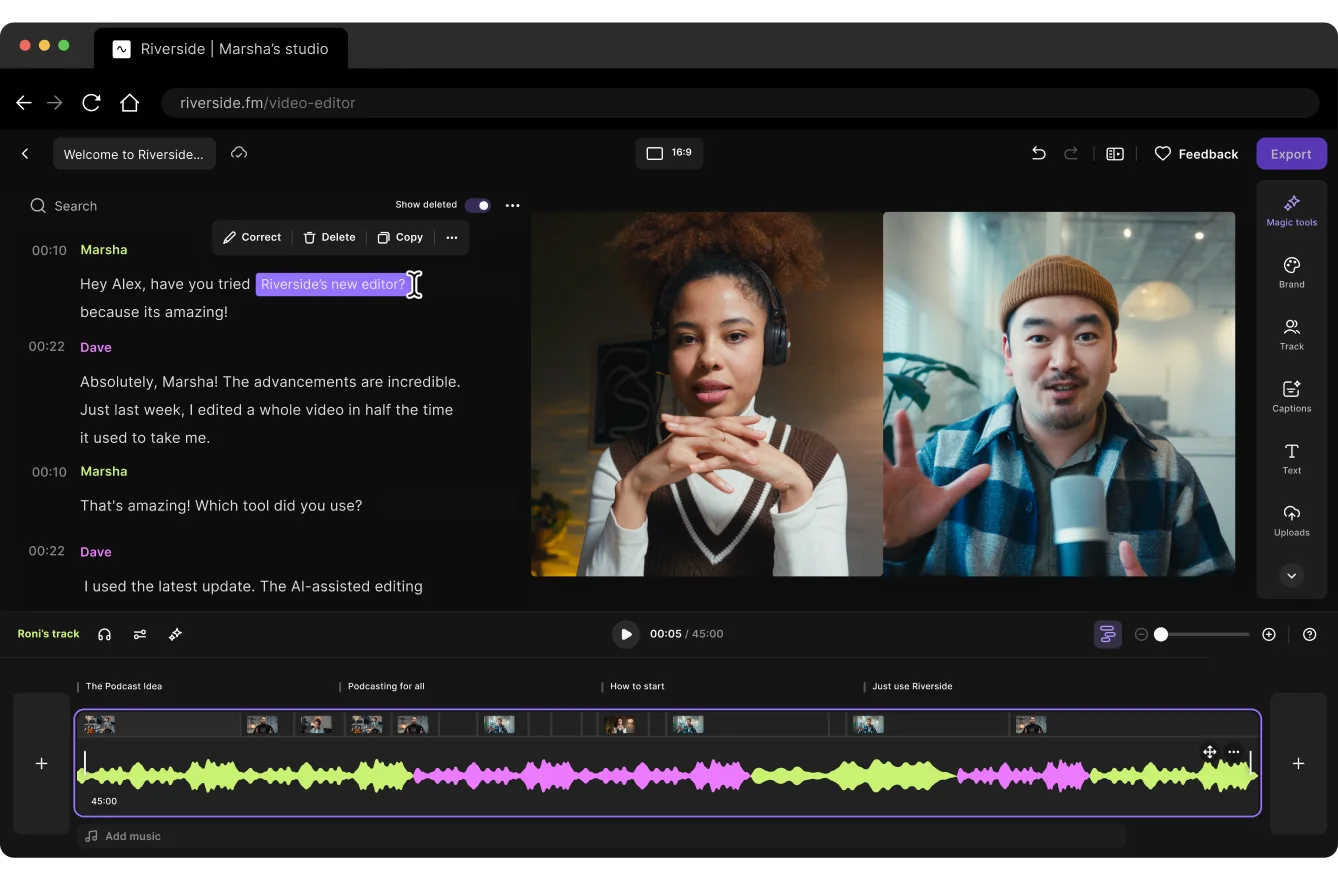
If you want to repurpose a webinar or virtual event, start by recording it in the highest quality possible. This means choosing recording software, like Riverside, that:
- Records locally: This ensures audio quality isn’t influenced by your internet connection.
- Records separate audio and video tracks for each speaker: This lets you edit, fix, and repurpose each person’s content independently for cleaner clips.
- Capture both video and screenshares: This helps you reuse the visual teaching moments alongside the speaker, so your clips and repurposed content still make sense.
Offer the full session as on-demand content
On-demand content is a great way to keep getting mileage out of your webinar long after you log off. You can:
- Send it to registrants who couldn’t attend in person.
- Put it behind email registration so you can continue to gather leads.
- Use it on sales pages or in sales calls.
Cut short clips for social and promotion
Short clips from your webinar or virtual event can help you promote them as on-demand content. Key moments, insights, or strong quotes can be a great way to give potential attendees a taste of what to expect. One event can easily produce 10 to 20 short clips you can use across LinkedIn, Instagram, TikTok, and YouTube.
And it’s pretty easy to create them. For example, with Riverside, just follow these steps:
Step 1: From your dashboard, select “Projects” on the left sidebar, then pick the video you want to generate clips from.

Step 2: Select the “Made for you” tab, then scroll down until you find “Magic Clips” and click on “Personalize.”

Step 3: Choose the aspect ratio, layout, and duration of your clips, then click “Save.” Magic Clip’s AI will select the best parts of your video and automatically generate clips for you.
Pro tip: Add captions to your clips, as many people watch social media videos with the sound turned off. On Riverside, you can add them with a single click!
Turn sessions into written content
You can easily turn audio and video content into blog posts for your website. This provides another way for audiences to access your webinar or virtual event insights.
You can use the transcript from the event to help you do this.
On Riverside, you can do it in a few minutes by prompting Co-Creator, our chat-based AI agent. Just follow these steps:
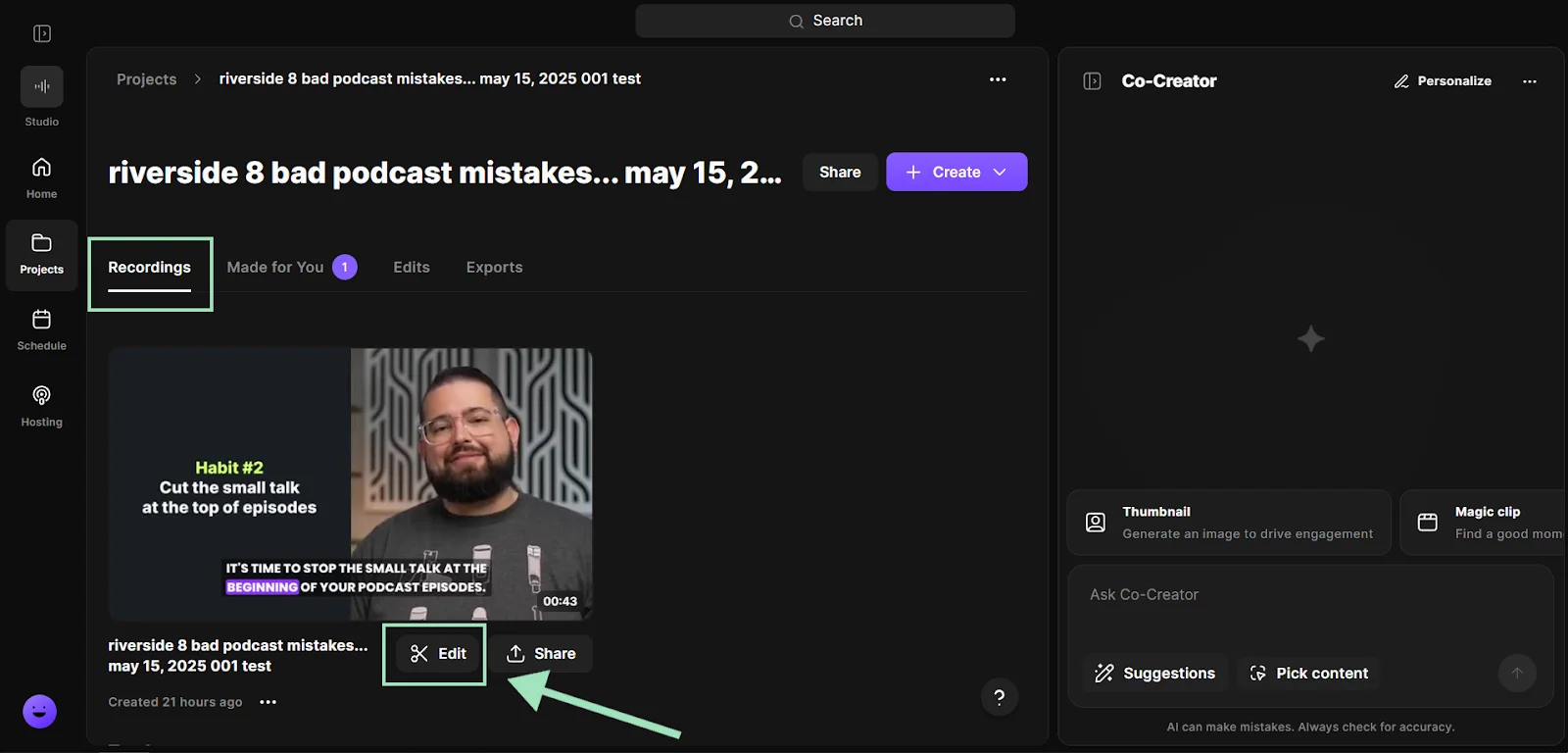
Step 1: From your “Projects” page, pick the video you want to edit. Go to the “Recordings” tab, then click “Edit” right below the video to open the editor.
Step 2: Click on the “Co-Creator” button from the right sidebar to open Co-Creator.
.webp)
Step 3: Go to the “Promote” tab and select “Blog post.” Co-Creator will generate a blog post from your recording. You can also create social posts, newsletters, and more.

For more control, chat with Co-Creator to refine outputs, choose topics, or generate custom content.
Create email and lead capture content
A webinar or virtual event can also be a good starting point for email. You can:
- Send a replay email to attendees and no-shows.
- Break insights into a multi-email sequence.
- Use clips or quotes in newsletters or campaigns.
Note that many webinar platforms automate this. For example, Riverside can send out reminder and follow-up emails to registrants.
Pro tip: Plan for repurposing before you record. If you know what clips and content you want ahead of time, you can structure your session to make them easy to extract later.
FAQs about webinars and virtual events
Can webinars be used for networking?
Webinars can be used for networking, although this isn’t typically their main focus. Webinars tend to have limited engagement between participants, but many organizers build in networking opportunities before, during, and after the presentation. This includes things like:
- Breakout networking sessions: Some webinar platforms allow for breakout rooms where smaller groups of people can interact and get to know each other.
- Networking events after the webinar: Some hosts run short networking rounds after the main webinar session. This could take the form of a guided conversation or expert Q&A.
- Networking via webinar chat: Many webinars encourage participants to introduce themselves and say something about themselves in the chat.
- Post-webinar community discussions: Some webinars extend networking after the event by inviting attendees to a Slack or Discord channel for further discussion.
Do people still watch webinars?
The data suggests that people still watch webinars, and that the audience for webinars is growing. According to data from Market Research Future, the virtual events industry is expected to grow by 14.12% by 2035. The data also suggests that webinar attendance rates are growing year over year, with a 7% increase in attendance in 2024 compared to the previous year.
How to promote a webinar effectively?
The most effective way to promote your webinar really depends on your audience. Different groups discover events in different ways, so focus on the channels they already use.
For example, B2B audiences often respond well to email campaigns and LinkedIn promotion. Creators and consumer audiences, on the other hand, may discover webinars through social media or community platforms.
In most cases, a successful webinar promotion strategy includes several channels working together, such as:
- Email marketing: Invite your existing audience and send reminder emails before the event.
- Social media promotion: Share announcements, highlight speakers, and count down to the day of the event.
- Partner promotion: Ask speakers or partners to promote the webinar to their own audiences.
- Paid advertising: Run targeted ads on platforms like LinkedIn, Facebook, or Google.
- Content marketing: Promote the webinar through blog posts, newsletters, or podcasts.
It’s also best to start promoting your webinar early, usually 3 to 4 weeks before the event. This way, you have time to build awareness and encourage registrations.



.webp)


