

-(1).webp)


Key takeaways:
- Podcast show notes are the written companion to an episode, from a short summary to a detailed breakdown with links and timestamps.
- Start with a compelling hook and brief episode summary, then add key takeaways, relevant links, and timestamps where useful.
- Choose a template depending on your episode's structure. Short and simple for conversational shows, detailed for deep dives, monetization-focused for sponsored podcasts, or educational for research-heavy episodes.
I’m Stephen Robles, and each week, Jason Aten and I publish a new episode of our podcast Primary Technology, along with its show notes. We include timestamps and links to the resources we discuss, but not every podcast needs that level of detail.
In this guide, I'll show you what to include and share 4 ready-to-use podcast show notes templates you can copy to write yours in under 5 minutes.
What are podcast show notes?
Podcast show notes are written summaries and supporting information that accompany a podcast episode. They help listeners understand what the episode covers. And since search engines can't process raw audio or video files on their own, show notes provide the text needed to rank your episode in search results.
Show notes can more or less detailed, but they often include the following elements:
- Episode title: A search-optimized title that reflects the episode's topic to make sure your podcast is easily discoverable.
- Episode summary: A detailed summary of topics discussed in the show (100-200 words max). It usually includes a hook detailing the core problem, the target listener, and the episode's main takeaway.
- Chapters: A timestamped list of main points for easy episode navigation.
- Resources: Links to additional resources like tools, books, studies, or articles you mention in your show.
- Guest information: Professional credentials and a direct link to the guest's primary website.
- Call to action (CTA): A clear next step encouraging readers to listen to, subscribe to, or sponsor the podcast.
- Full transcript: An edited, readable text record hosted on your podcast website to boost search rankings and make your episode accessible to all listeners.
What is the difference between an episode description and show notes?
Although these two terms are sometimes used interchangeably, the difference between an episode description and show notes is their scope and purpose.
An episode description is a short summary of an episode, usually visible in directories like Apple Podcasts and Spotify. It tells potential listeners what to expect, and its purpose is to convince them to press play.
Here’s an example from The Minimalists Podcast:
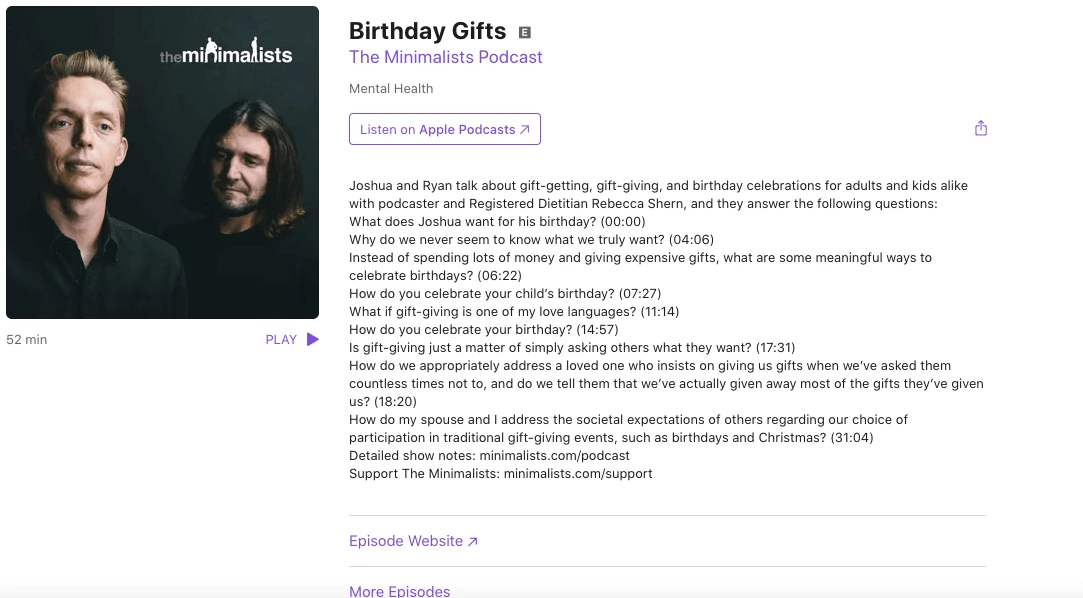
Show notes are a much more comprehensive written package that also includes timestamped chapters, guest information, useful links, and additional resources. They're often published in full on a podcast's website. This extended text helps search engines understand your topic and rank your episode in search results.
The terms aren't mutually exclusive, though. You can include links and other show notes elements in your episode description or publish a shorter version of your website's show notes in podcast apps.
See below for an example of the extensive show notes of one of the episodes of The Minimalists Podcast:
.webp)
Where do podcast show notes appear?
You can publish show notes on a dedicated episode page of your podcast website, in the episode description field on Apple Podcasts and Spotify, or in the video description below the episode on YouTube.
I recommend publishing the most detailed version on your website, then adapting it for each platform. If your notes are already short and easy to scan, though, there's nothing wrong with using the same version everywhere.
Each platform enforces different character limits for your show notes:
- Podcast websites: No character limit.
- Apple Podcasts: 10,000 characters.
- Spotify: 4,000 characters.
- YouTube: 5,000 characters.
Note: The 4,000-character limit is a universal RSS feed limitation adopted by most hosts. Even though platforms like Apple Podcasts and YouTube allow higher limits, it's not a good approach to exceed 4,000 characters if you distribute everywhere through a single RSS feed. If your description is longer, the feed can break, or platforms like Spotify will truncate your text.
4 Best podcast show notes templates with examples
In this section, we’ve created a few templates to help you with your podcast show note creation by providing you with some practical examples.
Feel free to use them as they are or adapt them according to your show’s unique needs.
Template #1: The ‘Straight to the point’
This is the shortest, most concise template for podcasters who know their audience doesn’t care much about reading show notes. Use this concise format for comedy shows, brief updates, or episodes under 15 minutes where listeners just want the links.
Shorter show notes aren't necessarily worse for SEO, but they provide less context for search engines. If organic search traffic is a priority, you can still rank well by pairing this template with a full transcript on your website.
[Episode title] - Episode [number] | [Publication date]
Episode overview: [Write 2–4 sentences introducing the topic, what happens in the episode, and why it's worth listening to. Mention your guest if applicable.]
Resources mentioned in this episode:
[Link to Resource 1][Link to Resource 2][Link to Resource 3]
Call to action
[Apple Podcasts Link]
[Spotify Link]
[YouTube Link]
Support the show: [Patreon/Newsletter/Membership Link]
Example: NPR's The Indicator from Planet Money:
The secret tariff-free zone
There's something interesting happening at the Port of Baltimore. On today's show, we explore the hidden world of bonded warehouses, where you can stash your imported Latvian vodka or Dutch beer free from tariffs (for a while).
Related episodes:
Tariffied! We check in on businesses (Apple / Spotify)
For sponsor-free episodes of The Indicator from Planet Money, subscribe to Planet Money+ via Apple Podcasts or at plus.npr.org.
Template #2: The ‘Let me tell you the full story’
This podcast show notes template is the longest, most complete description of everything you can find inside the episode.
It’s the opposite of the “Straight to the point” template. I'd use it for long-form interviews, investigative podcasts, or deep-dive shows where listeners want detailed explanations and references.
This format can also be particularly useful for SEO when published on your website, as the additional text gives search engines more context about your episode and helps it appear for a wider range of relevant searches. However, more words don't automatically mean better rankings.
[Episode title] — Episode [number] | [Publication date]
Episode overview: [Write a detailed introduction (up to 250 words) explaining the episode's main topic, the questions it answers, and what listeners will learn. Introduce your guest and highlight what makes this discussion worth listening to.]
About the host: [Host name] is [a brief professional bio, relevant credentials, and background]. [One sentence introducing the podcast and its focus.]
About the guest: [Guest name] is [their professional role, expertise, and notable achievements]. [Explain why their experience or perspective is relevant to this episode.]
## [Topic 1 Keyword-Rich Title] ([mm:ss])
[Write 1-2 paragraphs explaining the first major discussion point, including key insights, examples, and conclusions.]
## [Topic 2 Keyword-Rich Title] ([mm:ss])
[Write 1-2 paragraphs explaining the first major discussion point, including key insights, examples, and conclusions.]
Resources mentioned in this episode:
[Resource name]: [Brief explanation of what it is and why it's relevant.] - [Link][Book, study, or tool]: [How it relates to the discussion.] - [Link][Related episode]: [Why listeners might find it useful.] - [Link]
Episode Transcript: [Link to the full edited transcript]
Call to action
[Apple Podcasts Link]
[Spotify Link]
[YouTube Link]
Support the show: [Patreon/Newsletter/Membership Link]
Sign up for the newsletter: [Newsletter Link]
Contact Info:
Website: [URL]
Email: [Email Address]
Twitter/X: [Handle]
Instagram: [Handle]
Example: The Tim Ferriss Show
Here's a shortened adaptation of the episode's notes:
Dr. Andrew Huberman — Peptides, Performance, and Protocols (#876), July 22, 2026
Episode overview:
Tim Ferriss sits down with neuroscientist Andrew Huberman to discuss strength training, mental performance, peptides, emerging medical research, and Huberman's book Protocols.
About the guest:
Andrew Huberman is a neuroscientist and Stanford professor who hosts the Huberman Lab podcast.
Key topics:
Training with Dorian Yates: A discussion of strength training, intensity, and exercise routines. (00:06:27)Understanding peptides: The conversation explores GLP-1 drugs, growth hormone, and BPC-157. (01:03:26)Inside Protocols: Huberman explains the structure and purpose of his book. (01:56:09)
Resources mentioned:
Protocols: An Operating Manual for the Human Body — Andrew Huberman's book.FDA documentation on peptide-related medications and compounding.Earlier Tim Ferriss Show interviews with Andrew Huberman.
Episode Transcript:
Read the full transcript at tim.blog/521-transcript
Listen, Rate, and Subscribe!
Apple Podcasts
Spotify
YouTube
Sign up for the 5-Bullet Friday newsletter
Contact Info:
Website: tim.blog
Twitter/X: @tferriss
Instagram: @timferriss
Template #3: The ‘Give me your money’
This template prioritizes your monetization efforts by showcasing affiliate links, sponsors, discount codes, or merchandise as prominently as possible in the show notes. Use this format for sponsored podcasts or if the episode supports a significant fundraising or crowdfunding effort (such as launching a product on Kickstarter).
[Episode title] — Episode [number] | [Publication date]
Support the show:
[Sponsor/Affiliate Name]: [Brief offer description and discount code] - [Link][Merchandise/Patreon/Kickstarter]: [One-sentence pitch] - [Link]
Episode overview: [Write 100–200 words summarizing the episode, its main topics, and why listeners should tune in. Introduce your guests, if any.]
About the hosts: [Short host bio highlighting your subject authority and expertise.]
About the guest: [Guest name] is [professional role, relevant experience, and credentials].
Key topics:
[Topic 1] ([00:00])[Topic 2] ([00:00])[Topic 3] ([00:00])
Resources mentioned:
[Link to Resource 1][Link to Resource 2][Link to Resource 3]
Call to action
[Apple Podcasts Link]
[Spotify Link]
[YouTube Link]
Example: Primary Technology
This is a shortened version of the structure Jason and I use every week to ensure our premium feed and sponsors get maximum visibility before the episode summary.
Muse AI is Useful and Horrible, Apple Home Event, OpenAI Crossed a Line — Episode #152, October 8, 2026
Support the show
Membership: Join Primary Technology with promo code IWANTCHAPTERS.
Framer: 30% off an annual Pro plan through Framer's sponsor link.
CleanMyMac: 20% off with code PRIMARYTECH through CleanMyMac's sponsor link.
ElevenLabs: Explore its AI voice tools at ElevenLabs.
Episode overview
Jason and I discuss Apple's potential partnership with LG for smart home products, Microsoft's latest Surface Laptop, the benefits and privacy concerns surrounding Muse AI, and Stephen's first experience with Tailscale.
Key topics
Apple smart home products (13:40)Microsoft Surface event (25:46)Muse AI (39:00)OpenAI discussion (01:02:30)
Stay connected
Subscribe to our podcast or join the Primary Technology community.
Template #4: The ‘Educational podcast’
This template focuses on providing your audience with as much information as possible beyond the episode itself. Unlike template #2, this template replaces the long description with bulleted timestamps and removes the biographies to make room for extensive bibliographies and peer-reviewed references.
Use this research-backed format for science, history, or instructional shows where listeners expect academic citations and further reading materials.
[Episode title] — Episode [number] | [Publication date]
Key topics:
[Topic 1] ([00:00])[Topic 2] ([00:00])[Topic 3] ([00:00])
Suggested reading:
[Book/Article Name]: [Brief description of what it covers and why it is relevant] - [Link][Book/Article Name]: [Brief description of what it covers and why it is relevant] - [Link]
References & studies:
[Study Title/Author] - [Journal/Publication Name] - [Link][Study Title/Author] - [Journal/Publication Name] - [Link]
Call to action
[Apple Podcasts Link]
[Spotify Link]
[YouTube Link]
Sign up for the newsletter: [Newsletter Link]
Example: Huberman Lab
Science-Based Mental Training & Visualization for Improved Learning — Episode #121 | April 24, 2023
Key topics:
Developmental vs. adult neuroplasticity (00:08:04)Why mental training can't replace physical training (00:30:51)Combining physical and mental training (00:37:36)Mental training and sleep (01:11:09)
Suggested reading:
Mobius stripImpossible cubeRubin’s vaseStop-Signal Task
References & studies:
Acquisition and consolidation processes following motor imagery practice — Ruffino et al., Scientific Reports (2021).Mental practice modulates functional connectivity between the cerebellum and the primary motor cortex — Rannaud Monany et al., iScience (2022).Best practice for motor imagery: a systematic literature review on motor imagery training elements in five different disciplines — Corina Schuster et al., BMC Medicine (2011).
Call to action
Apple Podcasts
Spotify
YouTube
Sign up for the newsletter: Huberman Lab Neural Network Newsletter
How to write podcast show notes
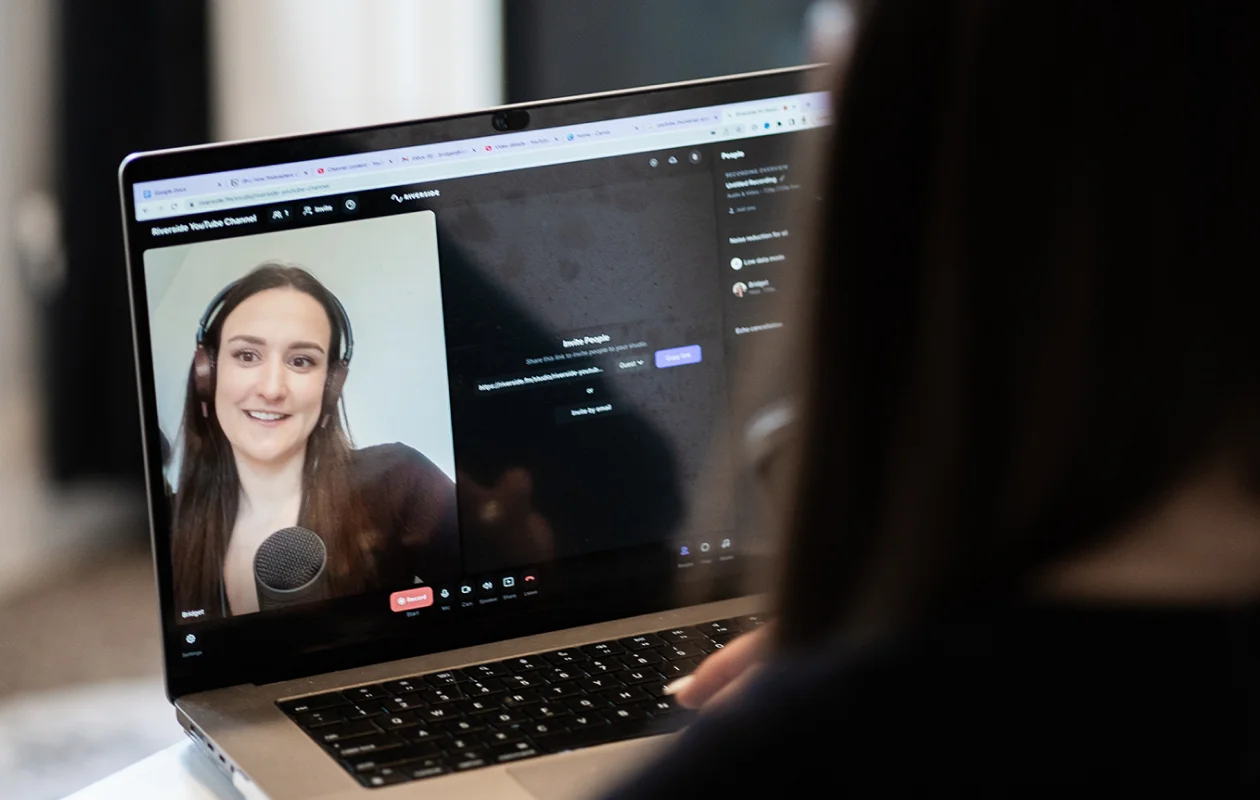
Now that you know what podcast show notes are, it’s time to learn how to write them.
Follow these seven steps to help your listeners easily scan and navigate your episodes with engaging show notes:
Step 1: Open with a strong hook
The first sentence is often the only one a casual scroller reads, so make it catchy enough to draw attention. Open with a compelling hook like a controversial statement or the exact problem the episode solves to make the reader want to know more.
Step 2: Draft the episode summary
Explain what the episode covers and what listeners will get out of it, but do not give away the actual answers. Focus on the three to five most useful takeaways rather than recapping every conversation. I prefer outlining the main points while planning the podcast script so they’re still fresh in my mind.
Step 3: Add timestamped chapters
Break longer episodes into timestamped chapters with short, descriptive titles. This helps listeners find the sections they're interested in without searching through an hour-long recording.
Yet, in our analysis of podcast episodes published in 2026, fewer than 1 in 5 descriptions written without AI included timestamps. That's a useful feature most podcasters are still overlooking, probably because writing chapter timestamps by hand for a long episode is incredibly slow.
But that shouldn’t be a problem anymore. If you record in Riverside, the AI automatically generates chapters and timestamps directly from your transcript. You only need to review a draft rather than start from a blank page.
Step 4: Write a brief guest bio
Introduce your guest by highlighting their specific expertise. Skip the full career history. Just tell the audience exactly why this person is an authority on the topic of the episode in a few sentences.
Step 5: Include all resources and links
Give listeners an easy way to find the resources you've mentioned during the episode. These might include links to tools, products, research studies, books, and the original sources for any audio or video clips you played. You can also add related episodes for listeners who want to explore the topic further and affiliate links to monetize your show.
Step 6: End with a clear CTA
What do you want listeners to do next? Pick a primary goal for the episode (subscribing to a newsletter, supporting you on Patreon, leaving a review, etc.) and include a simple, direct link for listeners to act on.
Step 7: Optimize your show notes for search engines
Including some SEO best practices will help your podcast episodes appear in search engines. Research on 100,000 podcast episodes found that including full transcripts alongside episode titles and descriptions in a podcast search index improved search discoverability by 33%.
Find the key phrases people search for around your topic and include them naturally in your text. Then, publish the fully edited text transcript on your website alongside your notes to make your show fully accessible to everyone (including search engines).
How to generate podcast show notes with AI
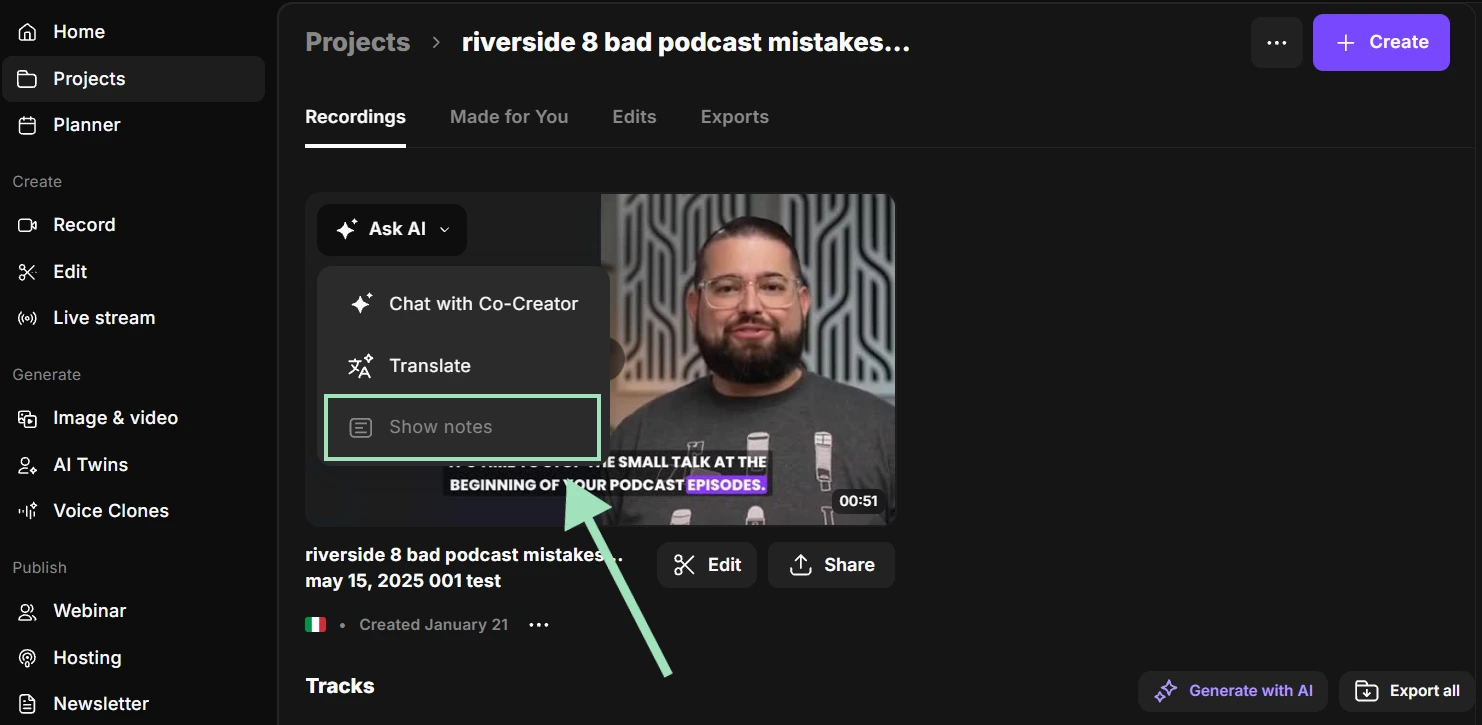
You can dramatically speed up your workflow by using AI tools to automatically draft show notes directly from your episode's transcript.
However, you should always treat AI output as a first draft. We compared AI-generated drafts with the final published descriptions of 31,876 podcast episodes hosted on Riverside. While 41.5% were published without a single change, 29.3% were heavily rewritten. You still need to manually edit the text to match your natural tone and check all links and facts.
Here are four AI tools worth considering:
Deciphr: Built for quick turnarounds, Deciphr AI creates show notes, SEO articles, and episode summaries in minutes. It costs just $5 per month, but don’t expect too much in terms of precision, and the finished file will likely require a few edits before it's ready to use
Podsqueeze: A dedicated podcast content generator that turns uploaded audio or video files, or episodes imported from an RSS feed, into show notes, transcripts, timestamps, and promotional content. A good choice if you want to generate notes without switching your existing recording or editing software.
Riverside: If you already record or edit your podcast in Riverside, you can generate your show notes directly inside the platform. Riverside automatically generates summaries, key takeaways, keywords, and timestamped chapters from your podcast transcript. And since every speaker is recorded on a separate track, the AI can transcribe with up to 99% accuracy in 100+ languages. You can access all these features straight from your studio project.
Castmagic: Upload an audio or video file, or import an episode from a podcast feed, to generate show notes and other written content. Particularly useful if you want to repurpose each episode into newsletters, blog posts, and social media content.
FAQs
Where can I find podcast show notes?
You can usually find podcast show notes on the podcast's website or blog. You can also find a shortened version under each episode's description on podcast platforms like Apple Podcasts, Buzzsprout, or Spotify.
How long should podcast show notes be?
In our analysis of nearly 200,000 episodes published through Riverside, we found that the median episode description was approximately 150 words long. Longer show notes are better suited to dedicated episode pages on your website.
How do you write engaging podcast show notes?
To keep your readers engaged, start your show notes with a catchy hook, like a powerful quote or a controversial statement. Make sure all your content is well organized and has clear headings and bulleted lists.Stick to basic text formatting and avoid tables or custom fonts so the layout does not break across different podcast apps. Close with a compelling CTA.
Where are the show notes in Apple Podcasts?
The show notes in Apple Podcasts are located on the individual episode page, directly below the episode title. Listeners can view the full text by tapping on the episode title from the show's main feed. Expand the description if necessary to see the full notes, including any links and timestamps the creator included.
How do you get show notes from a podcast?
To get show notes from a podcast, open the episode description in your podcast app or visit the show's website. If you're a creator, you can generate show notes from your episode's transcript using an AI tool like Riverside, which automatically drafts the summary and timestamped chapters.

.webp)



-(1).webp)
.webp)
%20(1).webp)


