


Table of contents
Key takeaways:
- For free podcast software, Audacity, GarageBand, and Adobe Podcast Studio are all solid options.
- For beginners who want simple software with an intuitive interface, Riverside, Adobe Podcast, and StreamYard are all beginner-friendly.
- If audio quality is your top priority, Cleanfeed and Reaper are the best choices.
I’m Stephen Robles, a YouTube content creator with more than 230,000 subscribers. I’m also the host of Primary Technology, a tech podcast that consistently ranks in the top 100.
One thing I’ve learned: The recording software you choose can make or break your podcast.
In this guide, I’ve tested 8 popular podcast software options and explained each one’s pros and cons.
My goal? To help you choose the best podcasting software for your specific needs.
Let’s go!
Podcast recording tools comparison
Here is my quick recap of the best podcast recording software to help you decide:
- If you want an all-in-one podcast platform, from recording to editing and hosting: Choose Riverside.
- If you want to record remote interviews: Pick Riverside or Zencastr.
- If you need a free option and don't care about video: Download Audacity.
- If you are Apple-only and just starting out: Stick with GarageBand.
- If you want seamless editing: Go with Squadcast and Descript.
- If you need the absolute cleanest remote audio routing: Use Cleanfeed.
- If you want an affordable, professional DAW: Invest in Reaper.
- If you live stream while you record: StreamYard is a solid option.
- If you prefer simple, AI-powered browser recording: Try Adobe Podcast.
Here is my quick recap of the best podcast recording software to help you decide:
- If you want an all-in-one podcast platform, from recording to editing and hosting: Choose Riverside.
- If you want to record remote interviews: Pick Riverside or Zencastr.
- If you need a free option and don't care about video: Download Audacity.
- If you are Apple-only and just starting out: Stick with GarageBand.
- If you need the absolute cleanest remote audio routing: Use Cleanfeed.
- If you want an affordable, professional DAW: Invest in Reaper.
- If you live stream while you record: StreamYard is a solid option.
- If you prefer simple, AI-powered browser recording: Try Adobe Podcast.
How I tested these tools
I’ve recorded more than 15,000 hours of podcasts and videos, attracting millions of listens on YouTube, Spotify, and Apple Podcasts. And I’ve tested more than 100 tools in the process.
To give you an honest comparison, I recorded the exact same 15-minute conversation across every platform on this list.
Then, I downloaded the uncompressed WAV files to compare the raw audio quality side by side. I also tried every editing feature to check how well they actually streamline post-production.
During my hands-on tests, I evaluated each software against 6 criteria:
- Audio quality: Does the software capture studio-grade sound?
- Recording reliability: Does the software protect your recording quality and files from unstable internet connections or tech issues?
- Editing workflow: Does the software make it easy and quick to turn your recording into a polished episode?
- Ease of use: Is the software intuitive to use for yourself and guests with no technical background?
- Pricing: Is the price justified for the features offered?
- AI features: Is there automation to help complete time-consuming tasks in minutes?
The top podcast recording software
If you want to build a reliable studio setup, looking at what the podcaster community uses is the best place to start. Here are the tools podcasters use most often.
Audacity
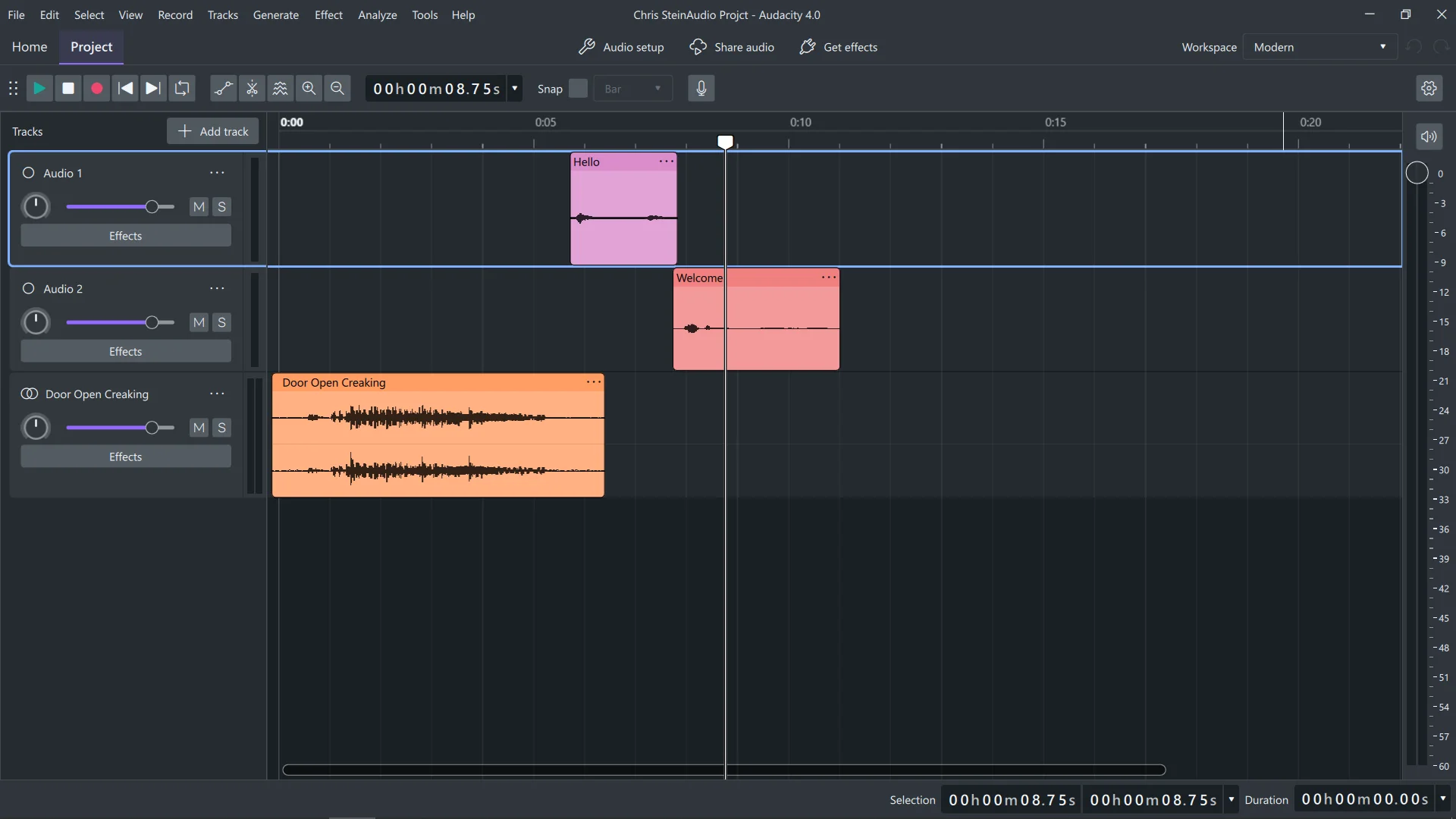
Why I like it: Unlike most free podcast software, Audacity comes with a full suite of advanced tools.
Price: Free.
Compatibility: macOS, Windows, and Linux.
Audacity is free, open-source, and gives you multi-track recording in up to 384kHz/32-bit as long as your hardware supports this resolution.
Audacity’s editor is very complete, including EQ, dynamics, noise repair, reverb, modulation, and more. You can also install plugins to extend the workflow as your production needs grow. I also highly recommend checking out MuseHub, which is Audacity owner Muse Group’s integrated repository of effects (VST3) and royalty-free loops.
Muse Group has also recently updated Audacity’s interface and added non-destructive editing so your original audio stays intact while you work.
A big advantage for beginners is the ease of exporting, importing, and even converting files into major audio formats like WAV, MP3, FLAC, Ogg, and more.
While powerful, Audacity’s interface has a steep learning curve, especially compared with newer browser-based tools. It lacks support for remote recording, live streaming, video capture, and automated post-production. To appreciate Audacity, you must be comfortable recording locally and editing manually.
Key features:
- High-quality audio: Record at a sample rate of up to 192 kHz and a 32-bit float depth.
- Recording timer and sound-activated recording: Schedule recordings or start recording when a sound is detected.
- Extensive editing tools: Enjoy all the basic editing tools you’d expect, plus advanced options like split, duplicate, join tracks, and move segments.
- Audio effects: Access built-in effects and get even more with third-party plugins.
Riverside
.webp)
Why I like it: You get everything you need to record, edit, host, and distribute a podcast, plus many features to make all of that even easier.
Price: Free trial available. Paid subscriptions start at $24 per month.
Compatibility: Browser-based for macOS and Windows devices, plus a recording app for Mac and a mobile podcasting app for iOS and Android.
If you want to stop bouncing between different tools, use Riverside, which is an all-in-one podcast recording, streaming, editing, and hosting software.
The software offers an intuitive, easy-to-use user interface. But it still provides everything beginner and professional podcasters need to create a high-quality show.
You can record up to 4K video and 48 kHz audio locally, so a slow internet connection won’t ruin your recording resolution. You can also live stream your podcast across multiple channels.
The AI editor lets you automate editing while still keeping full control. Just prompt the chat-based editor, Co-Creator, to make edits or create full episodes. There’s also an array of automated editing tools for removing filler words, cleaning up audio, and trimming your podcast with your transcript. But unlike most other AI editors, you still have a traditional video editing timeline and a parametric equalizer for more precise edits.
Riverside handles translations, captions, and branding. It also has dynamic layouts that automatically switch the focus to whoever is speaking.
Co-Creator is also particularly strong at repurposing your podcast. Ask it to turn episodes into blogs, social posts, shareable video clips, and more. And you can automatically generate ready-to-publish show notes, a cover, and a transcript for each episode.
Key features:
- Studio-quality video and audio: MP4 video recordings at up to 4K resolution; WAV or MP3 audio recordings at up to 48 kHz.
- Remote recording: Host up to 10 participants in one recording and up to 10,000 webinar audience members.
- Live streaming and live call-ins: Live stream to all major social media platforms and engage your podcast audience in real time.
- AI features: AI-generated transcripts, podcast show notes, automatic captions, social media-ready short video clips, edit by chatting with Co-Creator, and AI text-to-speech to fill in missing audio.
- Built-in teleprompter: Easily keep track of a script while recording.
- Podcast hosting: Host unlimited episodes of a single show, and then distribute them to all major podcasting directories with one click.
Best free podcast recording software
Here are some great podcast recording software options that’ll let you start a podcast for free.
Adobe Podcast
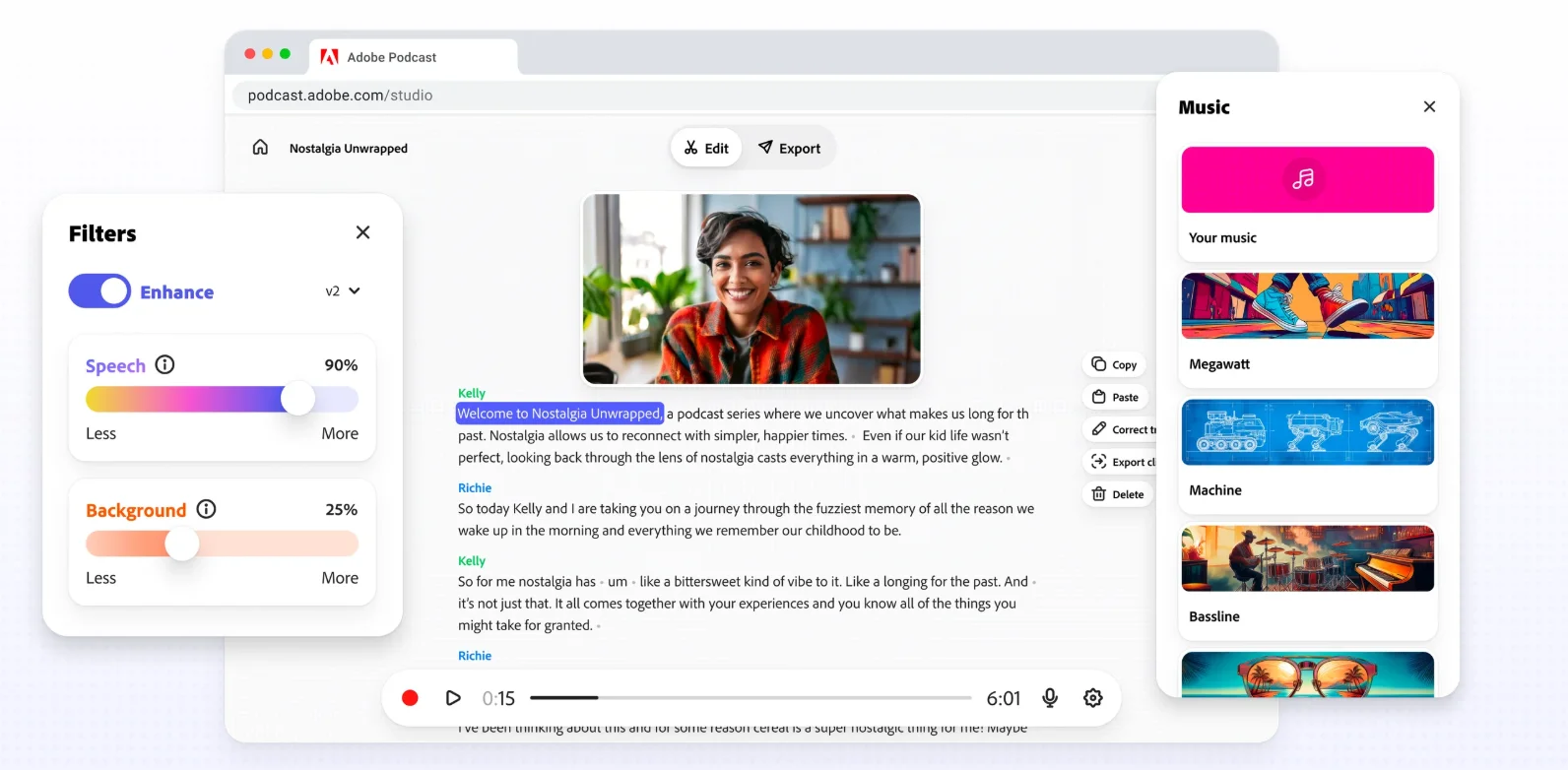
Why I like it: Fast, easy, and efficient browser-based tool with zero friction.
Price: Free. You can get extra features and longer recordings for $19.99 per month.
Compatibility: Browser-based. Recording tools are available only on Google Chrome on desktop.
I consider Adobe Podcast the best free podcast recording software for beginners looking for a browser-based tool with zero setup.
Adobe Podcast’s free plan is one of the most complete you can find, with high-quality local recording and fast AI-powered post-processing. You can capture each speaker as a separate 16-bit, 48 kHz WAV track, even when someone’s internet connection is unstable.
The tool’s flagship feature, “Enhance Speech,” is genuinely impressive. It uses AI to strip away background noise and echo, making a standard laptop mic sound remarkably close to a treated studio setup.
The premium version of the feature, which is available on the Adobe Firefly Pro plan, is even more powerful. It lets you independently adjust speech, background noise, and even music on separate layers.
The catch is the limited editing depth and the constraints of the free plan. For example, unless you upgrade to the Adobe Firefly Pro plan, Enhance Speech is limited to audio files up to 30 minutes, with one hour of processing per day.
Key features:
- Recording quality: WAV or MP3 audio in 16-bit, 48 kHz quality with separate tracks.
- Enhance Speech: Automatically reduce background noise and echo with a click. You can also adjust and rebalance music on the paid plan.
- Browser-based platform: No download required. Just log in and start recording and editing.
- Remote recording: Invite your guests by sharing a simple link.
GarageBand

Why I like it: Its built-in guided learning and tutorials make it really easy for anyone to get into.
Price: Free.
Compatibility: macOS and iOS only.
GarageBand remains one of the best entry points for new podcasters who don’t want to invest in paid podcasting software. It’s Apple’s freeware for audio recording and editing, and while it’s primarily built for music production, it works well for podcasting.
Apple designed this software with a highly visual, beginner-friendly interface with simple-to-use recording and editing tools. You can make your own podcasting templates and equalize or compress your audio easily. I use GarageBand’s built-in sound library full of royalty-free jingles, instruments, loops, and sound effects to make some intros and transitions.
There’s also an iPhone and iPad app available that works as a mobile recording studio for up to 32 tracks and also offers touch-based editing.
GarageBand limits are clear, though. Besides working only on Apple devices, it doesn’t support video editing or remote recording.
Key features:
- Quality sound: Record in standard 44.1 kHz sample rate and up to 24-bit depth.
- Multitrack recording: Record each participant in separate tracks for easier editing in post-production.
- Basic editing tools: Cut, copy, paste, trim, and split. Set up automations for volume, panning, and effects.
- Integration with Apple products: GarageBand plays nice with other Apple software like Logic Pro and Final Cut Pro.
- iOS app: Works on iOS devices so you can record on the go.
Best remote podcast recording software
Remote recording software lets you record podcasts with guests in different locations. This software uses local recording, where everything records directly on each participant’s device to prevent connection issues from affecting quality. Many also include progressive uploading, where files upload to the cloud as you record to keep them safe and for easy access.
My top pick for remote recording is Riverside. You can record with up to 10 remote participants and get separate audio and video tracks for each speaker.
Guests can join from a browser link on their desktop or mobile, from anywhere. Everything records locally in 4K resolution, with progressive uploads and synced tracks for easy editing afterward.
Other remote podcast recording software options include Cleanfeed and Zencastr.
Cleanfeed
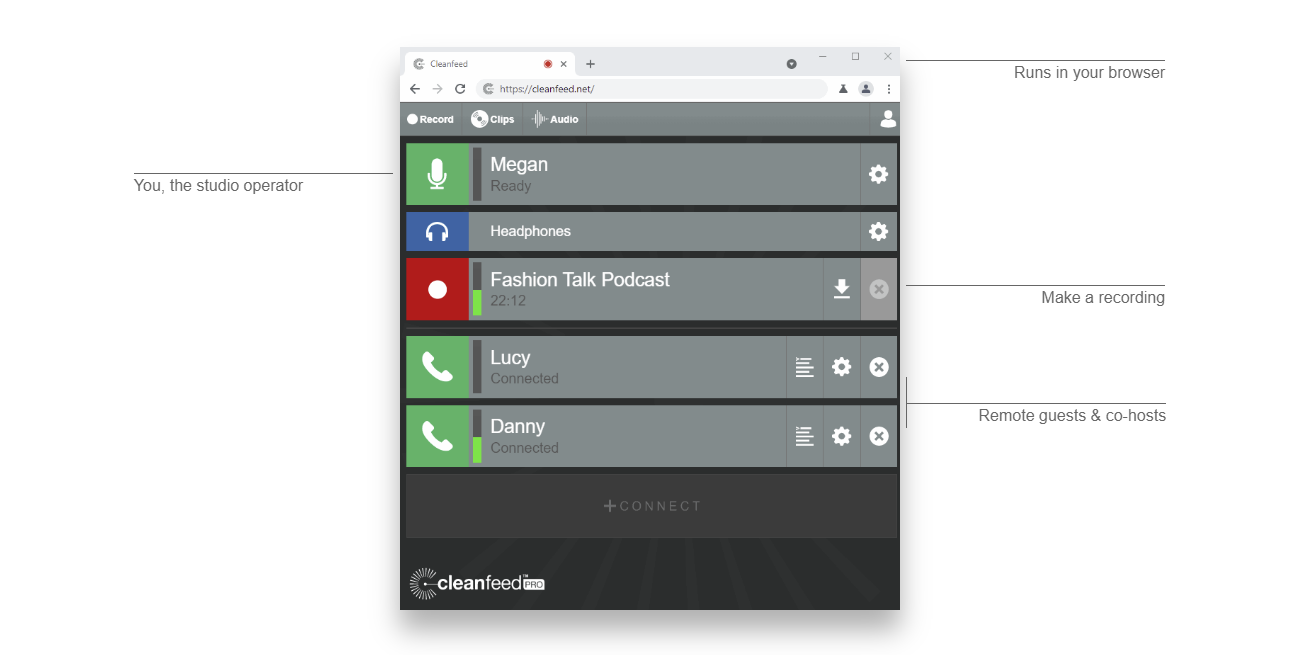
Why I like it: Captures broadcast-quality audio without any unnecessary bloat.
Price: Free plan available. Paid plans start at $36 per month.
Compatibility: Browser-based on Windows, macOS, Linux, and Android. The Firefox and Safari browsers are supported for guests only.
Cleanfeed is a web-based platform that’s best at capturing uncompressed, exceptionally clean remote audio. It’s built for live broadcasting, which is why professional media teams and broadcasters like BBC and NBCUniversal use it.
It offers multitrack recordings for up to 32 guests. It also provides advanced recording options for mixing multiple hardware sources simultaneously or routing tracks live into other software. The audio repair feature helps you record clean audio even in the harshest, noisiest environment.
Despite its advanced features, Cleanfeed is still a simple platform, which makes it a solid choice for beginners. Just remember that it records audio only, so it won't scale with you if you move into video and need video podcasting software.
You also won’t find audio editing capabilities. You’ll need to export audio files to separate software to edit your recordings.
Key features:
- High-quality audio: Preserve original sound quality with 16-bit depth and 48 kHz sample rate.
- Multi-track recording: Capture each participant’s audio on separate tracks for better post-production editing and control.
- Live audio monitoring: Hear the quality of your recordings in real time to ensure consistent audio levels and quality.
- Remote recording: Connect with guests from different locations easily and seamlessly.
- Live broadcasting: Send a live audio feed from any location back to your recording studio.
Zencastr
.webp)
Why I like it: It offers a lot for a free remote recording platform.
Price: Free plan available. A paid plan with custom pricing is also available.
Compatibility: Browser-based for Windows and macOS devices, plus an iOS app for iPads and iPhones.
Zencastr has a generous free plan, making it a top choice for budget-friendly remote recording.
On the free plan, you can record in 4K video resolution and 48 kHz audio with up to 5 other remote participants on desktop and mobile. Zencastr records locally to maintain audio and video quality, then uses progressive uploads to give you quick access to your recordings when you’re ready to edit.
Post-production supports all the features of a modern AI editor, like text-based editing, audio normalization, filler word removal, pause removal, and face centering. You can customize your recording by adding logos and custom backgrounds.
Still, its editing features feel somewhat limited. For example, it lacks an editing timeline for more precise edits.
Zencastr provides hosting and monetization of your shows as well. You can host up to 5 shows and share your episodes on any website with embeddable players. You can also dynamically insert ads into your episodes.
The paid plan offers custom limits for the free plan’s features. Talk to sales for a pricing quote.
Key features
- Local, multitrack recording: Get quality audio in separate tracks regardless of internet connection reliability.
- Audio enhancements: Reduce background noise, normalize audio, and more.
- Podcast hosting and distribution: Upload up to 5 shows and distribute your episodes to podcast platforms like Spotify, Apple Podcasts, and YouTube.
- Analytics: View analytics for multiple shows within the platform.
Best podcast recording software for solo podcasters
If you’re a solo podcaster, you can use any software in this list. But if you don’t ever intend to have remote guests, a dedicated digital audio workstation (DAW) may be the best option.
Reaper
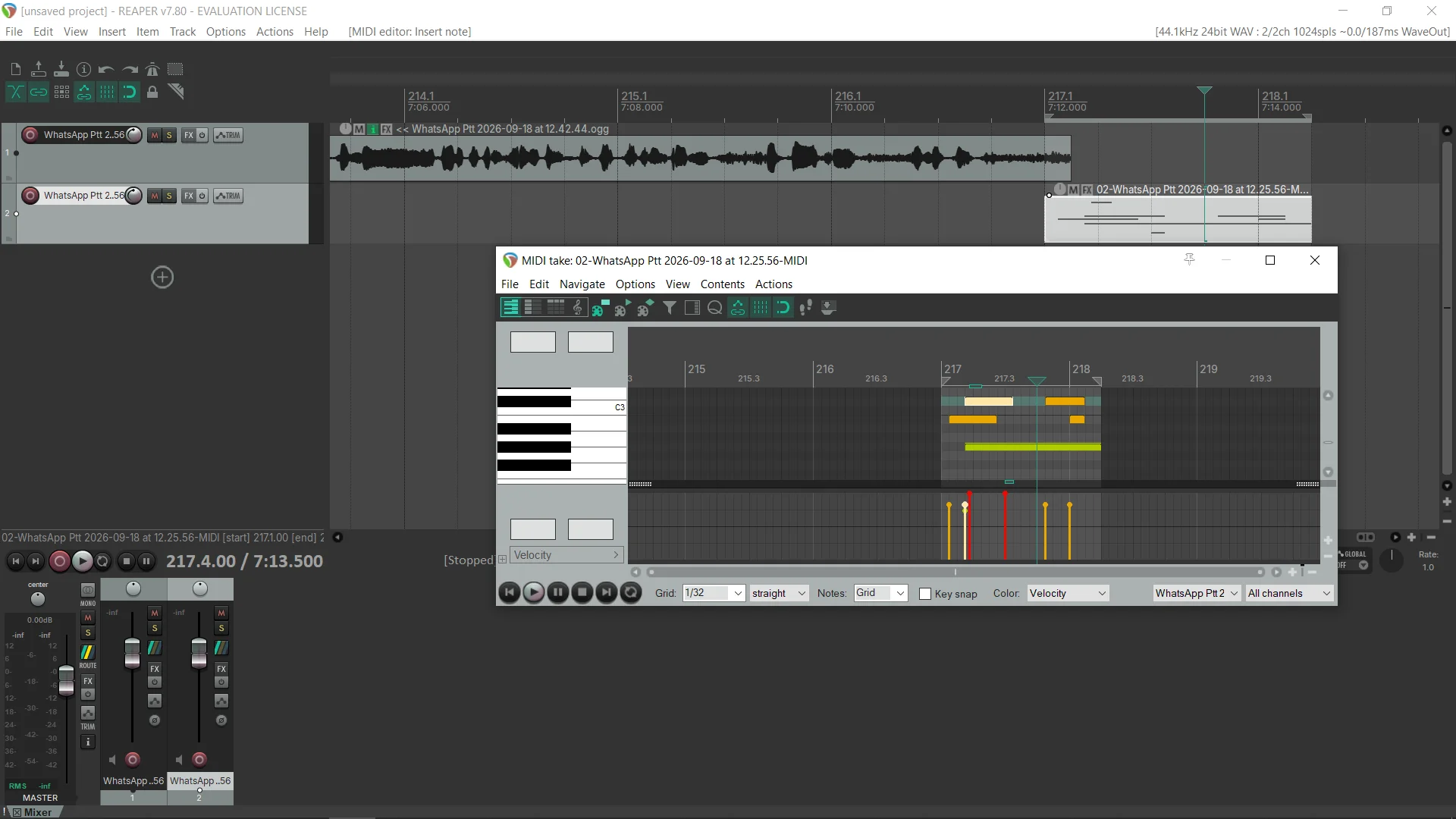
Why I like it: Advanced audio control and deep editing precision without a subscription.
Price: Free 60-day trial available. One-time licensing fee starting at $60.
Compatibility: macOS, Windows, and Linux.
Reaper is the best option if you want professional recording software at a one-time price, with no subscription and no feature limits.
It’s a full DAW, so you can record high-quality content with multiple inputs. You also get professional multitrack editing, automation, routing, effects, and support for thousands of plugin effects and virtual instruments without being locked into a subscription.
Reaper is lightweight, runs smoothly even on older computers, and is fully customizable. You can record and clean up a solo episode, or build a full post-production chain with custom macros and scripts to automate almost every task. It supports many plugin formats, which makes it far more expandable than most podcast editors.
While Reaper is a good audio recorder for podcasters, it comes with a steep learning curve. It can also get complex to set up if you want to do more than record and edit audio, like live streaming.
Key features:
- Multi-track recording: Record separate tracks in up to 192 kHz and 64-bit float.
- Real-time monitoring: Hear yourself and your participants live.
- Comprehensive editing tools: Cut and trim, adjust timing and pitch, and apply smooth crossfades.
- Plugins and tools: Supports many plugins and tools to expand your audio processing options.
Best podcast recording software for live streaming
If you want to engage with an audience in real time while simultaneously capturing the episode for later, you need a tool built specifically for this purpose. Here’s my favored pick:
StreamYard
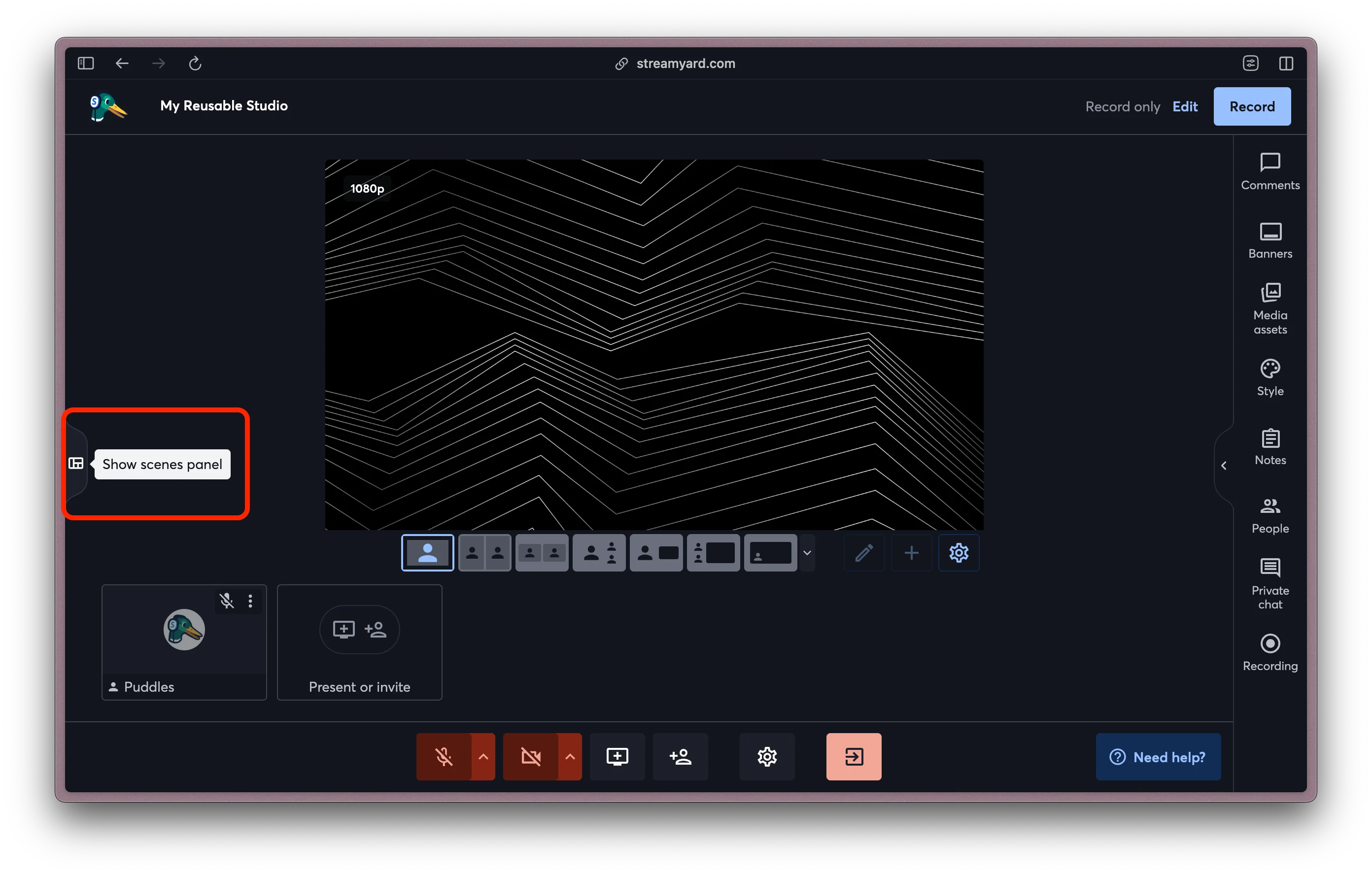
Why I like it: Going live on multiple platforms at once is really simple.
Price: Free plan available. Paid plans start at $35.99 per month.
Compatibility: Browser-based on macOS, Windows, Linux, iOS, and Android, with the Safari, Chrome, Firefox, Edge, and Opera browsers being recommended. Certain features aren’t supported in Safari and Firefox.
StreamYard is the best option if you want to stream your podcast live to multiple platforms, including YouTube and Twitch, while still capturing clean, separate tracks for editing.
The platform is entirely browser-based, making guest onboarding as simple as sending a link. You can stream your podcast live to multiple destinations simultaneously, pulling all audience comments into a single chat window.
StreamYard comes equipped with lots of features to keep your audience engaged during your live. Invite audience members onscreen, highlight their messages, and even host contests and giveaways. Your studio is fully customizable, with plenty of branding options.
While live broadcast feeds are naturally compressed, StreamYard captures 48 kHz WAV audio and up to 4K video locally for each participant. This means you can run a live show and still walk away with pristine, separate tracks for your editor.
StreamYard offers basic AI clipping tools, but its post-production features are fairly limited, with no text-based editing available.
Key features:
- Easy to use: Beginner-friendly interface and frictionless browser-based guest access.
- Multistreaming: Stream to multiple destinations and custom RTMP.
- Multitrack recording: Save separate audio and video files for each participant in up to 4K video and 48 kHz audio quality.
- Engagement tools: Unified live chat, live call-ins, on-screen audience comments, and customizable giveaways.
- Branding tools: Add overlays, logos, backgrounds, banners, and custom layouts.
- AI clips: Automatically generate short clips and reels from longer streams.
FAQs about podcast recording software
What do you need to start a podcast recording?
To start a podcast recording, you need a USB or XLR microphone, a mic stand, closed-back headphones for audio monitoring, and recording software. Consider also using accessories like a pop filter and an audio mixer. If you’re recording a video podcast, you’ll need a camera and a basic lighting setup. View our guide to podcast equipment to learn more.
Can I record a podcast with just my phone?
Yes, you can record a podcast with just your phone by using a podcast recording app like Riverside, GarageBand, or Zencastr. Use the mobile app to capture quick episodes while on the go, and then edit and polish them using the respective software’s editor.
What’s the difference between a DAW and podcast recording software?
The difference between a DAW and podcast recording software is that a DAW is built for extensive audio mixing and mastering, while podcast recording software is usually purpose-built for podcast production.
For example, Reaper is a DAW: it gives you deep audio editing control and advanced routing. Riverside is podcast recording software, since it focuses on recording video and audio episodes with multiple guests and also supports remote recording.
What’s the best free podcast recording software?
The best free podcast recording software for browser-based recording is Adobe Podcast. It records locally to maintain audio quality and uses AI to clean up noise and echo from recordings. If you’re an Apple user, GarageBand is a strong choice with its beginner-friendly interface, multitrack recording capabilities, and built-in sound library. You can even record on the go with GarageBand’s mobile app.
What recording software do professional podcasters use?
Professional podcasters use remote recording platforms like Riverside or dedicated DAWs like Reaper and Audacity. Riverside captures studio-grade 4K video and separate audio tracks, making it ideal for remote interviews. For heavy, localized audio post-production, solo professional podcasters sometimes prefer relying on the surgical precision of DAWs instead.
Does Audacity support remote recording?
Audacity doesn’t support remote recording. As a workaround, each participant could record to Audacity on their own device, and then you’d use podcast editing software to combine the separate tracks. This can be challenging to do if your guests aren’t familiar with Audacity, and using dedicated remote recording software would be a simpler option.
What software is best for recording a podcast with a remote guest?
The best software for recording a podcast with a remote guest includes Riverside, Cleanfeed, and Zencastr. They use local recording to capture audio and video directly on each participant's device and maintain quality even if someone’s internet connection becomes spotty mid-recording. Your guests can also join the recording with a link instead of downloading any software.
How do you record a podcast with 3 people?
To record a podcast with 3 or more people, each person will minimally need their own microphone and headphones. They’ll also need a camera if you’re recording video. If everyone will be in the same room, any recording software that can record each person’s audio and video on separate tracks will work. But if some participants are joining remotely, you’ll need software that supports remote recording.


Record in studio quality without the studio. Transcribe, clip, and edit within seconds.


Keep reading
 6 Best Podcast Software to Record Video Interviews Remotely
 .webp) How to Record a Podcast Remotely: 4 Methods Compared
How to Record a Podcast Remotely: 4 Methods Compared Video Podcast Software: Top Tools to Record, Edit & Publish


Features


