Riverside
Platform
Products
  • Recording
    4K video and audio recorder.
  • Editing
    AI, text-based video editor.
  • Live Streaming
    For livestreams in full HD.
  • Webinars
    Host, record, and repurpose.
  • Hosting
    Podcast publishing and analytics.
  • Newsletters
    Create and send newsletters.
Features
Agents
Magic Clips
AI Twin
Transcribing
Captions
Magic Audio
AI Show Notes
AI Translation
Social Scheduling
Video Enhancement
AI Tools
All AI Tools
Arrow Icon
Apps
Mac App
Mobile Apps
MCP
Meet the Agents
Solutions
Use cases
Podcasts
Video testimonials
Webinars
Video marketing
In-person Recording
Learning & Development
Async Recording
Virtual conferences
Internal communications
Tutorial videos
For
Podcasters
Producers
Marketers
Industries
Tech
Finance
Resources
Learn
Riverside University
Blog
What’s New
Free tools
Webinars
Masterclass
Community
Case studies
Creators Newsletter
Community hub
Recorded on Riverside
Support
Help Center
Contact support
Laptop
Blog
University
For BusinessPricing
English
Site language
English
Deutsch
English
English
Deutsch
Contact SalesLoginStart for Free
Get started
RIVERSIDE UNIVERSITY
LEARN FROM RIVERSIDE
Getting started
Courses
Studio set-up & equipment
Editor certification
Explore videos
By use case
Podcasts
Live streams
Webinars
Social media & marketing
Tutorials & demos
Interviews
Customer testimonials
Meetings & client calls
By topic
Set-up & equipment
Recording
Live streaming
Editing & repurposing
Promotion & growth
Hosting & publishing
Mobile & Mac app
All videos
LEARN FROM THE COMMUNITY
Community workflows
Submit a flow
DISCOVER
Product updates
Events
Case studies
LEARN FROM RIVERSIDE
Help Center
Blog
Get Started
What's new
Add more magic to your Magic Clips
New release
Editing & repurposing

Add more magic to your Magic Clips

Add even more magic to your Magic Clips with b-roll, motion graphics, and more, all in one click. The result? Clips that look like they took days to make, done in minutes.

November 3, 2026
AI credits
Pro +
Share

Try Riverside
for Free

Get Started
Record video Try Riverside for Free

What's new

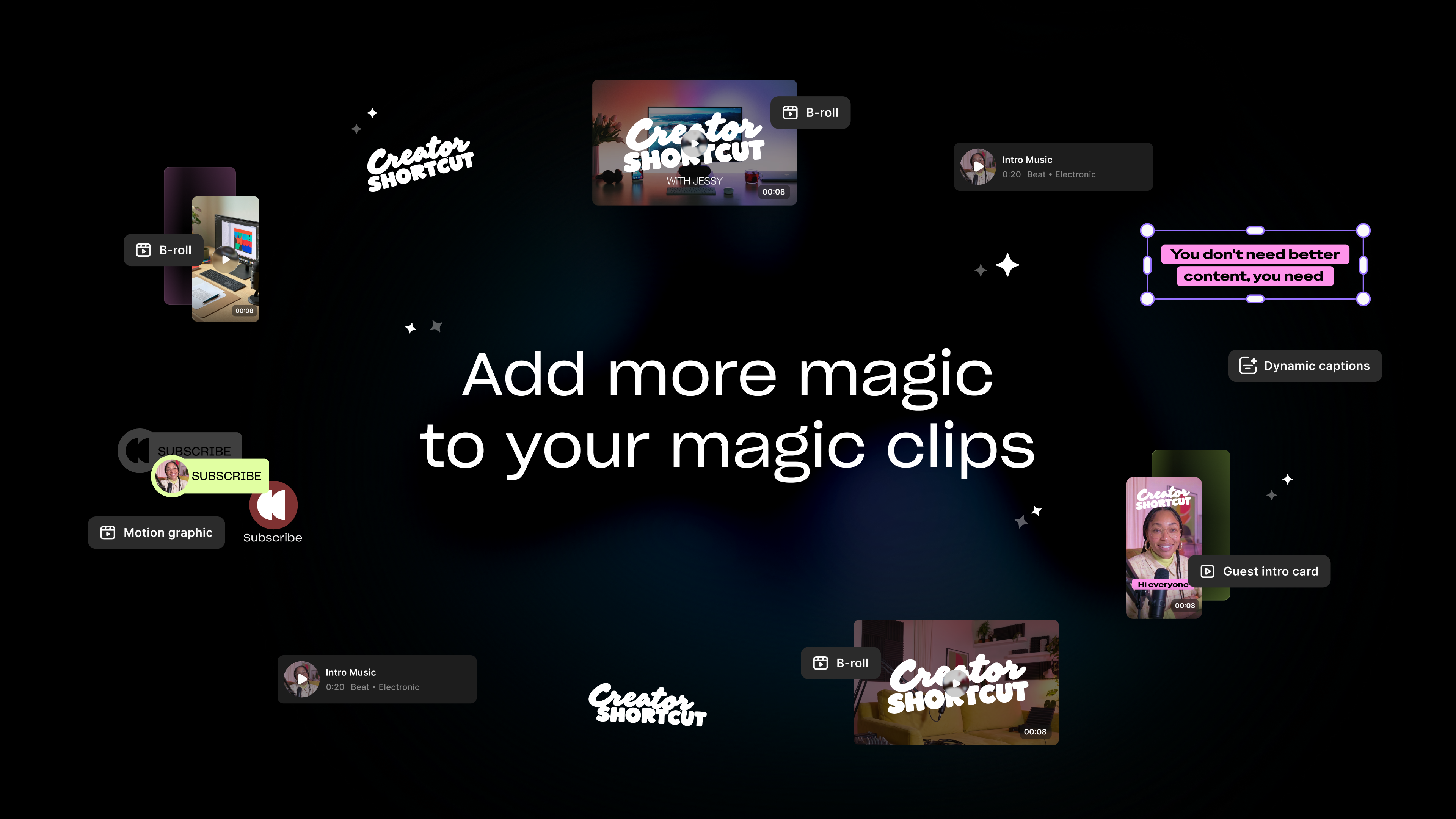
Now you can add even more magic to your Magic Clips. Click Add magic on any Magic Clip, and then your Clipper Agent will take it from there. It'll ask you about your style preference and what you want added, like dynamic captions, music, B-roll, and more. Then it adds it to your timeline. Keep editing from there using prompts, or manually on the timeline, or both. You'll end up with clips that look like they took days to make, but it'll only take a few minutes.

How to use it

On any Magic Clip, click Add magic. You can also do it by asking your Clipper Agent directly.

Learn more about this topic

About Magic Clips

Riverside pulls the best moments from your recordings and turns them into shareable clips using AI.

Add more magic to a Magic Clip

Enhance a Magic Clip by selecting a style and adding different visual element like Motion graphics, dynamic captions, b-roll and more.

Ready to create? We think so too.

Got a process that works for you? Get featured by submitting your step-by-step flow. Help other creators save time, learn new tricks and improve their productions.

Start for Free
Riverside

Company

About usBlogCareersPartnersAffiliate ProgramCreator PartnershipsImpressum

Platform

Why RiversidePricingFor BusinessMac AppMobile AppsFAQAppsAppsSupport

Features

RecordingLivestreamEditorHostingMCPAI Co-CreatorMagic clipsTranscriptionsCaptionsMagic AudioAI Show NotesTeleprompterAsync RecordingOverlaysStudio BrandingAI TranslationArrow Icon
All AI Features

Use Cases

Video MarketingTutorial VideosVirtual EventsPodcastsLearning & DevelopmentInternal CommunicationsWebinarsCustomer TestimonialsVirtual ConferencesLive ShowSplit-Screen Video

Tools

Podcast MakerPodcast RecorderLive PodcastYouTube Video MakerScreen RecorderVideo CompressorWAV to MP3Podcast Name GeneratorYouTube Name GeneratorMic TestWebcam TestYouTube Transcript GeneratorTop Podcast ChartsFree Podcast Music
All Tools

Solutions

PodcastersProducersMarketers

Resources

Riverside UniversityWhat's NewRecorded on RiversideHelp CenterCase StudiesPartnersBlogCreators NewsletterMasterclassCommunity HubVideo Editing Glossary
Download on the App Store IconGet it on Google PlayAICPA SOC certification
Podcast icon

Podcast guides

How to Start a Podcast in 2026: The Complete 10-Step Guide
How to Start a Podcast on YouTube: 6 Steps [2026]
How to Record a Podcast Remotely: 4 Methods Compared
Video Podcast Software: Top Tools to Record, Edit & Publish
Download on the App Store IconGet it on Google PlayAICPA SOC certification
Facebook iconYoutube iconX (twitter) iconLinkedin iconInstagram iconTiktok

© 2024 RiversideFM, Inc.

English
English
Deutsch
TermsPrivacyCookies
Facebook iconYoutube iconX (twitter) iconLinkedin iconInstagram iconTiktok