Riverside
Platform
Products
  • Recording
    4K video and audio recorder.
  • Editing
    AI, text-based video editor.
  • Live Streaming
    For livestreams in full HD.
  • Webinars
    Host, record, and repurpose.
  • Hosting
    Podcast publishing and analytics.
  • Newsletters
    Create and send newsletters.
Features
Agents
Magic Clips
AI Twin
Transcribing
Captions
Magic Audio
AI Show Notes
AI Translation
Social Scheduling
Video Enhancement
AI Tools
All AI Tools
Arrow Icon
Apps
Mac App
Mobile Apps
MCP
Meet the Agents
Solutions
Use cases
Podcasts
Video testimonials
Webinars
Video marketing
In-person Recording
Learning & Development
Async Recording
Virtual conferences
Internal communications
Tutorial videos
For
Podcasters
Producers
Marketers
Industries
Tech
Finance
Resources
Learn
Riverside University
Blog
What’s New
Free tools
Webinars
Masterclass
Community
Case studies
Creators Newsletter
Community hub
Recorded on Riverside
Support
Help Center
Contact support
Laptop
Blog
University
For BusinessPricing
English
Site language
English
French
Deutsch
English
English
French
Deutsch
Contact SalesLoginStart for Free
Get started
RIVERSIDE UNIVERSITY
LEARN FROM RIVERSIDE
Getting started
Courses
Studio set-up & equipment
Explore videos
By use case
Podcasts
Live streams
Webinars
Social media & marketing
Tutorials & demos
Interviews
Customer testimonials
Meetings & client calls
By topic
Set-up & equipment
Recording
Live streaming
Editing & repurposing
Promotion & growth
Hosting & publishing
Mobile & Mac app
All videos
LEARN FROM THE COMMUNITY
Community workflows
Submit a flow
DISCOVER
Product updates
Events
Case studies
LEARN FROM RIVERSIDE
Help Center
Blog
Get Started
What's new
Banners and tickers
New release
Live streaming
Webinars

Banners and tickers

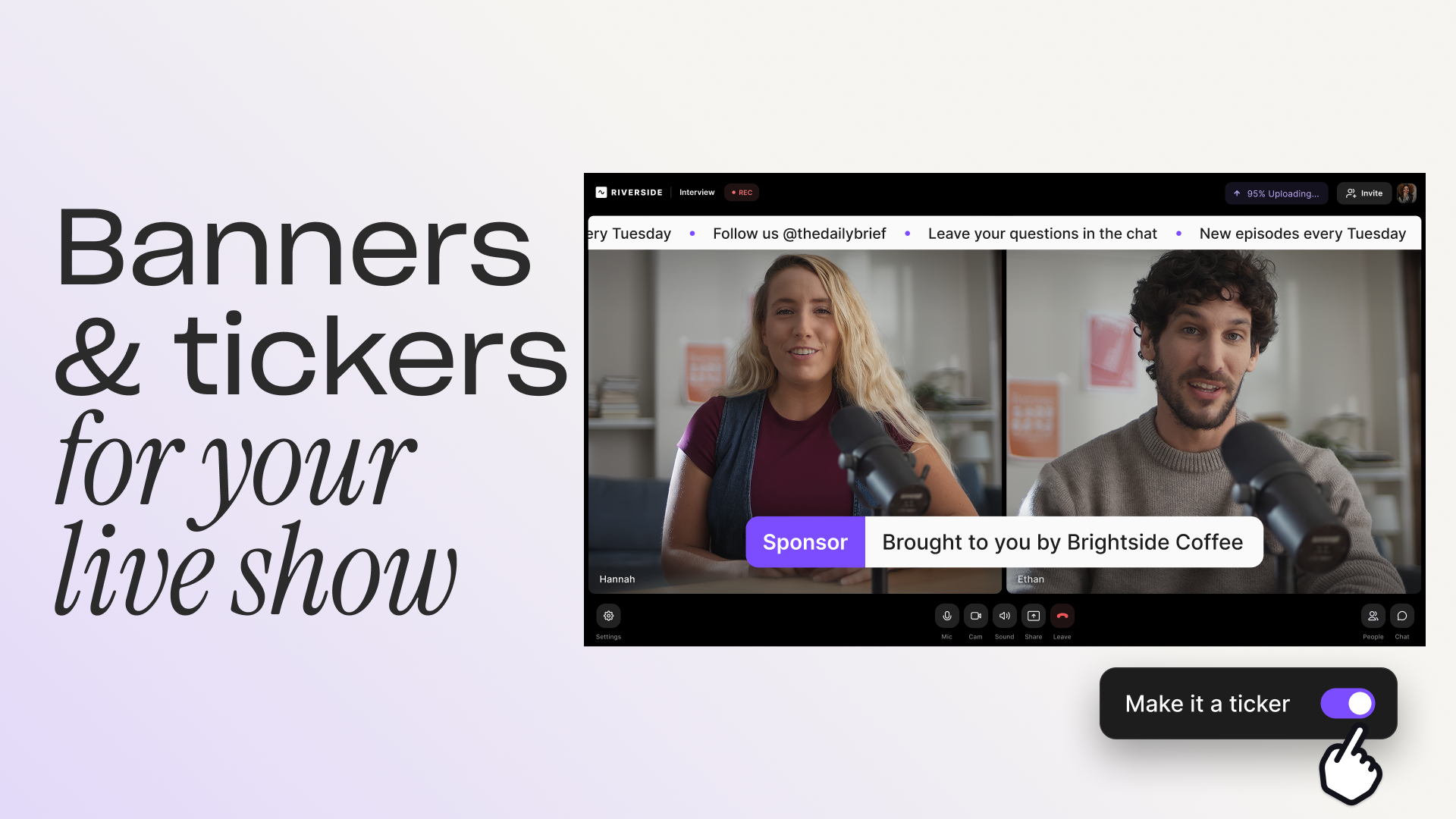
Show sponsor banners and scrolling tickers on screen during your live show.

November 10, 2026
Grow +

Share

Try Riverside
for Free

Get Started
Record video Try Riverside for Free

What's new

Save your sponsor lines, disclaimers, and "follow us" handles once, then put them on screen with one tap during your live stream. Style each banner with your font and brand colors, add a sponsor logo or a short tag, and add a link so viewers on Riverside can click through. Turn any banner into a full-width scrolling ticker along the top or bottom of the screen, show it for a set time or until you hide it, and save banners to a scene so they're back whenever you switch to it. For now, banners show in your live stream but aren't saved to the recording.

How to use it

In the studio sidebar, open the new Banners tab. It replaces the Text tab, and anything you saved in Text is already there. Hosts, producers, and invited producers can use it.

Learn more about this topic

Lower thirds: Add banners, tickers, and links in the studio

Show styled banners and scrolling tickers in the studio during your session to share sponsor lines, announcements, links, and more.

Set scenes in the studio

Build named scenes ahead of time, then switch between them live with a single click during your recording, live stream, or webinar.
Ready to create? We think so too.

Got a process that works for you? Get featured by submitting your step-by-step flow. Help other creators save time, learn new tricks and improve their productions.

Start for Free
Riverside

Company

About usBlogCareersPartnersAffiliate ProgramCreator PartnershipsImpressum

Platform

Why RiversidePricingFor BusinessMac AppMobile AppsFAQAppsAppsSupport

Features

RecordingLivestreamEditorHostingMCPMagic clipsTranscriptionsCaptionsMagic AudioAI Show NotesTeleprompterAsync RecordingOverlaysStudio BrandingAI TranslationArrow Icon
All AI Features

Use Cases

Video MarketingTutorial VideosVirtual EventsPodcastsLearning & DevelopmentInternal CommunicationsWebinarsCustomer TestimonialsVirtual ConferencesLive ShowSplit-Screen Video

Tools

Podcast MakerPodcast RecorderLive PodcastYouTube Video MakerScreen RecorderVideo CompressorWAV to MP3Podcast Name GeneratorYouTube Name GeneratorMic TestWebcam TestYouTube Transcript GeneratorTop Podcast ChartsFree Podcast Music
All Tools

Solutions

PodcastersProducersMarketers

Resources

Riverside UniversityWhat's NewRecorded on RiversideHelp CenterCase StudiesPartnersBlogCreators NewsletterMasterclassCommunity HubVideo Editing Glossary
Download on the App Store IconGet it on Google PlayAICPA SOC certification
Podcast icon

Podcast guides

How to Start a Podcast in 2026: The Complete 10-Step Guide
How to Start a Podcast on YouTube: 6 Steps [2026]
How to Record a Podcast Remotely: 4 Methods Compared
Video Podcast Software: Top Tools to Record, Edit & Publish
Download on the App Store IconGet it on Google PlayAICPA SOC certification
Facebook iconYoutube iconX (twitter) iconLinkedin iconInstagram iconTiktok

© 2026 RiversideFM, Inc.

English
English
French
Deutsch
TermsPrivacyCookies
Facebook iconYoutube iconX (twitter) iconLinkedin iconInstagram iconTiktok