Update
Editing & repurposing
Corner radius & opacity control for captions & text
Control the opacity and corner radius of your captions and text.
August 4, 2026
Free

Control the opacity and corner radius of your captions and text.
Try Riverside
for Free

What's new
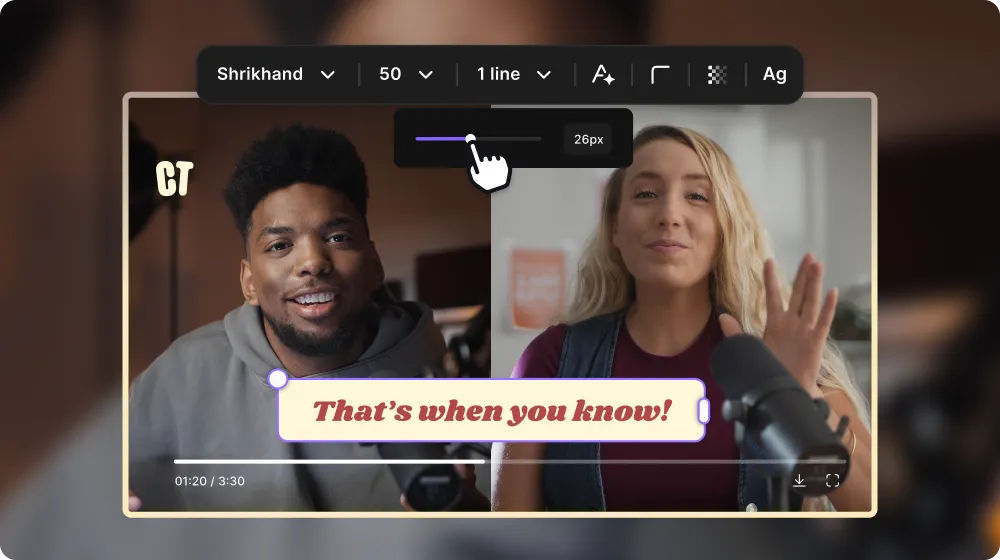
You can now set the exact opacity and corner radius of your text and captions that have backgrounds.
How to use it
Adjust corner radius: On the canvas of your edit, click on your text or captions, and on the styling panel select Corner Radius, then use the slider to get it looking exactly how you want.
Adjust opacity: On the canvas of your edit, click on your text or captions, and on the styling panel select the Font Color. In the color panel that opens up, go into the Background tab, and use the slider to choose the opacity you want.
Both of these controls only apply to text and captions that have a background.
Learn more about this topic
Add and customize captions in the editor
Add custom captions to your videos to make your content more expressive and engaging, especially for social media.
Add text overlays in the editor
Add text overlays to your video to identify speakers, show chapter titles on-screen, emphasize certain captions, and more.

Got a process that works for you? Get featured by submitting your step-by-step flow. Help other creators save time, learn new tricks and improve their productions.


