New release
Recording
Set-up & equipment
Find your best mic
Let Riverside pick the mic that sounds best before you join the studio.
November 9, 2026
Free

Let Riverside pick the mic that sounds best before you join the studio.
Try Riverside
for Free
What's new
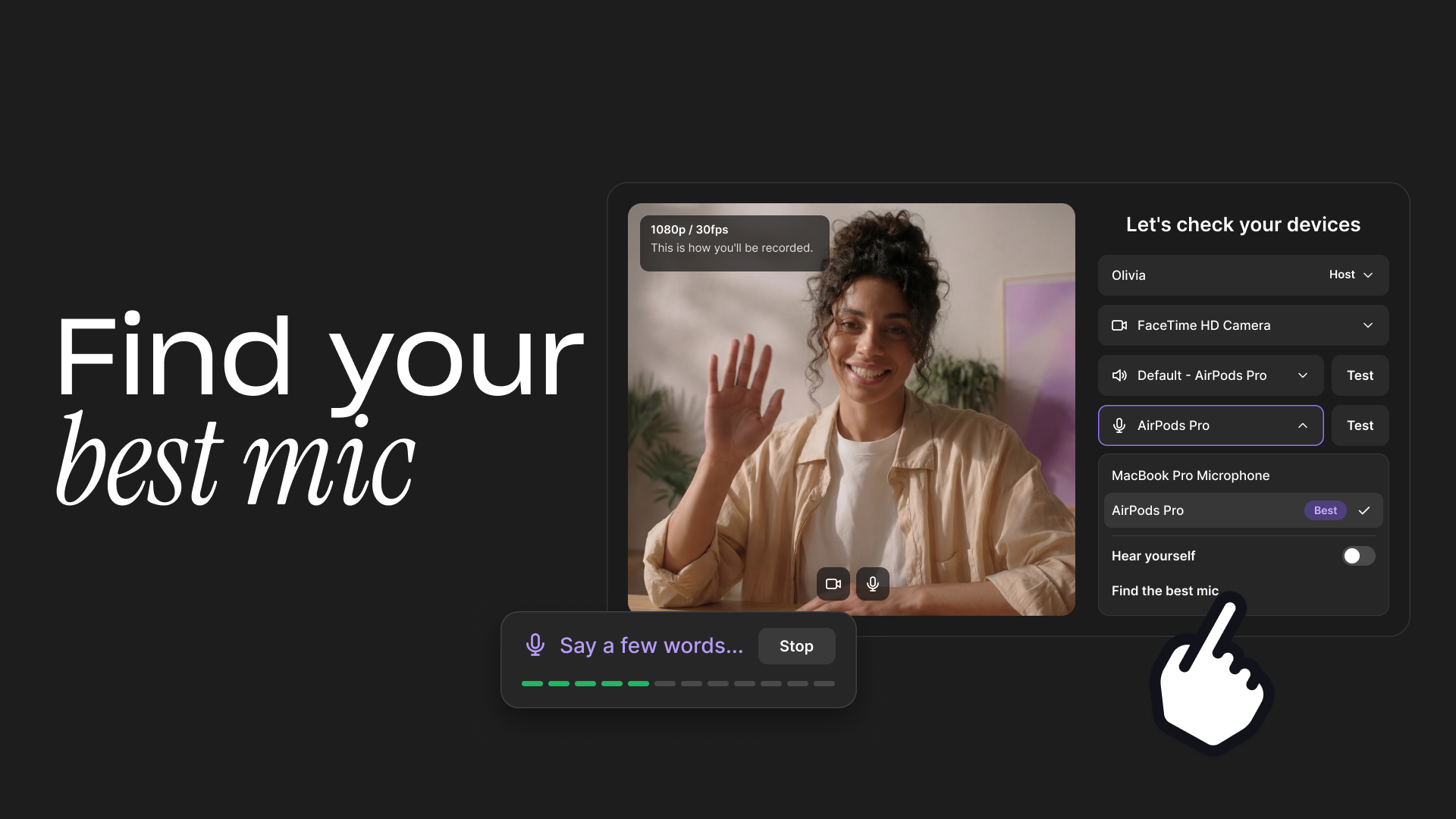
Most people have more than one mic connected, like a laptop mic, a webcam, a headset, or earbuds, and it's easy to record on the wrong one without noticing. Now Riverside can choose for you. Say a few words in the lobby, and Riverside listens on every connected mic, compares them, and switches to the one with the cleanest sound.
How to use it
In the lobby, open the mic dropdown and select Find the best mic. When you see "Say a few words...", keep talking until the check finishes. Riverside switches to the mic with the cleanest sound and marks it Best. To cancel, click Stop. It compares up to 6 mics, so if you have more connected, unplug the ones you're not using.

Got a process that works for you? Get featured by submitting your step-by-step flow. Help other creators save time, learn new tricks and improve their productions.


