Update
Editing & repurposing
Generate Magic Clips from edits
Generate Magic Clips from your edits, so your clips match the version you actually worked on.
October 28, 2026
Free

Generate Magic Clips from your edits, so your clips match the version you actually worked on.
Try Riverside
for Free
What's new
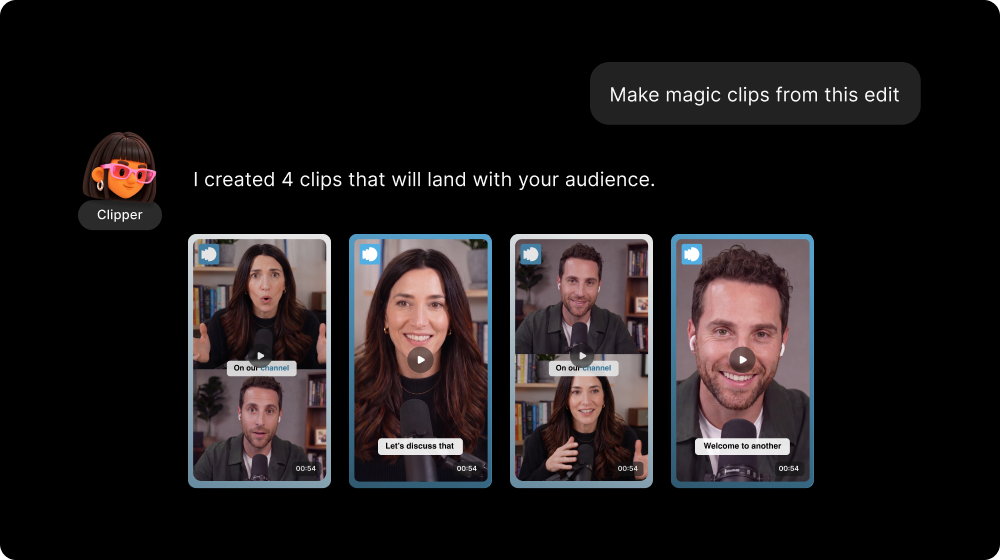
You can now generate Magic Clips from edits, not just from your raw recordings, so your clips match the version you actually worked on. The cuts and edits you made carry over into the clips, so nothing you cut out sneaks back in.
How to use it
Ask your Clipper Agent to create clips from an edit, and choose the file it should use. If you’re already working in the Editor, ask your Clipper Agent to make clips from the edit you have open. Your new clips land in the Magic Clips folder, ready to share.
Learn more about this topic
All about Magic Clips
Riverside identifies the highlights from your recordings and makes them into shareable clips with AI.
The Clipper Agent
Riverside's AI Clipper agent finds your best moments and turns them into polished, on brand short-form highlights you can post right away.

Got a process that works for you? Get featured by submitting your step-by-step flow. Help other creators save time, learn new tricks and improve their productions.


