New release
Webinars
Restrict who can register for your webinar
Keep your webinar focused on the right audience by allowing or blocking email domains and requiring work emails at registration.
September 27, 2026
Business

Keep your webinar focused on the right audience by allowing or blocking email domains and requiring work emails at registration.
Try Riverside
for Free

What's new
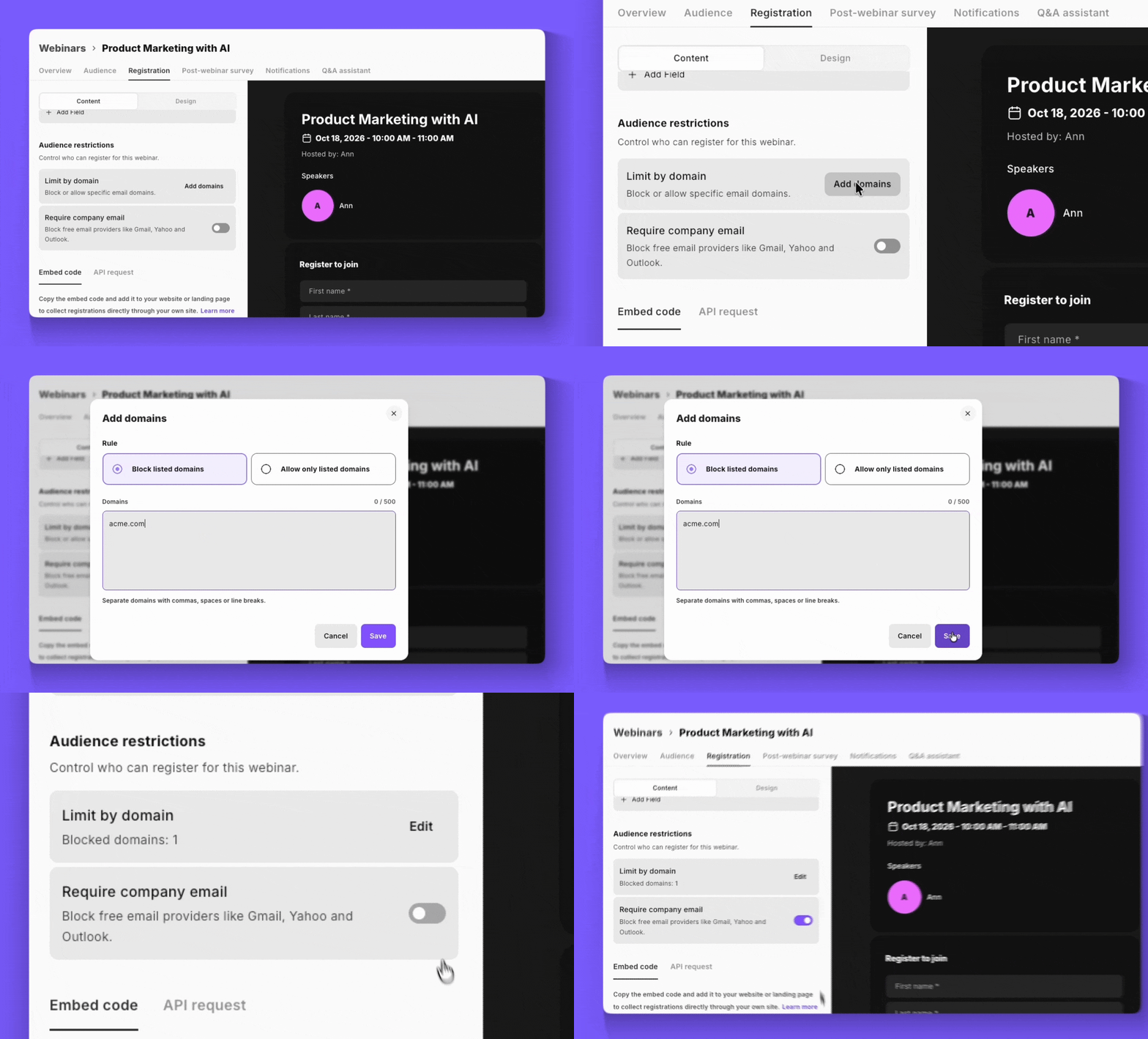
Decide exactly who can sign up for your webinars. Block specific domains, like competitors or junk addresses, or allow only the domains you approve, with up to 500 domains per list. Turn on Require work email to turn away free providers like Gmail, Yahoo, and Outlook, on its own or alongside a domain list. Anyone who doesn't meet your rules is stopped at submit with a clear message, so you no longer have to clean up your registrant list after the fact.
How to use it
Open your webinar, go to the Registration tab, and find the Audience restrictions section.
Limit by domain: Paste or type your domains, then choose whether to block the listed domains or allow only the listed domains. You can use one rule at a time.
Require work email: Turn it on to reject free email providers. It works on its own or together with a domain list.

Got a process that works for you? Get featured by submitting your step-by-step flow. Help other creators save time, learn new tricks and improve their productions.


