


Key takeaways:
- Anchor.fm was acquired by Spotify in 2019, rebranded to Spotify for Podcasters in 2023, then to Spotify for Creators in 2024.
- The platform is best for beginners on a budget, but advanced podcasters may outgrow it.
- Pros: Spotify for Creators is free, offers a big distribution network, and integrates with Riverside for easy podcast creation.
- Cons: Interface customization is limited, and you’ll find more robust analytics on other (but higher-priced) platforms.
Looking for Anchor.fm and landing on Spotify for Creators instead? Spotify rebranded it in 2024, but the free podcast platform still works similarly at its core.
In this review, I’ll cover what changed, how Spotify for Creators works today, and whether it’s still a good choice for your podcast. Plus, I’ll compare it to other hosting platforms, so you can see where it stands.
Anchor.fm’s rebrand: From Spotify for Podcasters to Spotify for Creators
Anchor.fm launched in 2015 as a mobile-first tool for recording and sharing audio. It evolved into a free creation, hosting, and promotion platform before Spotify acquired it. Here's the rebrand timeline:
- February 2019: Anchor.fm is acquired by Spotify as part of the latter’s strategy to become a one-stop shop for podcasters.
- March 2023: Spotify rebrands Anchor.fm as “Spotify for Podcasters,” combining its hosting and creation tools with a broader analytics platform.
- November 2024: “Spotify for Podcasters” becomes “Spotify for Creators.” The original Anchor app on iOS and Android is also renamed.
After the acquisition, existing Anchor users didn’t lose their hosted podcasts. All the original accounts automatically migrated to the new system and were accessible using the standard Spotify login.
Plus, all old Anchor.fm and Spotify for Podcasters links automatically redirect to the new Spotify URLs, so all shows remain active and available.
Overview of Anchor podcast hosting (now Spotify for Creators)
Spotify for Creators is the perfect place to start if you’re a beginner or just want to try podcasting at no cost. It’s 100% free with unlimited storage and has all the basic features you’ll need to get started.
Spotify for Creators: Key features
Spotify for Creators took the best aspects of Anchor.fm and packed it with even more useful tools for podcasters.
Here’s my honest, hands-on breakdown of the core features:
Podcast hosting
One of the best things about Spotify is that it offers unlimited hosting space absolutely free. You won’t need to pay a third-party hosting service, which can be a huge barrier to entry for new podcasters.
You can also import all your episodes from a previous host by redirecting your RSS feed. This allows you to keep your existing followers across all listening directories.
Recording and editing
Spotify for Creators doesn’t offer native recording or editing capabilities. But, the integration with Riverside allows you to record podcasts directly from your Spotify for Creators dashboard.
You can record remotely with up to 10 participants, capturing each person’s video and audio on a separate track. Everything is recorded locally on each participant's computer, capturing up to 4K video and 48 kHz WAV audio quality. That means crisp audio and video, regardless of the quality of your internet connection.
.webp)
After recording, polish your podcast using Riverside’s powerful video editor. Prompt the chat-based editor, Co-Creator to instantly polish your video, enhance audio, generate thumbnails, or repurpose your content into blog posts and short clips. Or, for more control make edits yourself with the text-based editor.
You can still upload episodes, add titles and descriptions, schedule releases, publish trailers, add episode artwork, and manage transcripts and chapters from Spotify for Creators.
Distribution
Distributing your show on Spotify means you’ll tap into one of the largest worldwide audiences. As of May 2026, Spotify reported over 760 million active users across 184 markets.
Once you hit publish, your show is instantly live on Spotify. You can also easily submit your show to other directories like Apple Podcasts and Amazon Music via RSS feed. You can then add links to those listings on your Spotify for Creators profile so potential listeners can find you on their preferred app.
For video podcasts, Spotify delivers the full video through its own platform. The other podcast apps will, instead, receive only the audio version through the show’s RSS feed.
Episode management
Spotify for Creators provides you with useful episode management capabilities, including:
- Recording (via Riverside) and uploading audio or video podcasts
- Custom episode previews
- Interactive timestamps
- Episode scheduling
- Podcast trailers
And, more.
These features help you streamline production so you can focus on creating great episodes instead of getting bogged down in technical setup.
Analytics

Unlike Anchor’s old platform, which provided only total plays, audience size, and demographics, Spotify’s podcast analytics are more detailed.
Data is divided into 4 main areas:
- Overview: High-level plays, audience size, followers, and performance trends.
- Discovery: Impressions, where your show appears on Spotify, and how people respond after seeing it.
- Engagement: Consumption time, retention, completion, and other listening or viewing behavior.
- Audience: Age, gender, location, devices, and other audience characteristics.
Note: As of June 11, 2026, Spotify counts a play when someone listens to or watches an episode for at least 30 seconds. This replaced the previous 60-second definition.
From my experience, while this data is great for refining your content strategies, I'd take the raw numbers with a grain of salt. The number of listens and downloads is occasionally inaccurate or inconsistent. It sometimes even varies between different pages of the Spotify for Creators dashboard.
Plus, these analytics aren’t IAB-certified, which means potential advertisers may not trust them. As one user reported on Reddit:
"I've seen my episode listens drop in numbers by a few. People can't unlisten to a show!"
Promotion and audience engagement
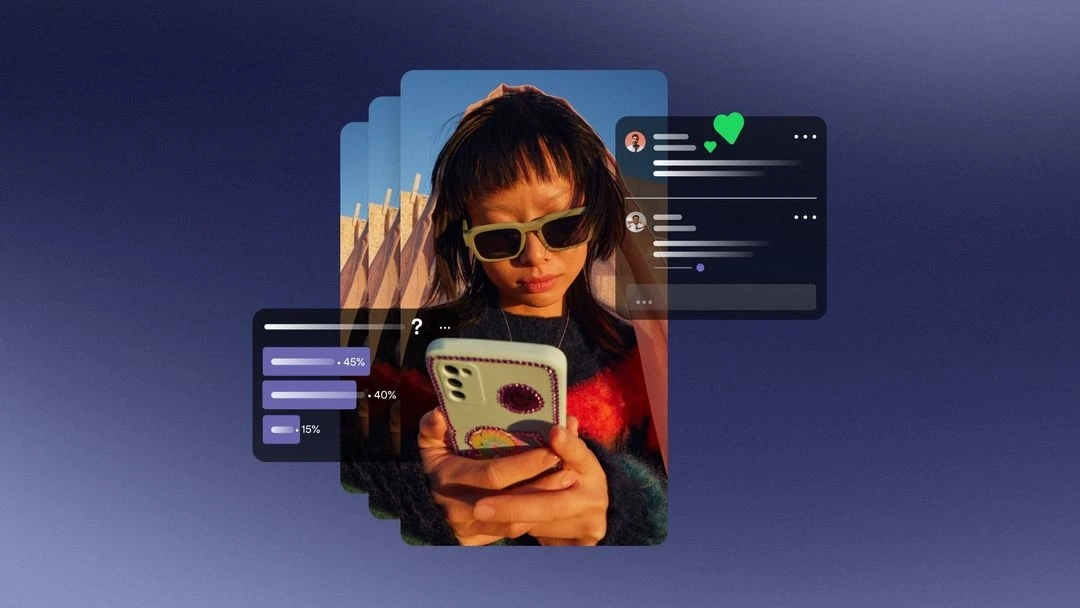
Spotify provides several tools for presenting and promoting your show inside its ecosystem.
You can boost your community’s loyalty and engagement on the Spotify mobile app with features like comments, Q&As, and polls. You are notified immediately once a listener leaves a comment, and can reply to spark a conversation.
Spotify is aggressively pushing video podcasts. That means the single best way to improve your show’s visibility and growth is to upload video episodes. Video keeps users on the app longer, which can signal the algorithm to recommend your show to new listeners. I think that’s one of the main reasons why 72% of podcast episodes published by Riverside creators now include video.
Pro tip: You can enhance the algorithm-driven recommendations by choosing the right keywords for your show to improve categorization.
Monetization
Compared to the old Anchor.fm, Spotify for Creators offers several avenues to monetize your content, but not without limitations.
Spotify Partner Program
The Spotify Partner Program lets eligible hosted shows earn through:
- Ad revenue: Spotify dynamically inserts ads into your episodes, and you earn a share of the revenue. But, it keeps 50% of revenue, one of the steepest cuts in the industry.
- Premium video revenue: Eligible video creators can earn when Spotify Premium subscribers watch their videos without dynamic ads.
- Sponsorship tools: On video episodes, you can use Spotify’s sponsorship tools to schedule, replace, and track brand sponsorships.
To apply through Spotify for Creators, your show currently needs at least 3 published episodes and 2,000 Spotify consumption hours with an audience of at least 1,000 in the past 30 days. You must also live in a supported market.
User review: “I use it. I'm small potatoes still, but Spotify's own advertising has gotten me thousands of impressions and a few dozen new followers, far more than any other single source, and I didn't have to do anything.” — David S. Filippi, MD, host of the Significant podcast
Spotify Ads Manager
Spotify Ads Manager is a self-serve platform primarily built for brands to buy and manage ad campaigns on Spotify. But, creators can use it to run their own paid campaigns to grow their show’s audience. You can push your ads to high-intent listeners, or let Spotify’s machine learning optimize your campaigns for you.
While it’s not a direct monetization tool, it can help you promote your show to monetize from a bigger audience.
Pro tip: If you want to maximize your monetization efforts, place your ad markers manually so your episodes have natural pauses. To avoid potentially annoying your listeners, don’t let the AI guess where the break should be.
Podcast subscriptions
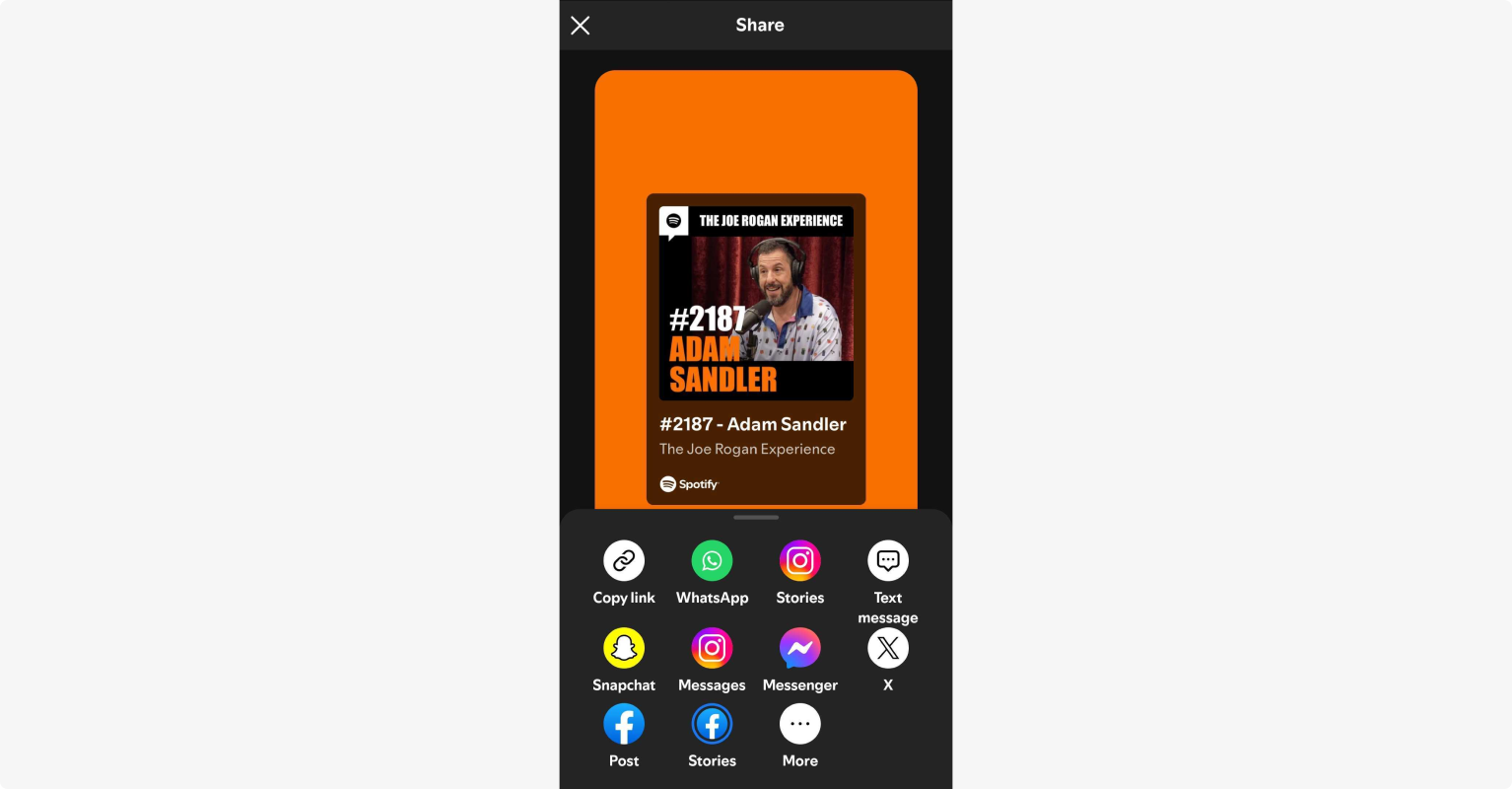
Spotify subscriptions let creators offer exclusive content to paying subscribers only.
To be eligible, you need at least 2 published episodes and an audience of 100 Spotify users in the past 30 days. Spotify deducts a 5.5% payment processing fee.
Spotify Open Access
If you use an external membership platform like Patreon or Substack, this feature allows your existing subscribers to listen to your private content directly on Spotify. This way, you won’t need to move your subscription business to Spotify.
Copyright and ownership
Like Anchor, Spotify protects your content's copyright by upholding your intellectual property rights. Anchor does not own your content, and neither does Spotify. You retain full ownership of your podcast.
There’s a tradeoff, though. When you use the platform, you grant Spotify a very broad license to use, distribute, and create derivative works from your content for promotional purposes.
"The only negative is the fine print in their T&Cs. You give them rights to your material. If you are doing something big I would go with a paid service that doesn't do this."
Another common misunderstanding is that Spotify offers a library of licensed background music to add during your episodes. That’s not true. These tracks are limited to personal, non-commercial use only.
You’re fully responsible for obtaining the necessary rights to any music, images, recordings, or other third-party material included in your episodes.
Usability and support
Anchor's interface was known for being very minimal and basic. The new Spotify for Creators interface is more polished and professional, but still very easy to use, even for beginners.
The learning curve is very gentle and you’ll find a whole range of tutorials under the “Resources” section to help you along the way. However, creator support relies heavily on this self-service knowledge base, which can be frustrating if you encounter some technical issue.
Additionally, Spotify for Creators is clearly a desktop-first platform. The former Anchor mobile recording app is now also called “Spotify for Creators” and functions solely as a management and analytics dashboard.
Getting started: How to start a podcast on Spotify for Creators
The process to start a podcast on Spotify for Creators is straightforward and hasn’t changed much since the platform was known as Anchor.fm.
Here is a quick recap of the steps you need to follow:
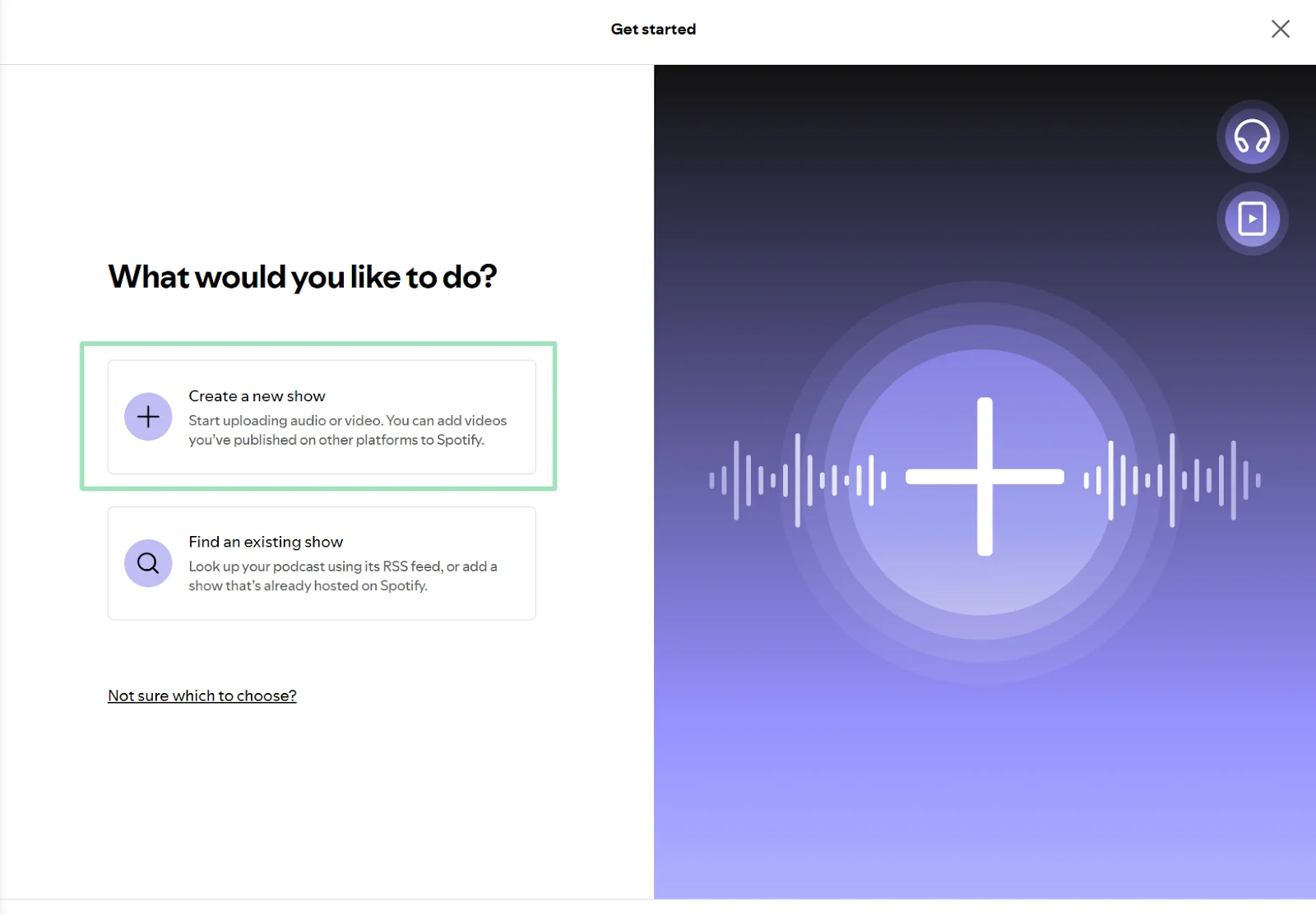
Step 1: Log in to your Spotify for Creators (Anchor.fm) account and choose whether you want to create a new show or find an existing one.
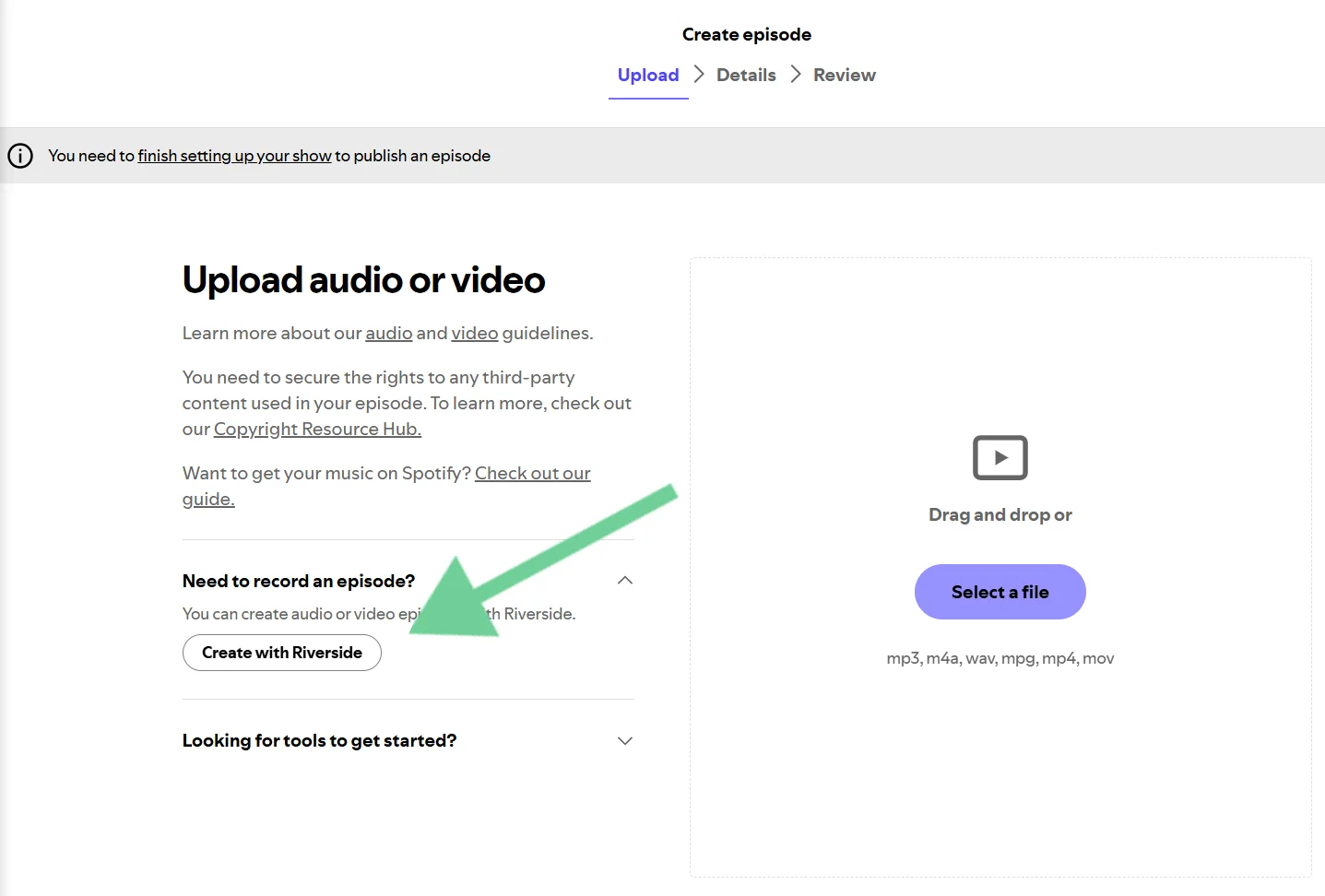
Step 2: Upload an existing file from your computer or record a new episode using Riverside.
Step 3 (optional): If you use Riverside, you can invite up to 9 guests and record separate high-quality tracks locally.
Once you’re finished, you can edit your podcast in minutes with AI, and then click “Export to Spotify.”
Step 4: Fill in your episode details (e.g., title, description, thumbnail, episode number). You can publish the episode immediately or schedule it to go live at a later date.
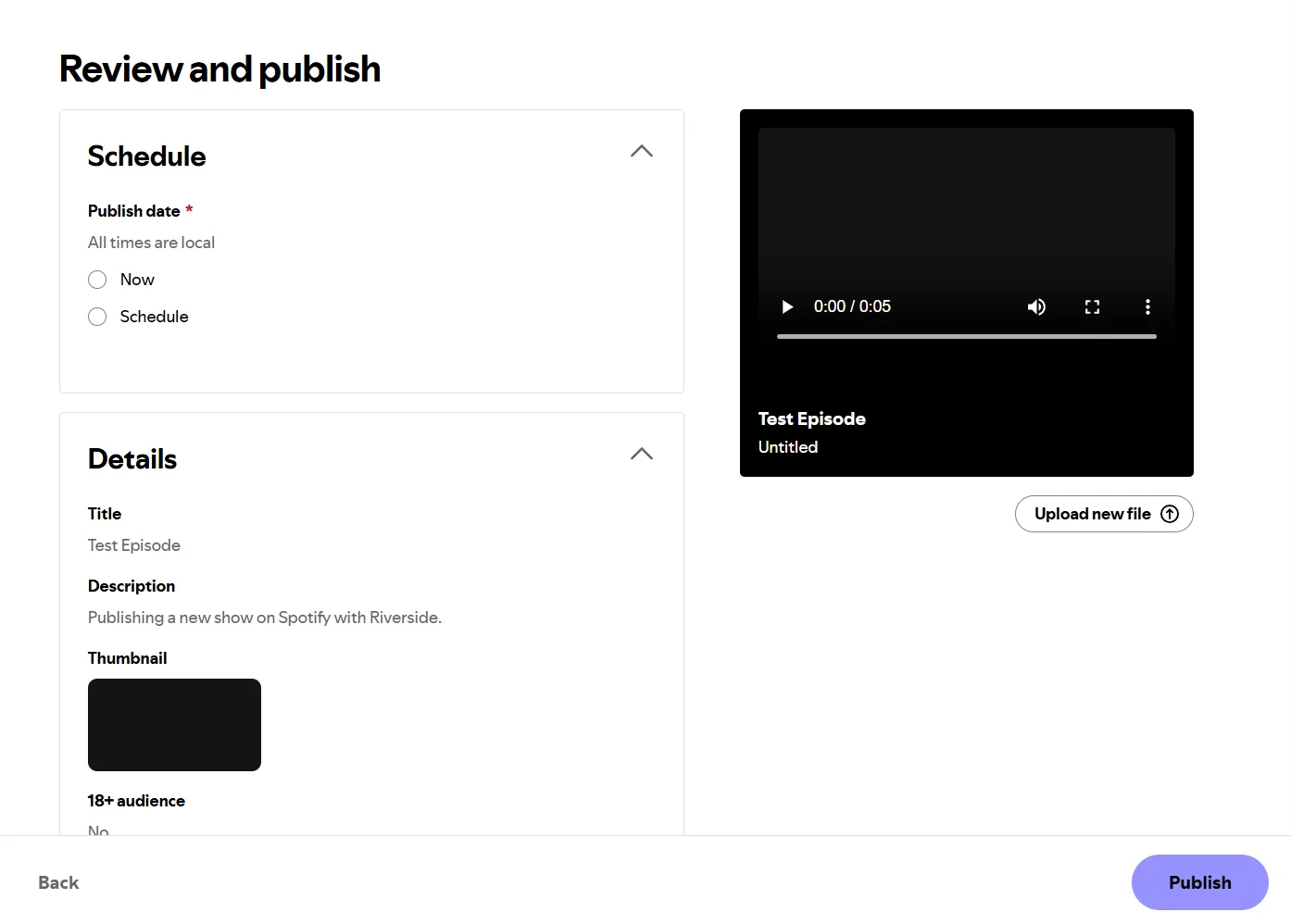
For more details, check out our in-depth guide on how to upload a podcast to Spotify.
Pros and cons of Spotify for Creators
Spotify for Creators (formerly Anchor) is a solid starting point for beginner and casual podcasters. It’s free, easy to use, and comes with everything you need to launch a show.
But, professional creators may be hindered by its limitations around monetization, copyright, and flexibility. It’s not uncommon for experienced podcasters to eventually outgrow the ‘free’ price tag.
To help you make your decision, here is my final verdict on its pros and cons:
Pros
- Free unlimited hosting: Just like Anchor was, Spotify for Creators is really free. You can upload unlimited audio and video episodes without storage caps or monthly fees. It's the perfect way to experiment with a podcast idea without committing any money.
- User-friendly interface: The platform is intuitive and it’s easy to navigate from initial account setup to final distribution.
- Large built-in Spotify network: The discovery and recommendation features allow your show to reach a massive audience within Spotify.
- Seamless integration with Riverside: You can record, edit, and then publish an audio or video podcast in one flow with this integration.
- Native engagement tools: Comments, polls, episode previews, and other show-page features help you interact with listeners and promote episodes within Spotify.
Cons
- Unfavorable monetization: The steep 50% ad revenue split makes it very difficult for new podcasters to earn a meaningful income. Also, certain monetization options are not available in all regions and come with high eligibility thresholds.
- Shallow analytics depth: While the interface is clean and detailed, most metrics are limited to Spotify listeners. Also, data can be unreliable and it’s not IAB-certified.
- Basic customization: The interface is very streamlined, which may be a good thing for some people. But, it lacks the advanced customization features that some professional podcasters might desire.
- Limited support options: Spotify offers direct messaging with customer service agents but no phone support. For the most part, you’ll have to rely on help articles and community forums.
- Very Spotify-centric: Although you can distribute your podcasts on other directories, doing so is not automatic and the platform is optimized for Spotify listeners. When you’re ready to take the next step and want to start promoting across all listening apps, Spotify may feel like a closed ecosystem.
Spotify for Creators vs. Other podcasting platforms
How does Spotify compare to other popular podcasting platforms? Let’s have a quick look.
Riverside (hosting)
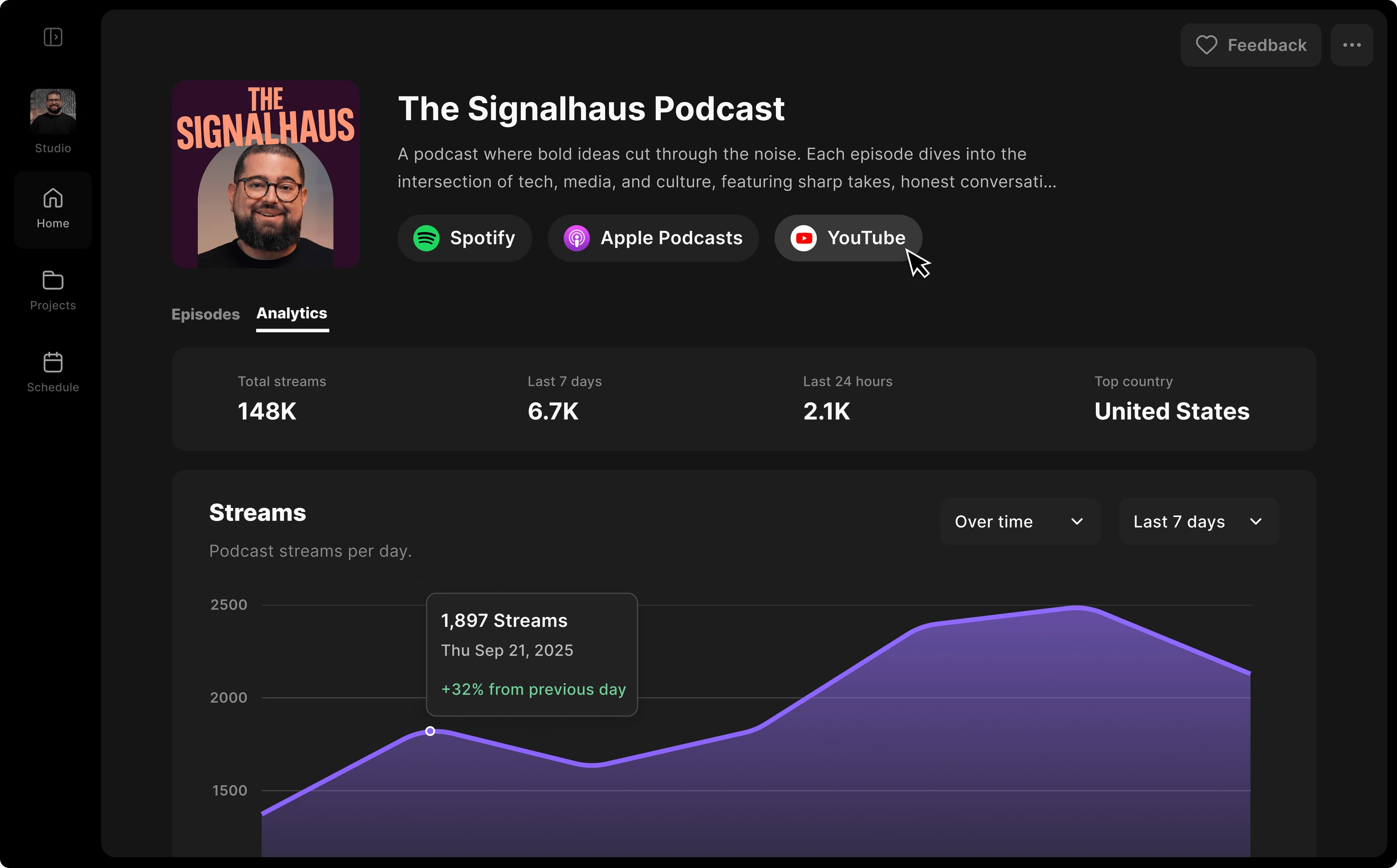
For a true all-in-one experience, it’s worth considering Riverside if you already record and edit on the platform.
You can one-click publish directly to Spotify, Apple Podcasts, and YouTube from your export list without having to upload files manually. Then, keep track of your show’s performance in the analytics dashboard.
Hosting is only available on Riverside’s paid plans starting at $24 per month. But if you’re already recording and editing with Riverside, you won’t pay anything extra for a hosting platform. You can also easily import existing podcasts (including video podcasts) and customize your episode covers and artwork.
Here are a few key characteristics of Riverside hosting that differentiate it from Spotify for Creators:
- Spotify offers a fragmented workflow: record with Riverside, then host and distribute for free on Spotify. Riverside offers one-click publishing straight from exports all while maintaining the highest quality from start to finish.
- Despite its limitations, Spotify offers monetization options. Riverside doesn’t.
- Riverside allows you to build a dedicated podcast website directly from your dashboard.
Podbean

If Spotify (formerly Anchor) is a launchpad for brand new podcasters, Podbean is often the next step for those who are ready to invest in their show. For a monthly fee, you’ll get more flexibility, reliable analytics, stronger video distribution, and less taxing monetization options.
Here’s what differentiates Podbean from Spotify for Creators:
- Spotify's video podcasts are confined to its own platform, while Podbean supports distribution to YouTube and other directories.
- Spotify for Creators is 100% free with unlimited hosting. Podbean starts at $12 per month for audio hosting and $29 per month for video hosting.
- Podbean provides IAB-certified analytics, the industry standard trusted by most advertisers.
- Podbean offers more flexible monetization options, like live show monetization and a built-in patron system. Plus, you get a better ad revenue share as Podbean only takes a 30% cut.
- Podbean’s separate PodAds tool lets you manage your own advertiser relationships and charges a flat rate of $1 per 1,000 ad downloads.
Buzzsprout

If you’ve got even more budget to invest and you’re serious about your podcast, Buzzsprout is what you’ll likely upgrade to. It gives you more customization and optimization options for your show, as well as full control of distribution, monetization, and promotion.
Buzzsprout is better for creators seeking a universal platform to create and manage their RSS feed, regardless of where they plan to distribute it.
- Buzzsprout’s built-in monetization has less strict eligibility rules and doesn’t take a revenue cut. Instead, it pays creators a fixed amount per monetized download.
- Buzzsprout gives you a universal RSS feed and full directory control, including manual submissions to Apple Podcasts, YouTube, and more.
- Buzzsprout plans start at $15 per month for just 6 hours of audio per month, so many creators end up paying overage fees. If you want to publish video episodes, video plans will cost even more.
- Buzzsprout’s podcast website building options are among the best in the market and come with extra features, like SEO tools and subscription banners.
Final verdict: Is Spotify for Creators right for you?
Anchor (now Spotify for Creators) is one of the best platforms to start your podcasting journey. It’s free, easy to use, and beginner-friendly.
With such a large audience, it’s a very strong fit if you’re focused entirely on the Spotify ecosystem. Plus, it’s fully integrated with Riverside to ensure best-in-class quality for recording and editing your content.
But, its Spotify-centric ecosystem may start to feel limited, especially if you need multi-platform control. If you’re a video-first creator or are serious about monetization, you should consider a dedicated, paid podcast host.
FAQs on Anchor.fm (now Spotify for Creators)
What’s new in Spotify for Creators?
Spotify for Creators’ accessible interface and user experience isn't much different from Anchor.fm. But, Spotify, improved Anchor.fm by providing more granular analytics, as well as more complete data from other platforms. Integration with Spotify's larger ecosystem also means you can tap into its expanded distribution tools to grow your audience.
Is Spotify for Creators good for podcast hosting?
Yes, Spotify for Creators is a great entry-level podcast hosting platform, especially for beginners and hobbyists. Since it’s free and allows creators to tap into Spotify's massive audience, it’s the ideal place to launch a new podcast.
But, if you want to grow your show or build a business out of it, its limitations can become frustrating quickly. The 50% ad revenue split is high, and analytics are not IAB-certified, so many advertisers won’t trust them.
Does Spotify for Creators cost anything?
No, hosting your podcast on Spotify for Creators is completely free. You get unlimited storage and bandwidth with no monthly fees.
Can you make money with Spotify for Creators?
Yes, eligible creators can make money with Spotify for Creators through several built-in monetization products. Availability and eligibility depend on your location and Spotify audience.
You can earn through the Spotify Partner Program, automated ads, Premium video revenue, paid subscriptions, sponsorships, and Spotify Open Access.
What is the difference between Spotify for Creators and Riverside?
Spotify for Creators is a hosting and distribution platform that stores your files and pushes them to listening directories. It includes built-in monetization options and lets you record episodes via the integration with Riverside.
Riverside is a professional recording studio that captures high-quality video and audio tracks, then lets you edit them in minutes with AI. It also offers its own podcast hosting on paid plans.
What are the latest features of Spotify for Podcasters?
Spotify’s latest 2026 updates include lower eligibility thresholds for the Spotify Partner Program. For example, the new standard for counting podcast plays is now 30 seconds instead of 60.
Spotify also launched Creator Sponsorships to give Spotify Partner Program members more control over their host-read ads. The platform is also expanding analytics with the introduction of new charts and more comprehensive metrics.



-Need-to-Know-About-Podcast-Hosting-Sites.png)


