

.webp)


Key takeaways:
- Automated transcription software is best for fast, budget-friendly transcriptions, and with modern software, can be very accurate.
- For a fast, affordable AI transcription of a clean recording or virtual meeting, choose Riverside or Otter.ai.
- Human transcription is not inherently more accurate, but it’s generally better suited to high-stakes audio like medical and legal transcriptions.
- If you have complex audio with heavy background noise or specialized jargon, choose human-verified services like Rev or GoTranscript.
You don’t need to spend hours trying to transcribe a meeting or interview. Modern transcription software and services make it much more manageable.
In this guide, I’ll help you find the best transcription software and services for your needs. Whether you’re transcribing meetings, interviews, or content, I’ve got you covered.
What is transcription software?
Transcription software is a digital tool that automatically converts speech in live or recorded audio and video into written text. It uses artificial intelligence and speech recognition algorithms to analyze voice files and identify different speakers. Most tools also add timestamps, chapters, speaker labels, and can generate subtitle files.
This differs from a transcription service, which relies on human professional transcriptionists. They can either manually listen to and type out your audio, or use AI software and review the results.
The best transcription software at a glance
Here is a direct comparison of the top transcription software and services I’ve tested for you.
7 Best transcription tools, reviewed
Whether you're looking for AI transcription tools or human-based transcription services, here are my top 7.
1. Riverside
Price: Paid plans starting from $24/month.
Free tier: Yes, with unlimited built-in transcriptions.
Type: AI-powered
Best for: Recording, transcribing, and editing in one workflow

Riverside’s transcription software is best for podcasters and video creators because it’s built into a full content workflow.
Record in high-quality from your browser with up to 9 guests, then get downloadable SRT (subtitle) and TXT (text) transcriptions straight after. No need to jump between different tools since everything can be done without leaving your dashboard.
Riverside supports transcriptions in Spanish, German, English, Italian, and more than 100 languages with separate speakers for easy organization. You can even translate your video and audio, and re-dub it with perfect lip syncing.
Alternatively, upload a file to our free online transcription tool or our instant YouTube transcript generator.
You can also cut and trim videos with our text-based editor by deleting the corresponding text in the recording transcript.
What Riverside isn't the right pick for is legal, medical, or research transcripts, which may need a human review for extra accuracy checks.
Riverside
Key features
- Accurate transcriptions in more than 100 languages.
- Auto speaker identification and labeling with up to 10 speakers.
- Transcripts available in SRT and TXT formats, ideal for repurposing.
- Text-based video and audio editing where you can trim recordings by deleting transcript text.
- Free customizable video captions.
- AI-powered summaries for your recordings.
- Automatic translation in Spanish, French, German and 30 languages with natural voice-dubbing and perfect lip syncing.
2. Trint
Price: From $52 per seat monthly.
Free tier: 7-day free trial only.
Type: AI-powered
Best for: Journalists and content teams

Trint is an AI transcription platform designed around collaborative newsroom workflows. You can upload prerecorded audio and video or use Trint Live to transcribe meetings, interviews, and broadcasts as they happen.
I like how you can also use the built-in tools to create soundbites by extracting audio clips directly from your transcription.
Trint can transcribe and translate audio in more than 50 languages, plus its real-time transcription is perfect for live events like webinars. You can also choose whether your text will be in U.K. or U.S. English.
In my opinion, one of Trint’s strongest assets are its collaborative features that let multiple users edit, review, and annotate simultaneously. They make this software perfect for industries where teamwork and precision matter, like journalism, law, and content creation.
Key features
- Transcribes and translates into 50+ languages.
- Transcription sharing for group editing.
- Highlighting and commenting features.
- Allows teams to edit, review, and annotate transcriptions together.
- Custom dictionaries to improve accuracy with industry-specific terms.
3. GoTranscript
Price: Human services start at $1.02/minute, or automated transcription starts at $0.20/minute.
Free tier: None
Type: AI-powered and human
Best for: Academics or companies looking for complex transcripts.

If you’re looking for a team of professional transcribers for medical or legal purposes, then I’d recommend GoTranscript.
While GoTranscript does have automated transcription, they specialize in human transcription services. They even offer audio translation, subtitles, and closed captioning services that meet the requirements of people with disabilities.
To place an order, you simply need to upload your recording. After you’ve paid, you’ll get your transcription in up to 5 days. You can actually pay more to receive it sooner, with the soonest being 6-12 hours. Faster delivery costs considerably more, however, so urgent or long recordings can become expensive.
You can also edit your transcript with GoTranscript’s interactive editor. I’ve tested it, and it’s comprehensive and easy to use. The editor includes a playback button, timestamps, and AI assistance. And, if you’re a big team, you’ll also enjoy their collaborative workspace with a shared library.
GoTranscript also offers AI transcription for lower-cost drafts. Results arrive within minutes, but they report their own accuracy at just 80–90%.
Key features
- Human transcription in more than 140 languages.
- Translations and foreign subtitle transcriptions.
- Interactive transcription editor for making changes.
- AI transcription with a 5-minute turnaround.
- Shared workspace for easy tracking of transcriptions in bigger teams.
4. Rev
Price: Free plan; AI transcription costs $0.25 per minute and human transcription starts at $1.99 per minute.
Free tier: 45 minutes per month (AI only).
Type: AI-powered and human
Best for: Combining fast AI transcription with optional human verification.

Rev's big win is its dual offering: AI-powered and human transcription services. Its AI service supports 37 languages and typically returns results within minutes, while the free plan includes 45 English transcription or caption minutes each month.
If you’re after speed and affordability, AI transcription is your go-to, offering great accuracy. But if you're dealing with really complex or jargon-riddled audio, human transcription steps in with up to 99% accuracy. They can deliver your transcript in 12 hours or less, or even faster with Rush delivery at $1.99 per minute. Human transcription, however, is limited to English and can become expensive very quickly.
Rev can handle almost any audio or video format, even URLs from YouTube and Vimeo. So whether you're transcribing a podcast, a business meeting, or legal documents, Rev has got you covered.
You can upload your files directly through their website or mobile apps. It took me a few minutes to work my way around them since they’re straightforward enough. The transcription editor is also a big plus, with features that let you search, highlight, and make edits with ease.
Key features
- AI or human transcriptions available.
- Fully editable text-based documents with comments and speaker labels.
- Custom AI glossary for names and technical terms.
- Works with various audio/video files.
- API ensures seamless integration for developers.
5. Otter.ai
Price: From $8.33 per user/month.
Type: AI-powered
Free tier: 300 minutes per month (30-minute cap per conversation).
Best for: Real-time meeting transcriptions.
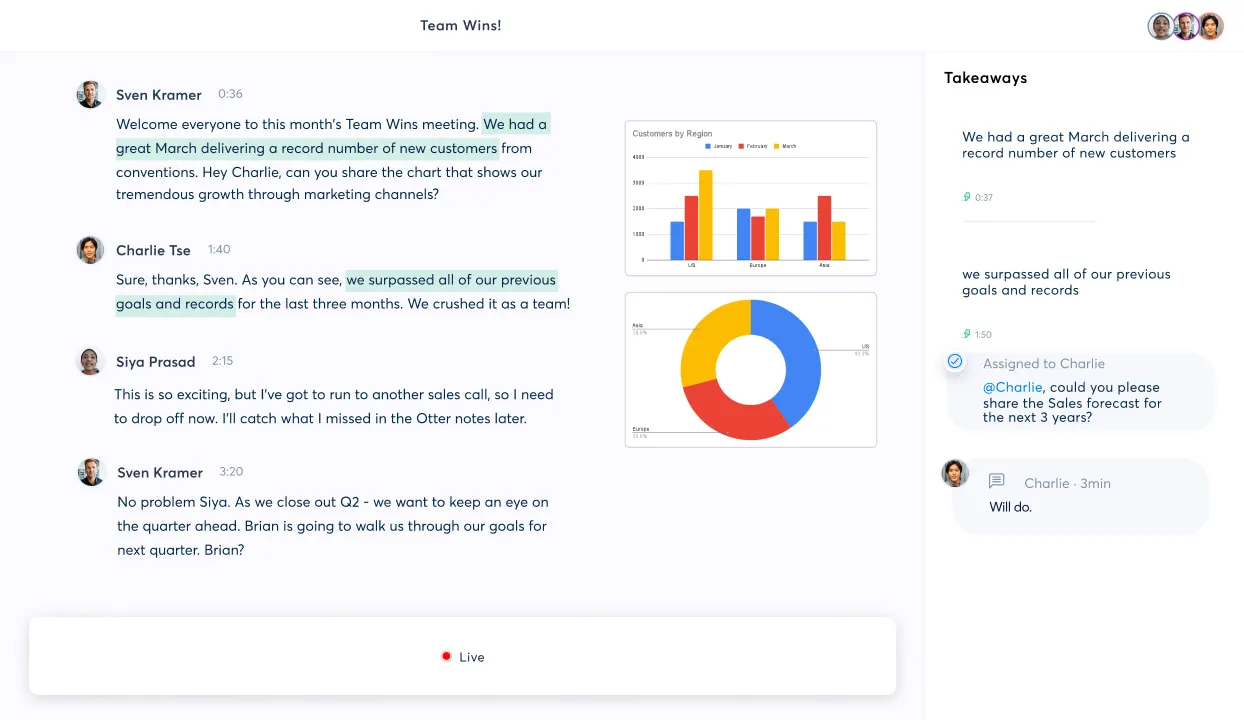
With Otter.ai's real-time transcription, it's my recommendation for fast-paced meetings or live lectures. Your words pop up on screen as you speak. Its AI Meeting Agent can join Zoom, Google Meet, and Microsoft Teams calls, to trancribe live. It works on both desktop and mobile, and generates summaries and action items. You can also record in person or upload existing files.
One of Otter.ai's standout features is its ability to recognize and differentiate between speakers. In a team meeting or a recording with multiple voices, Otter labels who said what, keeping your interview transcripts clear and organized. This is perfect when accurate attributions are essential.
But note Otter.ai supports only English, Spanish, French, and Japanese, plus a beta version for German and Simplified Chinese.
Otter.ai
Key features
- Transcribes meetings in real-time with live summaries
- Connects directly to Zoom, Google Meet, and Microsoft Teams.
- Lets you assign speaker labels to different tracks.
- Exports to a variety of file formats, including TXT and PDF.
- Free version with 300 transcription minutes.
6. Scribie
Price: Starts from $0.80 per minute.
Type: AI-powered and human
Best for: Affordable human-verified transcripts.

Scribie now uses AI and humans in the same workflow rather than offering separate automated and manual services. Your recording will go through a thorough 4-step process: automated transcription, review, proofreading, and quality assurance. While this service takes a bit longer, the accuracy is worth it.
Additionally, Scribie offers free re-reviews to make sure you’re happy with the final result. But it won’t suit you if you only want an immediate, low-cost AI draft. While you can pay rush fees for faster delivery, standard turnaround takes up to 24 hours.
I found that using Scribie feels very easy. Simply upload your files straight from your device or cloud storage like Google Drive or Dropbox, and you’re good to go. What I don’t like is that you have to use a web editor interface that feels slightly outdated compared to modern platforms once you receive your file.
Key features
- Guaranteed 99% accuracy through human verification.
- Strict confidentiality agreements and SSL encryption to keep your unreleased content safe.
- Online editor tool to alter your transcripts.
- Includes SRT/VTT files, verbatim transcripts, and time-coded audio.
7. Transcription Panda
Price: Starts at $0.79 per audio minute.
Type: AI-powered and human
Best for: Budget-friendly transcripts with flexible turnarounds.
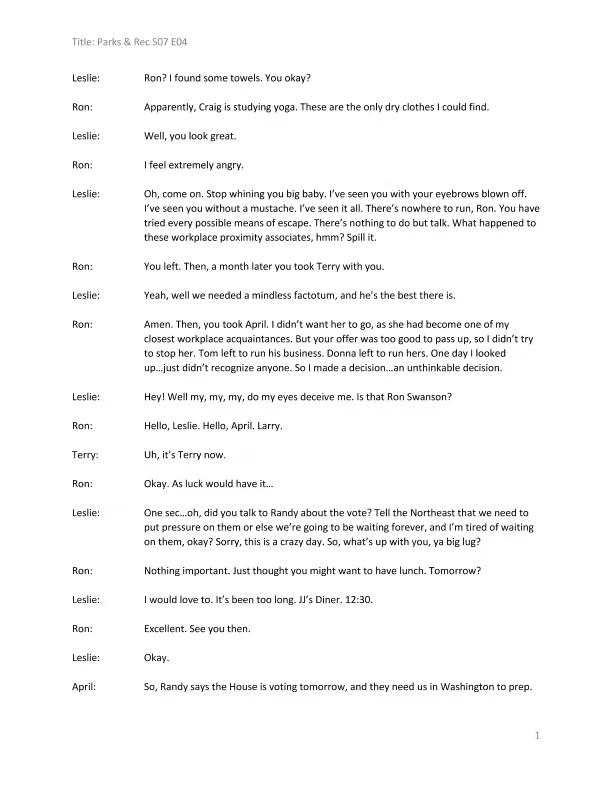
TranscriptionPanda offers human transcriptions only without an automated AI option. I think it’s one of the best services if you need a solid human-verified transcription without breaking the bank. The platform lets you adjust your pricing based on how fast you need the file.
The $0.79-per-minute Rough Draft service is very affordable, and delivers a surprisingly accurate initial text document that you can quickly polish yourself. But, it takes 5 business days and doesn’t include speaker labels or optional extras.
You can expedite your order, increase accuracy up to strict verbatim text, timestamping, and speaker labels by increasing the price.
This flexibility makes it easy to balance cost against urgency. But, faster delivery, higher accuracy, or other extras can make longer audios quickly become expensive. Also, unlike modern software platforms, TranscriptionPanda only returns a basic Word document instead of providing an interactive web editor.
Key features
- 100% human-powered transcription process with no automated tier.
- Ultra-affordable rough draft option for internal documents.
- Flexible delivery timelines ranging from 24 hours to 5 days.
- Add-on services for strict verbatim text, speaker labeling, and custom timestamping.
- Spanish-to-English audio translation available on request.
AI transcription vs. Human transcription: Which is better?
When deciding between AI and human transcription, consider: accuracy, efficiency, and reliability.
Accuracy
AI transcription:
AI transcription has made impressive strides, with accuracy rates hitting even 99% under the right conditions. But factors like audio quality, background noise, heavy accents, and technical speech can lead to errors that need manual editing.
If you don’t need perfection (think: podcast transcripts, interview notes), AI can work just fine, but it might not cut it for more specialized tasks.
Human transcription:
Human transcription from services like GoTranscript, Scribie, and Rev is more accurate, often reaching 99% accuracy or higher. Unlike AI, humans grasp context, nuances, and jargon, making them far better at handling complex audio.
This level of precision is crucial in fields like legal, medical, or academic work, where every detail matters. Yes, human transcription costs more and takes longer, but when accuracy is a must, it’s your best bet.
Speed
AI transcription:
Need a quick turnaround for live transcriptions or meeting notes? Speed is where AI transcription really pulls ahead. Tools like Riverside or Otter.ai can transcribe audio almost instantly or within a few minutes, making them perfect for tight deadlines.
Human transcription:
Human transcription takes more time. Standard delivery for human services like TranscribeMe or Scribie ranges from 24 hours to 5 business days. Some services like Rev allow you to pay extra for faster delivery, but it’s still several hours rather than just a couple of minutes.
The slower pace is due to the careful work involved, but the final transcript is almost flawless, often needing little to no extra editing.
Efficiency
AI transcription:
AI can process large workloads consistently without waiting for an available transcriber. Automated transcription typically costs between $0.10 and $0.25 per audio minute, or comes included as part of a flat monthly software subscription.
Usually, an hour of audio will cost $6 to $15, and some tolls like Riverside also allow you to translate and redub your recordings.
Human transcription:
While human transcription offers dependable quality for difficult audio, they can become really expensive for high-volume creator workflows.
Human transcription services cost between $0.80 and $2.00 per audio minute, which means $48 to $120 per audio hour. That is nearly 8 times more than AI!
FAQs on best transcription software
Can ChatGPT transcribe audio files?
No, OpenAI does not document a specific ChatGPT model that supports transcribing uploaded audio files. Developers can transcribe recordings through the OpenAI API using GPT‑Transcribe, but you can’t upload an audio file and ask ChatGPT to transcribe it in standard chat-based mode. For a straightforward, no-code workflow, dedicated transcription software is the more reliable option.
What is the easiest way to transcribe an audio file?
The easiest way to transcribe an audio file is by using automated AI transcription software. You simply upload your recording to a web-based tool, and the AI processes the speech into a text document within minutes. Platforms like Riverside simplify this workflow further by automatically generating a highly accurate transcript the moment you finish recording.
Does Google have a transcription tool?
Yes, Google has several transcription tools designed for different workflows. These include Google Docs Voice Typing for live desktop dictation, the Live Transcribe app for mobile users, and Google Cloud Speech-to-Text for developers. Additionally, Google Meet provides built-in automated transcription for live virtual meetings.
Does Microsoft have a transcription tool?
Yes, Microsoft has several transcription tools integrated into its software ecosystem. You can use the Transcribe feature in Microsoft Word to upload audio files or record directly to text. Microsoft Teams also includes built-in live transcription to generate text during virtual meetings and calls. Additionally, developers can build custom enterprise workflows using the Microsoft Azure Speech-to-Text API.


%20(1).webp)
.webp)


